
SBN Video Server
SBN Video Server
SBN Video Server
Module: Account Management
Overview
SBN Video Server is a command lined based video platform which companies can set up and use to view live video as well as playback recorded video clips through SBN Anywhere. The SBN video Server uses a combination of both the Real-time Streaming Protocol (RTSP) and Real-time Transport Protocol (RTP) to allow the connection and playback of various video camera devices by different manufacturers. Media is controlled using RTSP to transmit over TRP. Clients of media servers issue various commands such as play, record, or pause. This allows them to facilitate real-time control of the media streaming from the server to the client or from a client to the server.
Components
SBN Video Server is a comprised of various components which form the SBN Video Architecture.
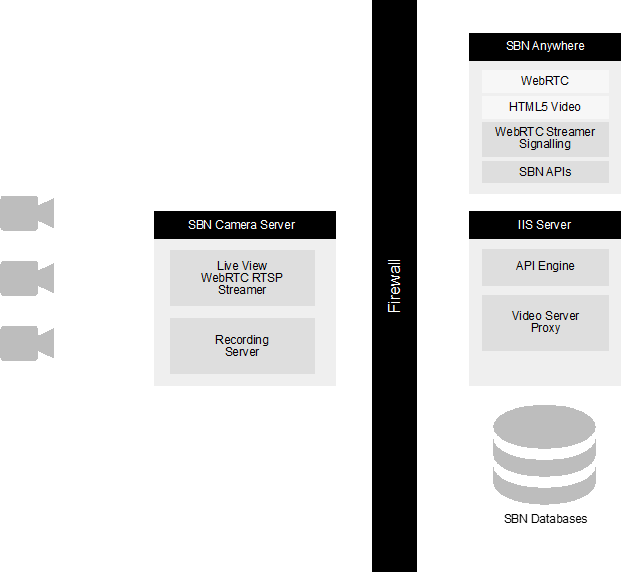
1. Cameras
2. SBN Camera Server - Live View WebRTC RTSP Streamer and the Recording Server
3. Firewall
4. SBN Anywhere - WebRTC, HTML5 Video, WebRTC Streamer Signaling, and SBN APIs
5. IIS Server - API Engine and Video Server Proxy
SBN Anywhere
SBN Anywhere is a browser-based alarm monitoring software. SBN Anywhere uses the browser WebRTC and HTML5 video elements to deliver live and recorded streams to operators.
WebRTC
WebRTC is an open-source, third-party streaming standard, providing a scalable, low-latency solution for real-time communication capabilities of audio, video, and data between browser, desktop applications, and mobile devices. WebRTC works with various browser such as Chrome, Firefox, Edge, Safari, and Opera (without the need for downloading plugins or extensions). WebRTC automatically adjusts the bit rate of the video to the currently available bandwidth. Users can stop, pause, and seek as if playback was being completed on their local computer. WebRTC negotiates video and audio codecs.
WebRTC also supports messages and rate data (files). Remote interfaces can be built for sending control commands to remote applications. It can also traverse through firewalls without opening them through the use of STUN and TURN servers - delivering a peer-to-peer connection.
WebRTC Streamer Signaling
WebRTC does not define the how the stream is established. SBN Video has used an open-source server (https://github.com/mpromonet/webrtc-streamer) to deliver an RTSP stream over WebRTC. See the description of the camera server for other options.
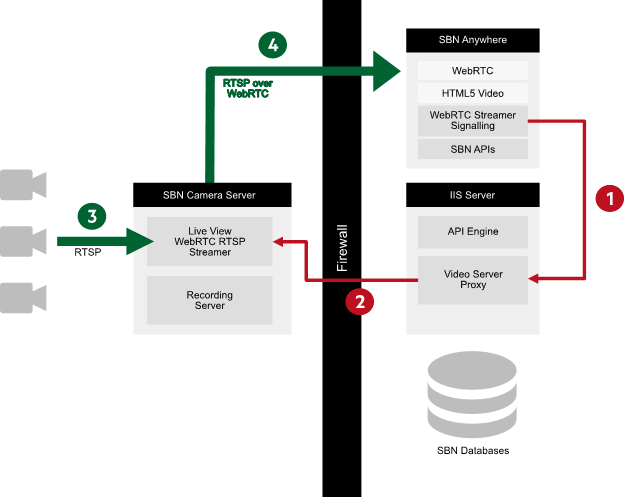
The signaling client requests the server to open up a RTSP stream to a camera and establishes a connection between the server and browser to stream RTSP over WebRTC.
HTML5 Video
The HTML Video element (<video>) embeds a media player which supports video playback of either a WebRTC stream or content delivered by an HTTP server.
SBN APIs
SBN APIs are used to retrieve the cameras associated with an installation (g_ma_cameras), the location of the streaming server (g_ma_alarmids), and log events that contain recordings (
IIS Server
As well as hosting the SBN API Engine, the IIS server acts as a reverse proxy to SBN Video Servers. The reverse proxy:
- Provides one url for SBN Anywhere to access the right video server
- Protects the SBN Video server from direct access
- Delivers HTTPS encrypted traffic to the client, which is required to support WebRTC streaming
The IIS server defines which server a recording or webrtc streaming server to access through URL Rewrite and Application Request Routing.
SBN Video Server
The SBN Video server is protected by firewalls and located where it can access the video cameras that it is responsible for. It is responsible for live streaming video and receiving video recordings from the cameras.
WebRTC Streamer
The streaming element of the SBN Videos server uses an unmodified version the open-source webrtc-streamer (https://github.com/mpromonet/webrtc-streamer) to deliver an RTSP stream over WebRTC. There are other open and closed source options that may be more scalable and commercially appropriate:
- OpenVidu is a highly scalable WebRTC server built on top of open source Kurento that has examples for IP camera streaming (https://docs.openvidu.io/en/2.16.0/tutorials/openvidu-ipcameras/). The technology behind OpenVidu is used by Twilio and OpenTok services.
- Red5 Media server (https://www.red5pro.com/red5-media-server/), a server capable of streaming RTSP.
- Janus (https://janus.conf.meetecho.com/), a general-purpose open source pluggable WebRTC streaming server that is capable streaming RTSP streams. Janus is written in low level C.
- MediaSoup (https://mediasoup.org/) a nodejs webrtc streaming server, allowing servers to be written in JavaScript / Typescript.
Recording server
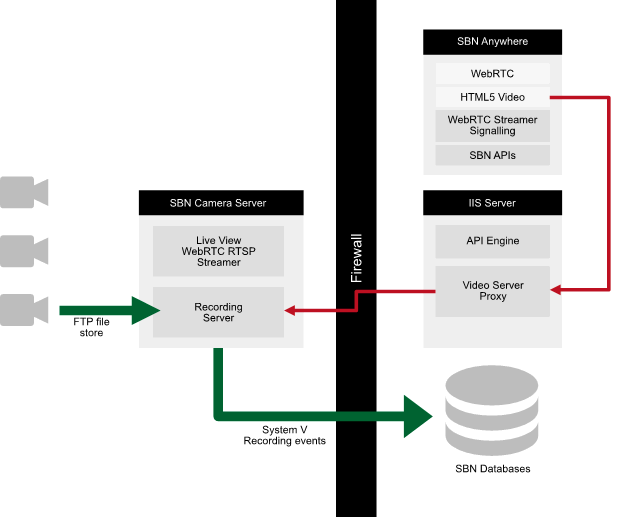
The recording server consists of an ftp server where cameras can place recorded video on a file store and the Innovative developed SBN Receiver Gateway which watches the ftp server directory for new files, creating events within SBN through a Sur-Gard IP protocol.
Live Stream
Recorded stream
Installing the SBN Video Service
Installing the SBN Video service "RTSP" can be found in SBN Service Manager. It follows the same installation process as other SBN services. Once installed, uses can start the services the same as other SBN services, or start the RTSP service through command line:
`./sbn-video start all`
Test the local client
Once started, users can test the local client by navigating to "http://localhost:8081" where the service is installed, and view a test page. Users can also confirm services are running within the RTSP service by accessing the 'Health' tab and 'Update' the status. One service of each type should be running. For additional information about each service. see Architecture below.
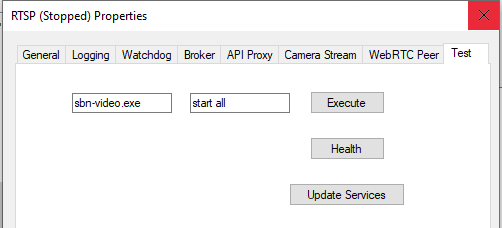
Detailed logging can be seen live within the RTSP Log window.
Architecture
Video Client: An angular component and service that access the Video server through the API Engine. Once a peer connection is established it will communicate directly with the WebRTC peer through WebRTC messaging channels.
API Engine: The SBN API Engine that acts as a proxy between the Video Client and the Video Server.
API Proxy: A REST API layer to interact with the video service.
Message Broker: An embedded version of [nats.io](https://nats.io/).
WebRTC Peer: A service to connect a WebRTC browser client to an RTSP stream.
Camera Stream: A service to stream from an RTSP camera.
Recording Peer: A service to record an RTSP stream and provide access through an HLS service.
Watchdog: A service to manage the other services, starting and stopping as requested.
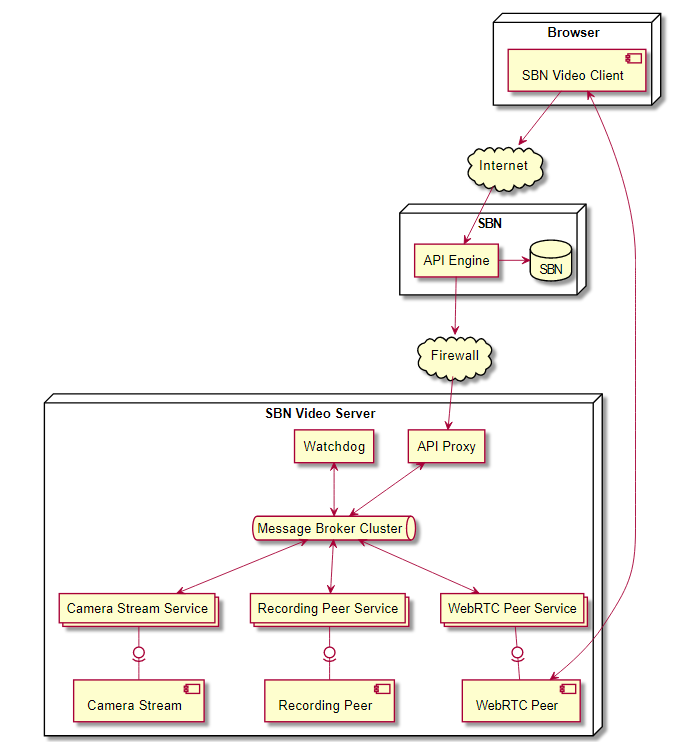
All components are owned by a service. Using the wild card mechanism of the message broker, only the service that owns the component will receive the message.
Troubleshooting
The SBN Video service has many interdependent parts. Below are some of the common issues that may be encountered when running the service.
| Issue | Description |
|---|---|
No message broker running |
SBN Video micro services communicate using a NATS message broker. Confirm that a message broker is running by accessing http://localhost:8222. This should successfully load the NATS monitoring page. |
No API proxy running |
The API Proxy acts as the main entry point for the client. Check that an API Proxy is running by confirming that http://localhost:8222/connz contains a connection from the monitoring client. |
API Proxy not accessible on the local network |
The
API proxy must be accessible in order for the client to use it.
Make sure that the configuration file contains the correct host
and port number. This is defined in |
Network requires TURN server |
SBN
Video uses WebRTC to access the camera behind a firewall. WebRTC
is a complex protocol and uses three mechanisms to establish a
connection between the client and server. TURN servers may be
required in some instances. In order to access the camera externally
in these networks you may need to setup a |
Activity Flows
Activity flows show how major parts of SBN Video interact and document:
the messages that pass through the message broker
the external API calls or CLI commands that initiate those message flows
The
diagrams below show the major interactions of the services. In all instances communication between
the services is through the message broker. However, The broker is only
shown where it adds clarity.
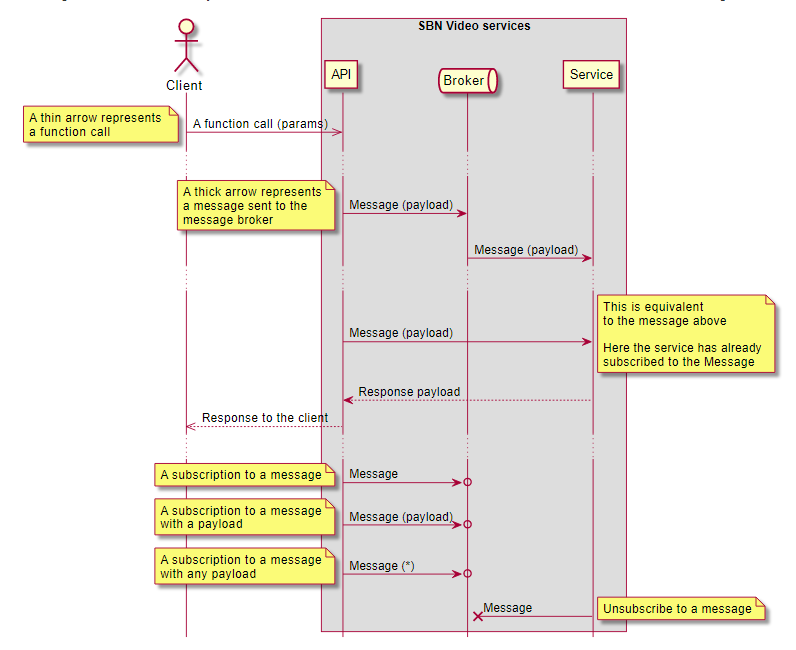
System wide interaction
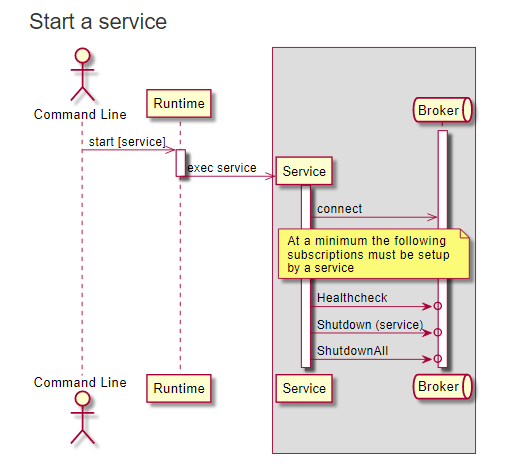
Start a service
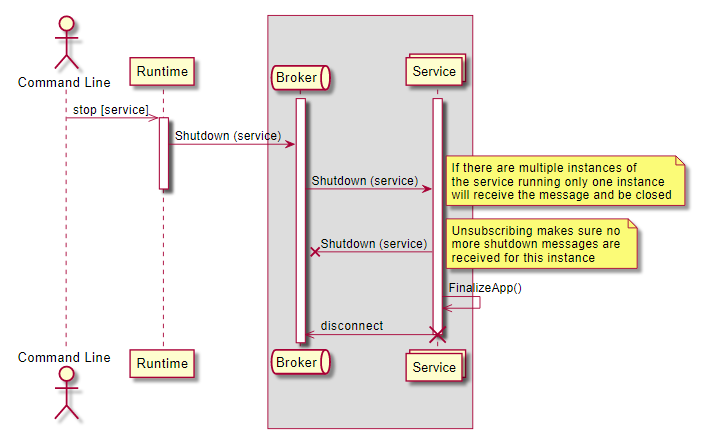
Shutdown a single service
A single service can be shutdown. Multiple instances of the service may be running. This will only shutdown one of the instances.
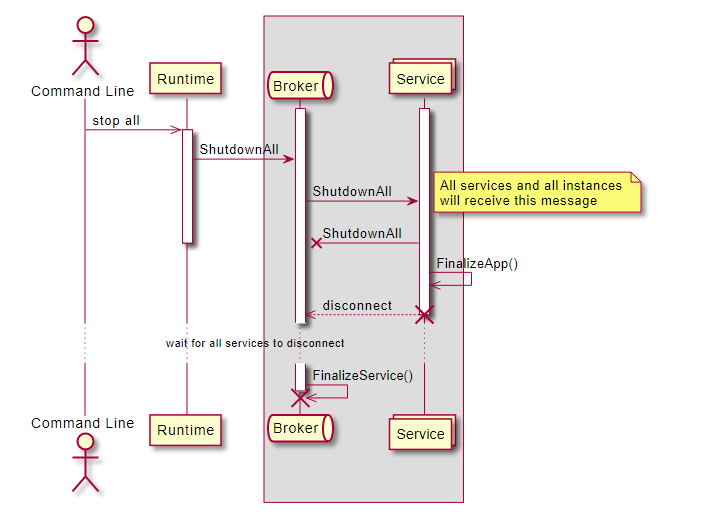
Shutdown all services
All services can be shutdown. In this instance, all processes and the broker are shutdown.
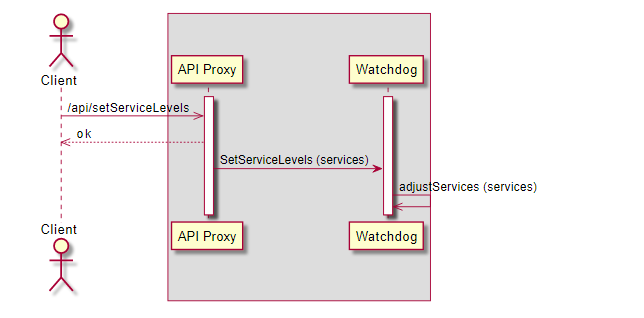
Set Service levels
Set the number of services that should be running. The watchdog will start / stop the services to match those requested.
The result can be seen when doing a health check.
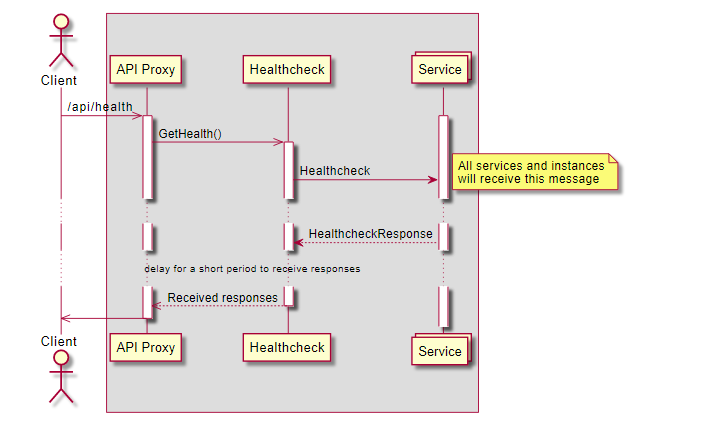
Health Check
Carry out a health check of all services. The health check response contains:
The service name
Unique service identifier
Running version
Connections that the service is managing
Each connection contains:
A UUID unique name
A description of the service
Current status of the connection
The last error received
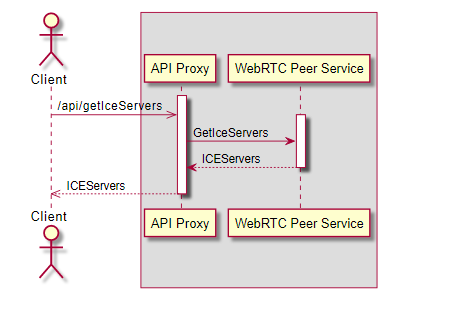
WebRTC Peer Interactions
Get ICE Servers
Get ICE servers that the client and WebRTC peer service can use to help connect through firewalls.
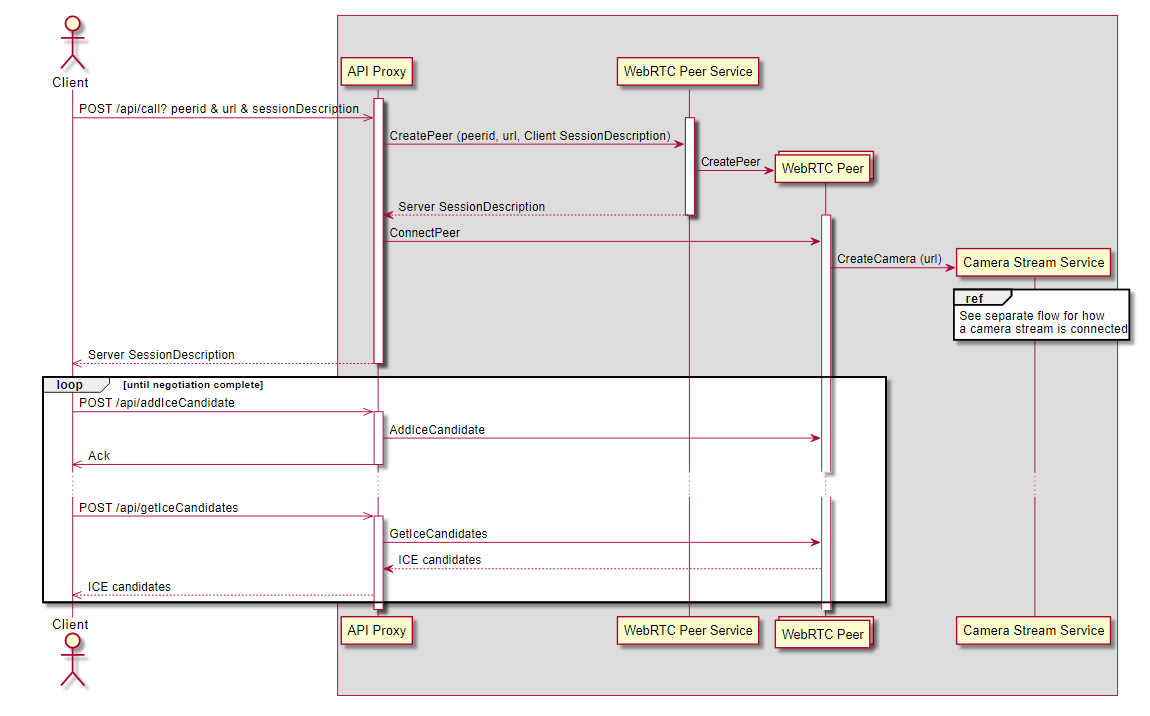
Connect a client
Connect a client to a peer.
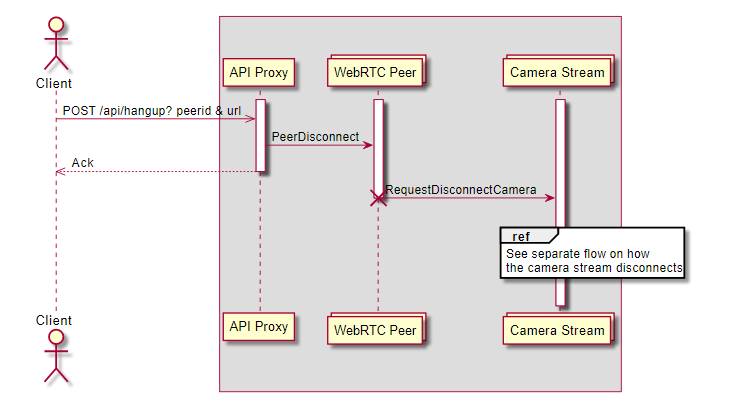
Disconnect a client
A client can disconnect either using an API for by closing the peer connection. If the client disconnects from the peer the WebRTC Peer will be notified directly.
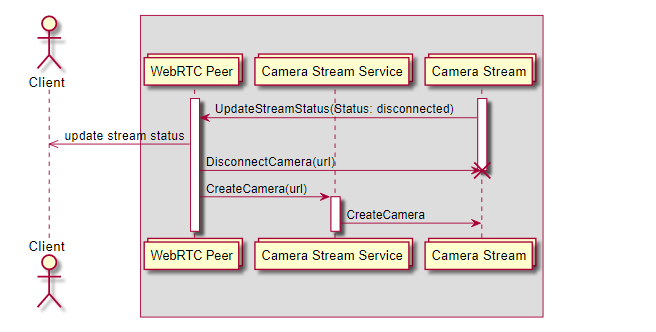
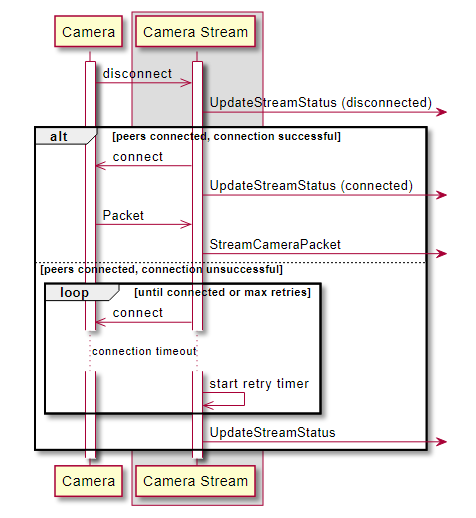
Camera disconnects
If a client is still connected and the associated camera disconnects the WebRTC Peer will try to reconnect.
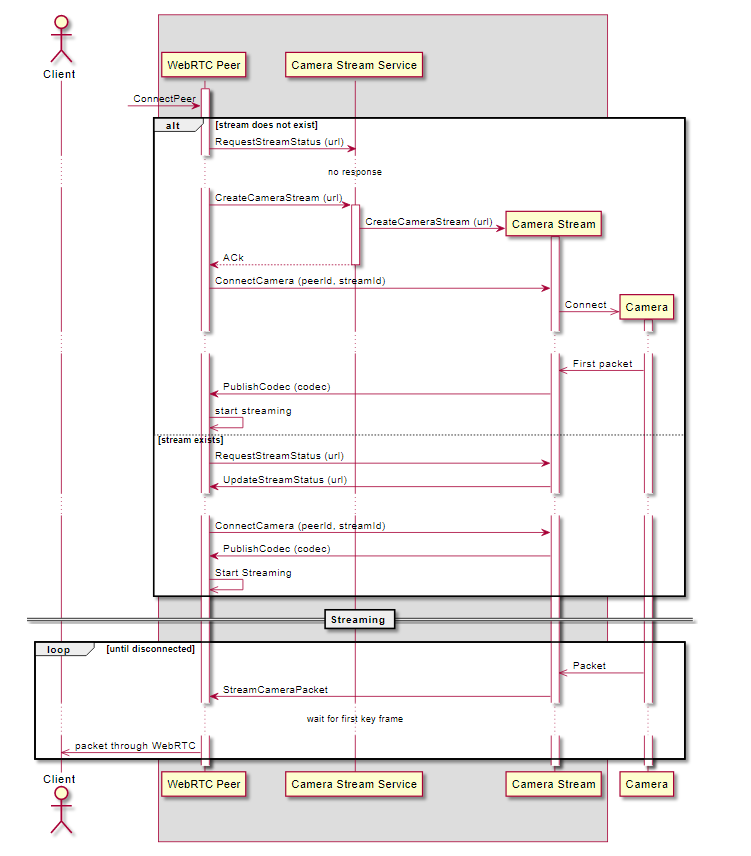
Camera Streams
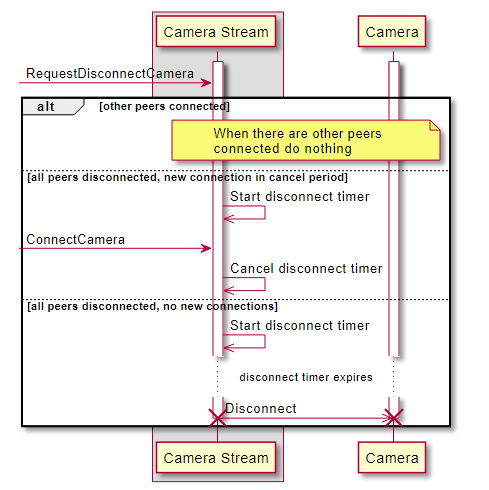
A camera stream service manages connections to cameras. The camera stream service can listen for specific types of cameras using the URL scheme type and only connect to cameras of that type.
The Camera Stream URL is defined by the Camera Stream service, but follow the rules set out in RFC3986.

Peer connect to a stream
Peer disconnect to a stream
Camera disconnects
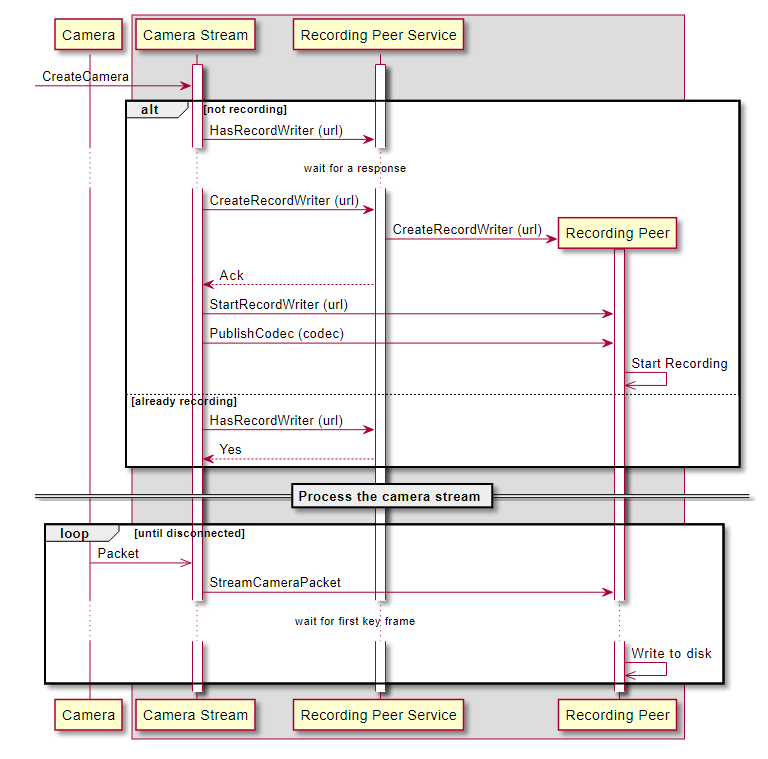
Recording
Start a recording
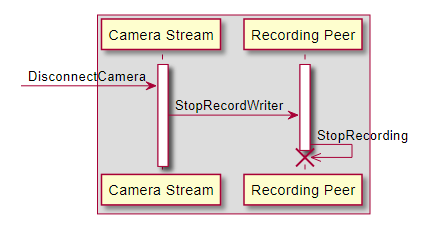
Stop recording a stream
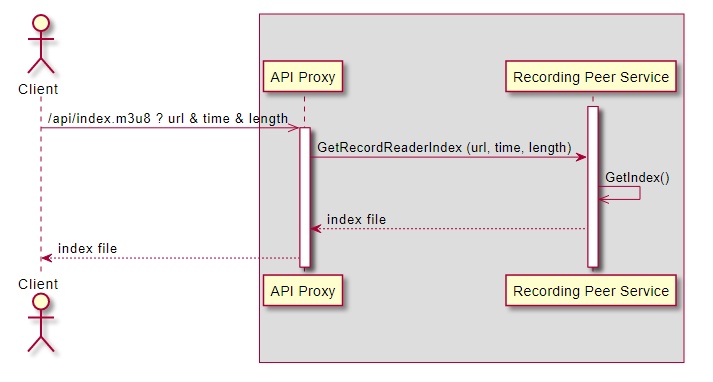
Get a recording stream index
To show recordings, SBN Video uses HLS. The recording peer saves streams as chunks on the file system and stores an index file alongside each one minute chunk.
In order to stream HLS, the only additional requirement is to generate an appropriate index file for the time period requested.
The recording stream peer produces this index.
Related Programs
The following table lists programs related to Dispatch.
Program |
Number |
Document Link |
Description |
RTSP Service |
N/A |
Install and set up the properties related to the RTSP service. |
|
SBN Video Client |
N/A |
Viewing of Cameras through SBN Video Client. |
Modifications and Updates to SBN Video Server
The following table lists modifications and updates to the SBN Video Server document.
Mod Number |
Date |
Description |
n/a |
03/04/2022 |
Document created. |