
Dealer User Access
Program #: 1743
Module: System Administration
Overview
Use Dealer User Access (program #1743) to include or exclude dealer IDs from a user access profile.
To access this program, select Dealer User Access (program #1743) from the main menu of SBN.
The Dealer User Access Window
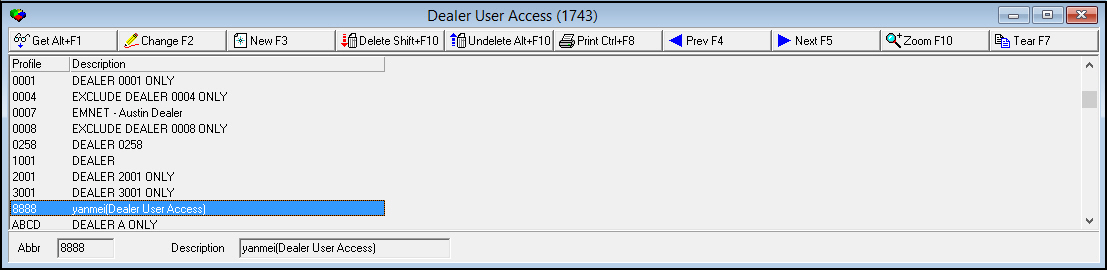
The following graphic shows Dealer User Access as the program opens. The upper pane displays all previously defined profiles for dealer user access.
Field/Column Descriptions
The following table describes the fields and columns used in Dealer User Access.
|
Field/Column |
Description |
|
Profile |
Abbreviation that identifies the profile. |
|
Description |
Text description of the profile. |
Using Common Functions
See the reference document Common Functions in SBN for more information.
Zooming into the Sublevel of Dealer User Access
Dealer User Access contains a sublevel with two tabs:
-
The Details tab - in which you define masks that determine which dealers a user can access.
-
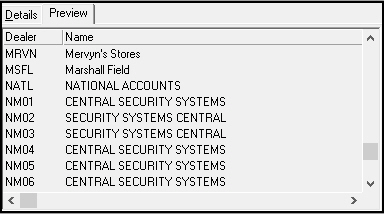
The Preview tab - in which you may view all dealers included or excluded from a selected user access profile.
The Details Tab
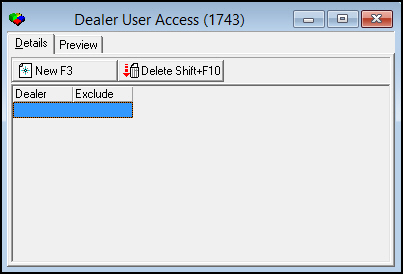
The following graphic shows the Details tab. The tab displays previously defined masks.
Field/Column Descriptions
The following table describes the fields and columns used in the Details tab.
|
Field/Column |
Description |
|
Dealer |
Dealer ID or a match string that identifies the dealers that users with this profile may access. |
|
Exclude |
If this field displays an X, users with this profile may not access accounts with the selected dealer ID or match string. |
The Preview Tab
The following graphic shows the Preview tab. The tab displays all dealers included or excluded from a selected user access profile.
Button Functions
The following table displays the buttons, describes the shortcut keys, actions, and functionality.
|
Button |
Name |
Shortcut Key |
Action |
Description |
|
|
Get |
ALT+F1 |
1743/ 1 |
Get record. |
|
|
Change |
F2 |
1743/ 2 |
Change selected record. |
|
|
New |
F3 |
1743/ 3 |
Create new record. |
|
|
Delete |
SHIFT+F10 |
1743/ 4 |
Delete selected record. |
|
|
Undelete |
ALT+F10 |
1743/ 5 |
Restore deleted record. |
|
|
|
CTRL+F8 |
1743/ 6 |
Print selected records. |
|
|
New |
F3 |
1743/ 11 |
Create new record. |
|
|
Delete |
SHIFT+F10 |
1743/ 13 |
Delete selected record. |
|
|
Previous |
F4 |
1743/ 999 |
Select last record. |
|
|
Next |
F5 |
1743/ 999 |
Select next record. |
|
|
Zoom |
F10 |
1743/ 999 |
Zoom in/out of sublevel. |
|
|
Tear |
[ ] |
1743/ 999 |
Open the Details tab in a full-sized separate window. |










Profile Restriction Enforcement
Dealer-profile restrictions are enforced on additional look-ups and saves, including call-list account saves in program 559 and program 1800, keeping each user's data within their authorization.
Modifications and Updates to Dealer User Access
The following table lists modifications and updates to the Dealer User Access document.
|
Mod Number |
Date |
Description |
|
n/a |
8/18/14 |
Images updated. |
|
|
|
|
|
|
|
|