
Patrol Company Report
Patrol Company Report
Patrol Company Report
Module: Account Management
Overview
Use the Patrol Company Report to determine the patrol agencies to pay and how much to pay them for a specified period. User’s branch restrictions apply.
This report returns results for agencies that responded to alarm dispatches within the required response time defined in their individual patrol agency records. To determine whether an agency is eligible for a payment and the amount due, SBN uses the following records from the Alarm Log:
Dispatch time
On-site time
Off-site time
SBN only includes agencies in this report that have pricing data defined in program #1717.
To access this report, select Patrol Company (report #2082) from the main menu of SBN.
The Patrol Company Report
This window contains two panes: use the upper pane to define the content of the report; use the lower pane to define the job output - how, when, and where you want to print the report.
Note: See Report Parameters Pane for information on the fields in the lower pane, which are the same in every report.
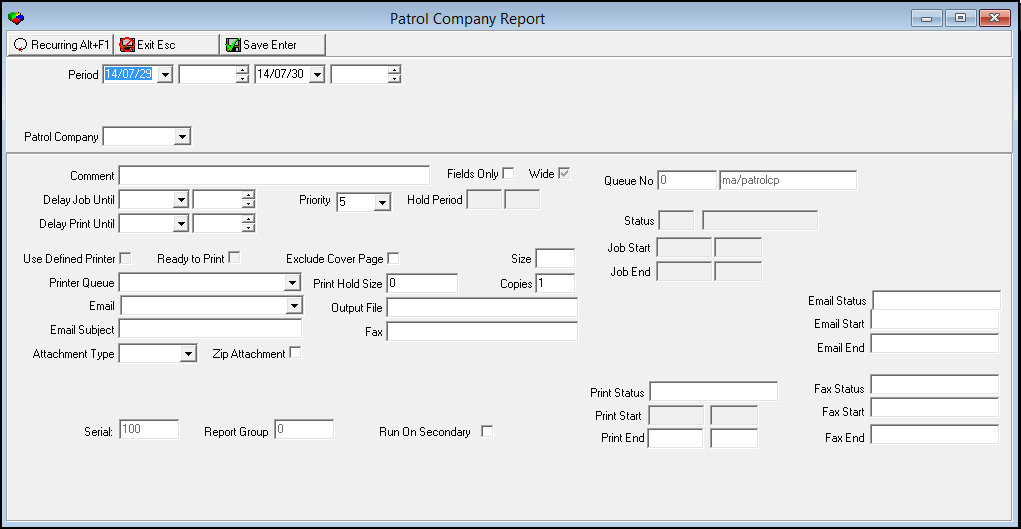
Field Descriptions
The following table describes the fields used in the upper pane of the Patrol Company report.
Field |
Description |
Period |
|
Date
- From |
You may select a range of dates to limit the report to patrol events that occurred during that range. Select the beginning date of the range. O This field defaults to the current date. |
Time
- From |
You may select a range of time to limit the report to patrol events that occurred during that range. Select the beginning time of the range. |
Date
- To |
You may select a range of dates to limit the report to patrol events that occurred during that range. Select the ending date of the range. O This field defaults to tomorrow’s date. |
Time
- To |
You may select a range of time to limit the report to patrol events that occurred during that range. Select the ending time of the range. |
Patrol Company |
You may select a specific patrol agency on which to report. (This menu originates from program #1717.) O If you leave this field blank, SBN includes all patrol companies in the report. SBN only includes agencies that have pricing data defined in program #1717. |
Running and Viewing a Report
For information on running and viewing a report, see Common Functions in SBN.
Report Example
The following graphic shows an example of the output of the Patrol Company report.

Column Descriptions
The following table describes the columns used in the output of the Patrol Company report.
Column |
Description |
Header Information |
|
(No label) |
Name of the patrol agency. Note: SBN only includes agencies in this report that have pricing data defined in program #1717. |
Data Columns |
|
Inc. Dt. |
Date of the incident disposition. |
Inc. # |
Incident number. |
Install # |
Installation number. |
Vend Ref# |
Reference number for the patrol agency. |
Customer |
Name of the customer. |
Addresses |
Customer address for the installation. |
Amount |
Amount due to patrol agency for responding to this incident. SBN calculates the amount based on (one-time fee, as defined in the agency record) + (off-site - on-site time) / (unit) x (unit rate). |
Total |
Total dollar amount due to the patrol agency. |
Calculation Example
The record for the patrol agency defines
A response time of 15 minutes
A one-time fee of $25.00
A unit of 15 minutes
A unit rate of $25.00
1. An alarm signal arrives at the central station.
2. The operator dispatches the patrol agency at 13:15:00.
3. The guard arrives at the installation at 13:22:30.
4. The guard leaves the installation at 13:43:30.
Because the guard arrived within the defined response time of 15 minutes, the record is eligible for payment and the agency is due $25.00.
Because the guard does not leave the installation for 21 minutes, the guard visit counts as two units. The agency is due $25.00 for each unit, or $50.00.
The total due to the patrol agency for this response is $75.00.
Button Functions
The following table displays the buttons, describes the shortcut keys, actions, and functionality.
Button |
Name |
Shortcut Key |
Action |
Description |
|
Recurring |
Alt+F1 |
2082 |
Open fields for recurring/template reports. |
|
Exit |
Esc |
2082 |
Exit without saving. |
|
Save |
Enter |
2082 |
Save existing record. |



Modifications and Updates to Patrol Company Report
The following table lists modifications and updates to the Patrol Company Report document.
Mod Number |
Date |
Description |
n/a |
7/29/14 |
Images updated. |