
Retention Profiles
Retention Profiles
Retention Profiles
Program #: 1624
Module: Utilities
Overview
Retention Profiles enable the ability to invoice the customer for the total but break out the payments to an initial payment and a final payment based on the percentage defined in the retention profile. Retention Profiles can be linked to billing accounts, contracts, or individual work orders. The percentage defined in the retention profile calculates the amount of the final payment for a work order. The following options define the functionality of the retention profiles program:
-
Option bl148 activates the retention profile logic in the invoice calculation.
-
Option bl149 defines the number of days in the future to define the payment term for the final payment.
Work order types must be marked with the Retention check box to allow a retention profile to be tied to a work order. If the work order type does not allow retention profiles, the system warns the user when saving the work order.
To access this program, select Retention Profiles (program #1624) from the main menu of SBN.
The Retention Profiles Window
The following graphic shows Retention Profiles as the program opens.
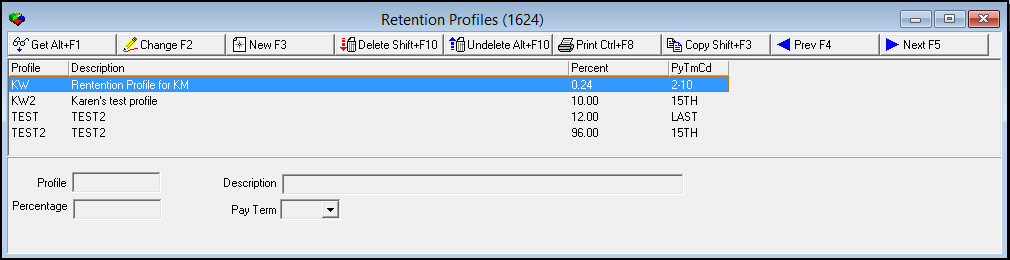
Field/Column Descriptions
The following table describes the fields and columns used in the Retention Profiles window.
|
Field/Column |
Description |
|
Profile |
Profile code. |
|
Description |
Description of the profile. |
|
Percentage |
Percentage used to calculate scheduled payment. |
|
Pay Term |
Pay term used to determine the due date of the scheduled payment. If no pay term is defined, the value of option bl148 sets the due date. |
Using Common Functions
See the reference document Common Functions in SBN for more information.
Button Functions
The following table displays the buttons, describes the shortcut keys, actions and functionality.
|
Button |
Name |
Shortcut Key |
Action |
Description |
|
|
Get Record |
alt+f1 |
1624/ 1 |
View details of selected record. |
|
|
Change Record |
f2 |
1624/ 2 |
Change selected record. |
|
|
New Record |
f3 |
1624/ 3 |
Create new record. |
|
|
Delete Record |
shift+f10 |
1624/ 4 |
Delete selected record. |
|
|
Select Record to Undelete |
alt+f10 |
1624/ 5 |
Restore deleted record. |
|
|
Print Selected Records |
ctrl+f8 |
1624/ 6 |
Print selected record. |
|
|
Copy Current Record |
shift+f3 |
Copy current record. |
|
|
|
Previous |
f4 |
Scroll to previous record. |
|
|
|
Next |
f5 |
Scroll to next record. |
|
|
|
Exit without saving |
esc |
Exit without saving changes to selected record. |
|
|
|
Save Existing Record |
enter |
Save changes to selected record. |











Modifications and Updates to Retention Profiles
The following table lists modifications and updates to the Retention Profiles document.
|
Mod Number |
Date |
Description |
|
n/a |
09/02/14 |
Images updated. |