
APIEngine - Install (v95 and earlier)
APIEngine is the REST gateway between SBN clients (SBN Anywhere, sbn-video, mobile, Windows Services, third-party vendors) and the SBN Sybase database. This page covers installing APIEngine on a Windows Server for release v95 and earlier.
These are general guidelines for what APIEngine needs on IIS. Each customer's environment, naming, certificates, and security standards vary - adapt the specifics to your own setup.
Which runtime does my version use?
APIEngine v95 and earlier run on the Microsoft .NET Framework 4.8 (classic ASP.NET / IIS, hosted by the ASP.NET v4.0 integrated pipeline). APIEngine v96 and later run on .NET 8 (ASP.NET Core) - a different host model entirely (No Managed Code app pool, .NET 8 Hosting Bundle, ASP.NET Core Module). The framework split is firm: there is no in-place patch across it.
If you are installing v96 or later, stop here and use Installing & Uninstalling instead. The instructions below do not apply to v96+.
Prerequisites
1. Microsoft .NET Framework 4.8
The runtime. It ships in-box on current Windows Server - no download or internet egress is required, but confirm it is present:
A Release value of 528040 or higher indicates .NET Framework 4.8.
2. IIS features (with ASP.NET 4.x)
Install the Web Server role plus the ASP.NET 4.x feature set. From an elevated PowerShell:
Installing Web-Server on its own omits Static Content, HTTP Errors, and Filtering, which surfaces later as 500.19 / 404 errors. Web-Net-Ext45 + Web-Asp-Net45 register ASP.NET 4.x; Web-ISAPI-Ext + Web-ISAPI-Filter are required for the MVC/Web API routes.
If the .NET runtime was installed on the box before IIS, also register ASP.NET 4.x explicitly - otherwise every API route returns 404 while static files load normally:
Confirm the isapiCgiRestriction entry for v4.0.30319\aspnet_isapi.dll is allowed="true".
IIS app pool
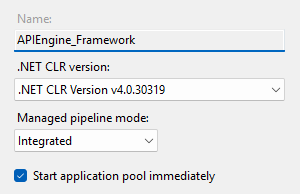
Create an app pool (e.g. APIEngine, or APIEngine-<env> if the box hosts more than one environment):
Setting | Value |
|---|---|
.NET CLR Version | .NET CLR Version v4.0.30319 - critical. v95 is .NET Framework 4.8 and will not run under No Managed Code (that is the v96+ setting). |
Managed Pipeline Mode | Integrated |
Identity | ApplicationPoolIdentity (the |
Enable 32-Bit Applications | False - APIEngine and its database driver are 64-bit |
Start Mode | AlwaysRunning (otherwise the first request after idle is slow) |
Idle Time-out (minutes) | 0 - keep the engine warm |
Regular Time Interval (recycle) | 0, or a fixed off-hours time (e.g. 03:00). The default 1740-minute recycle drops in-flight alarm/dispatch traffic. |
IIS site
- Physical path:
C:\Innovative\APIEngine(canonical). On hosts where the system drive is small,D:\Innovative\APIEngineis used instead - keep the rest of the paths on the same drive. - Application pool: the pool created above.
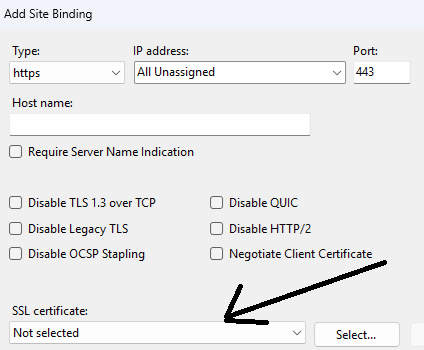
- Bindings: in IIS Manager, add an HTTPS binding for each hostname APIEngine should serve and select the appropriate certificate. Obtaining and installing certificates is a standard IIS/Windows task per your own process - not specific to APIEngine.
File-write permissions (icacls grants - DO NOT SKIP)
The IIS app pool identity needs Modify permission on every path APIEngine writes to. Missing grants cause "Access to the path '...' is denied" failures on the first request that touches that path.
Run as Administrator (replace APIEngine with your actual pool name; pre-create any directory that does not yet exist before granting):
Notes:
(OI)(CI)M= Modify with Object-Inherit + Container-Inherit, so files and folders created later inherit the grant.IIS AppPool\<pool>is the account name for the app pool.- The log folder is
log(singular) on v95 - it is theLog.Directorydefault, rooted at the site root. Pre-create it so the service never needs to create it itself. sms_mediaand the file-server path (C:\Innovative\APIEngine.files) come fromapiengine.settings; if you change those values, grant the new paths instead.- If APIEngine runs Crystal Reports, also grant Modify on the Crystal Report Destination, Data XML and Dealer Branding Images paths, and read on the Crystal Report Source path, as set in the Reporting section of the Settings page. The SAP Crystal Reports runtime must be installed on this server; see Reports.
Verify a grant landed:
Settings file (apiengine.settings)
C:\Innovative\APIEngine\App_Data\apiengine.settings is the runtime configuration (JSON). The deployed zip does not carry this file - every host owns its own, and in-place upgrades preserve it. On a fresh install you create it once.
First-run UX (local-only Settings page). v95 lets you author apiengine.settings interactively from the engine's built-in dashboard. The Settings page is only available when you open it from the server itself.
RDP onto the host, browse to the site root from the box itself (e.g. https://localhost/), open the Settings tab, fill the form, and Save - the Save writes apiengine.settings to App_Data.
If you would rather hand-author the file, the minimum schema is:
Notes:
TokenSecretis the signing key for API access tokens - use a long, random value, unique per host. Never commit it.OverrideAPISecurity=truebypasses token validation. Development only - never on a production box.UseSmartSBN=trueenables multi-server failover; only enable it where SmartSBN is provisioned.- Once APIEngine connects to Sybase, hosted services materialize additional sections (ADFS, Twilio, ASAP, Reports paths, etc.) - these are added to the file automatically.
After authoring, grant the file and recycle the pool:
First-start verification
After the first deploy and pool start, exercise the diagnostic endpoints. Replace <your-api-host> with the bound hostname (or the host IP if you bound a catch-all self-signed cert before DNS exists).
1. Version check (no auth):
This returns the running assembly version - confirmation that IIS and ASP.NET routing started. Do not exact-match the zip filename.
2. Liveness ping (no auth):
On v95 the ping route is unversioned - /api/ping, not /api/v1/ping. (v96+ moved it to /api/v1/ping.) The v95 ping also makes a lightweight database round-trip, so a true result confirms the data connection is alive.
3. Authenticated diagnostic: obtain a JWT, then call the full self-check:
Every row in the returned result array must report "success": true. Pay attention to Datasource Connection (the SBNServer block is correct), Log directory is valid (the log folder exists and is writable), and App_Data Permissions (the icacls grants landed).
If any check fails, the install is not complete - see Troubleshooting below.
Troubleshooting
Symptom | Likely cause | Fix |
|---|---|---|
HTTP 500.21 | App pool CLR version wrong (e.g. set to No Managed Code - that is the v96+ setting) | Recreate the pool with |
HTTP 500.19 | Bad | Check |
HTTP 404 on every | ASP.NET 4.x not registered with IIS | Run |
| Bad | Verify host/port/creds reach the Sybase server |
| icacls grant missing or pool name typo | Re-run the icacls grants; verify with |
Settings tab missing / "must run from local server" | By design - Settings is local-only | RDP onto the host and browse to the site root from |
Diagnostic returns 500 with | Sybase unreachable from this host | Network / firewall - not an APIEngine install problem |
Log locations, installer exit codes and more symptoms are on Troubleshooting.
Verification checklist
- .NET Framework 4.8 installed (
Release >= 528040) - IIS Web Server role + ASP.NET 4.x feature set installed; ASP.NET 4.x registered (
aspnet_regiis -iruif needed) - App pool created with
.NET CLR Version v4.0.30319, Integrated, 64-bit, AlwaysRunning, Idle Time-out 0 - Site bound on every required HTTPS hostname with the matching certificate
- All paths in the icacls grant list created and granted
(OI)(CI)M apiengine.settingsauthored (local Settings page or hand-written) with validSBNServer+TokenSecret, then granted Modify and the pool recycledGET /api/v1/diagnostic/versionreturns the expected v95 versionGET /api/pingreturns{"result": true}(v95 ping is unversioned)- Authenticated
GET /api/v1/diagnosticreturns every rowsuccess: true
Upgrading to v96+
The v95 -> v96 upgrade is not an in-place patch. v96 moves APIEngine onto .NET 8 ASP.NET Core, which needs the .NET 8 Hosting Bundle on the host and a different IIS app-pool configuration (No Managed Code). Follow Installing & Uninstalling for that procedure.