
Holiday Calendar
Holiday Calendar
Holiday Calendar
Program #: 1747
Module: System Administration
Overview
Use Holiday Calendar (program #1747) to specify actual dates for scheduled holidays. A menu of scheduled holidays appears in the Day field of the Holiday grid in the Open/Close Schedule tab of Data Entry (program #559). If your user profile includes a dealer ID, the menu displays only those scheduled holidays:
-
Associated with the same dealer ID
-
Not associated with any dealer ID
To access this program, select Holiday Calendar (program #1747) from the main menu of SBN.
The Holiday Calendar Window
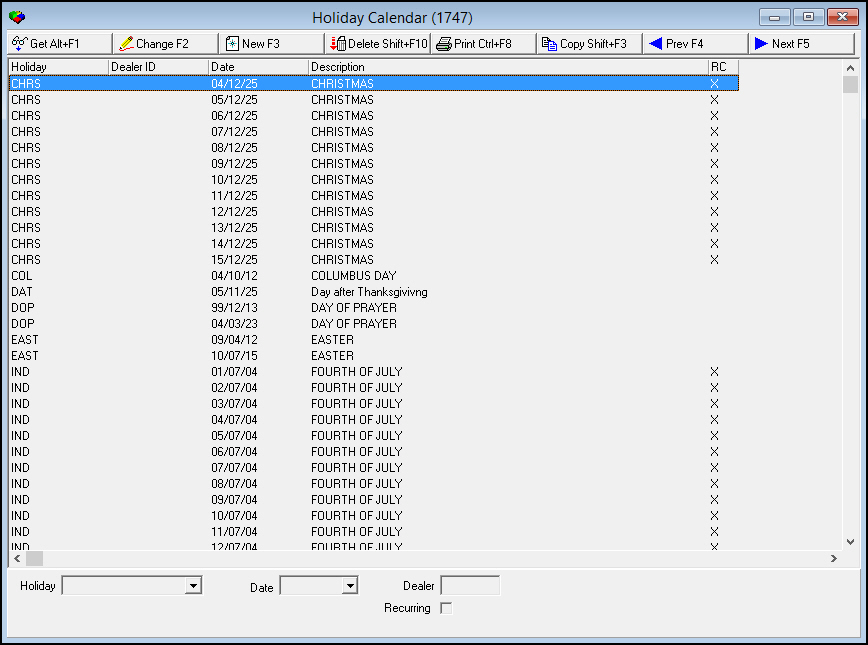
The following graphic shows Holiday Calendar as the program opens. The upper pane displays previously specified scheduled holidays.
Field/Column Descriptions
The following table describes the fields and columns used in Holiday Calendar.
|
Field/Column |
Description |
|
Holiday |
Identifies the holiday. (This menu originates from program #1746.) |
|
Date |
The actual date on which this holiday is celebrated. |
|
Dealer |
ID of the dealer associated with the selected holiday. |
|
Recurring |
Read-only check box that displays whether the holiday occurs every year according to the setting for the selected holiday from program #1746. |
Using Common Functions
See the reference document Common Functions in SBN for more information.
Associating a Holiday with a Dealer ID
You may define duplicate holidays with different dates and then associate those holidays with specific dealer IDs.
Example
The dealers for your company are from different countries. The different countries celebrate the same holiday, but on different dates. For example, country A celebrates Thanksgiving on the first Monday in October. Country B celebrates Thanksgiving on the third Thursday of November. You could define:
-
One Thanksgiving with a date that corresponds to the first Monday in October and associate that Thanksgiving with the ID of the dealer for country A.
-
One Thanksgiving with a date that corresponds to the third Thursday in November and associate that Thanksgiving with the ID of the dealer for company B.
Users whose profiles include the dealer ID for company A see Thanksgiving - defined as occurring on the first Monday in October - in their menu of Scheduled Holidays. Users whose profiles include the dealer ID for company B see Thanksgiving - defined as occurring on the third Thursday in November - in their menu of Scheduled Holidays.
Button Functions
The following table displays the buttons, describes the shortcut keys, actions, and functionality.
|
Button |
Name |
Shortcut Key |
Action |
Description |
|
|
Get |
ALT+F1 |
1747/ 1 |
Get record. |
|
|
Change |
F2 |
1747/ 2 |
Change selected record. |
|
|
New |
F3 |
1747/ 3 |
Create new record. |
|
|
Delete |
SHIFT+F10 |
1747/ 4 |
Delete selected record. |
|
|
|
CTRL+F8 |
1747/ 6 |
Print selected records. |
|
|
Previous |
F4 |
1747/ 999 |
Select last record. |
|
|
Next |
F5 |
1747/ 999 |
Select next record. |







Modifications and Updates to Holiday Calendar
The following table lists modifications and updates to the Holiday Calendar document.
|
Mod Number |
Date |
Description |
|
n/a |
09/15/14 |
Images updated. |