
GL Payment Report
GL Payment Report
GL Payment Report
Module: Accounting
Overview
Use the GL Payment Report to view payment batches posted to the general ledger for a specified closed month (or for a month that is not yet closed). This information sorts the output by
Batch
GL Account
Note: You may run this report in Export mode by selecting the Run in Export Mode check box in the lower pane. In Export mode, SBN generates the report as a text file in the report directory.
To access this report, select GL Payment Report (report #1188) from the main menu of SBN.
The GL Payment Report
This window contains two panes: use the upper pane to define the contents of the report; use the lower pane to define the job output - how, when, and where you want the report printed.
Note: See Report Parameters Pane for information on the fields in the lower pane, which are the same in every report.
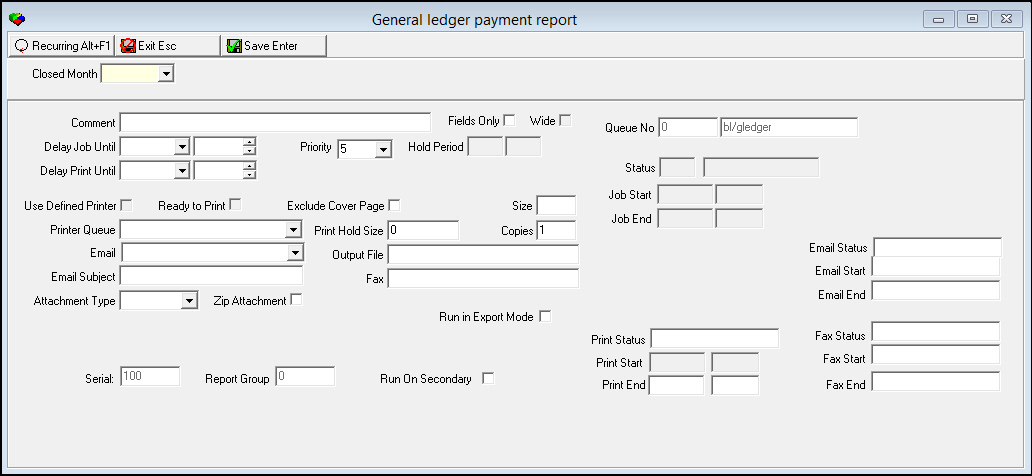
Field Descriptions
The following table describes the fields used in the upper pane of this report.
Field |
Description |
Closed Month |
You must select the closed month on which to report. |
Running and Viewing a Report
For information on running and viewing a report, see Common Functions in SBN.
Note: You can run the GL Payment Report for a month that is not yet closed.
Column Descriptions
The following table describes the columns used in the output of the report.
Column |
Description |
Check Date |
Identifies the closed month covered by the report. |
Date |
Date the batch posted. |
Account |
GL account number. |
Department |
Department number. |
Batch |
Batch number. |
Amount |
Batch total. |
Button Functions
The following table displays the buttons, describes the shortcut keys, actions, and functionality.
Button |
Name |
Shortcut Key |
Action |
Description |
|
Open fields for recurring/template reports |
alt+f1 |
Open fields for recurring/template reports. |
|
|
Exit without saving |
esc |
Exit without saving changes to selected record. |
|
|
Save Existing Record |
enter |
Save changes to selected record. |



Modifications and Updates to GL Payment Report
The following table lists modifications and updates to the GL Payment Report document.
Mod Number |
Date |
Description |
n/a |
8/04/14 |
Images updated. |