
Phone Change Batches
Phone Change Batches
Phone Change Batches
Program #: 1723
Module: System Administration
Overview
Use Phone Change Batches (program #1723) to make global changes to telephone area codes or prefixes. The program updates the entries on the window as a batch, not one at a time. The program checks the entire database for the parameters selected, and checks ALL addresses and then ALL contacts for matches.
When you make phone changes, SBN searches the Report Queue for reports scheduled to be faxed, and make changes to fax numbers according to the parameters in the Phone Change Batch.
The Phone Change Batch Window
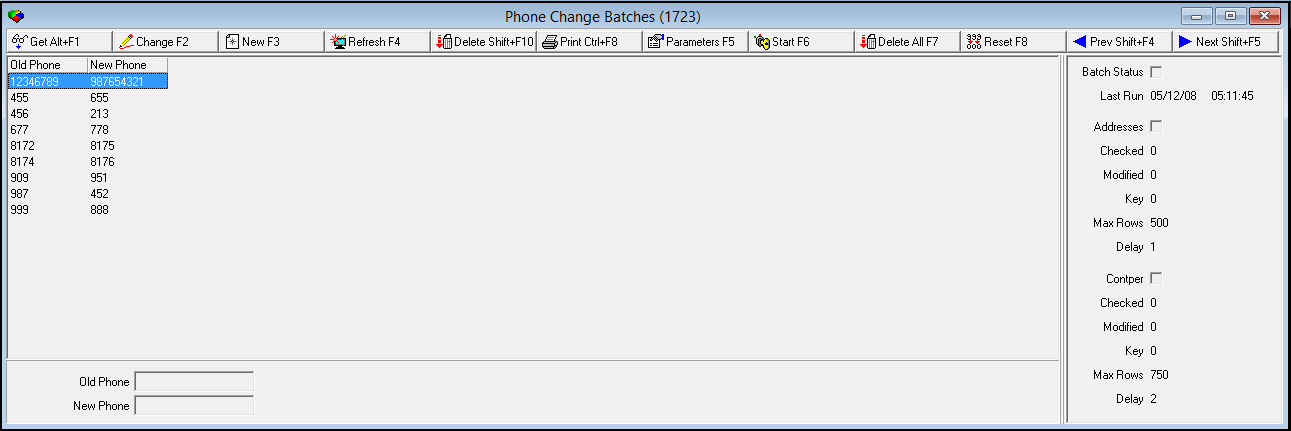
The following graphic shows Phone Change Batch as the program opens. The left pane displays previously defined phone change batches.
Field/Column Descriptions
The following table describes the fields and columns used in Phone Change Batch.
|
Field/Column |
Description |
|
Old Phone |
Portion of the old phone number to change. O Do NOT use the % wildcard. SBN automatically enters this to the end of the number you type. |
|
New Phone |
Number to replace old number. |
|
Batch Status |
If this box displays a check mark, the batch is running. If not, the batch is complete. |
|
Last Run |
Date and time the last batch was run. |
|
Addresses |
If this box displays a check mark, SBN is checking addresses. If not, SBN has finished checking addresses. |
|
Checked |
Displays the number of addresses that SBN has checked for the change. |
|
Modified |
Displays the number of addresses that SBN has changed. |
|
Key |
Internal system number. |
|
Max Rows |
Maximum number of rows of addresses to check in each batch. |
|
Delay |
Delay in seconds between checking each address. |
|
Contper |
If this box displays a check mark, SBN is checking contact persons. If not, SBN has finished checking contact persons for the change. |
|
Checked |
Displays the number of contact persons that have been checked for the change. |
|
Modified |
Displays the number of contact persons that SBN has changed. |
|
Key |
Internal system number. |
|
Max Rows |
Maximum number of rows of contact persons to check in each batch. |
|
Delay |
Delay in seconds between checking each contact person. |
Using Common Functions
See the reference document Common Functions in SBN for more information.
Note: After you add a new phone change batch, set the parameters for the batch.
Setting Parameters for a New Batch
After you set up a new batch, you can enter specific parameters for the batch.
Use the following steps to enter parameters for the batch:
1. In Phone Change Batches, select the phone change batch for which you want to set parameters.
2. Double-click your selection or choose Get Record.
3. Choose Parameters.
‰ The Entry Query Parameters dialog box opens.
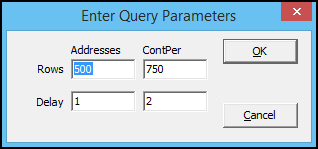
4. Type the maximum number of rows to include in the batch for addresses and contact persons.
5. Type the delay in seconds between checking address and contact persons batches.
Note: The number of rows and delay seconds entered could effect your system performance.
Button Functions
The following table displays the buttons, describes the shortcut keys, actions, and functionality.
|
Button |
Name |
Shortcut Key |
Action |
Description |
|
|
Get |
ALT+F1 |
1723/ 1 |
Get record. |
|
|
Change |
F2 |
1723/ 2 |
Change selected record. |
|
|
New |
F3 |
1723/ 3 |
Create new record. |
|
|
Delete |
SHIFT+F10 |
1723/ 4 |
Delete selected record. |
|
|
|
CTRL+F8 |
1723/ 6 |
Print selected records. |
|
|
SQL Refresh |
F4 |
1723 |
Refreshes the parameters pane of the window. |
|
|
Parameters |
f5 |
1723 |
Enter parameters in the Enter Query Parameters dialog box. |
|
|
Start |
F6 |
1723 |
Starts the Phone Change Batch run. |
|
|
Delete All Records |
F7 |
1723/ 7 |
Deletes all entries in the left pane of the window. |
|
|
Reset |
F8 |
1723 |
Resets the status fields counters to zero and the activity flags to blank. O Do not choose during processing. |
|
|
Previous |
shift+F4 |
1723/ 8 |
Select last record. |
|
|
Next |
shift+F5 |
1723/ 9 |
Select next record. |











Modifications and Updates to Phone Change Batches
The following table lists modifications and updates to the Phone Change Batches document.
|
Mod Number |
Date |
Description |
|
n/a |
8/22/14 |
Images updated. |
F1 Help
| Delphi Forms | cpphonechangeform |
| Program Numbers | 1723 |