
Credit Profiles
Credit Profiles
Credit Profiles
Program #: 1623
Module: Utilities
Overview
Use Credit Profiles to define allowable balances on billing accounts. Credit profiles can be tied to a billing account to prevent new work orders or service when the total balance nears or exceeds the credit profile.
Option ba381 controls the calculation when checking for new service tickets. The value of the option is added to the outstanding balance, and then compared to the credit profile. If this amount exceeds the credit profile, new service tickets are prohibited, unless a user contains the action in their profile to override this check.
To access this program, select Credit Profiles (program #1623) from the main menu of SBN.
The Credit Profiles Window
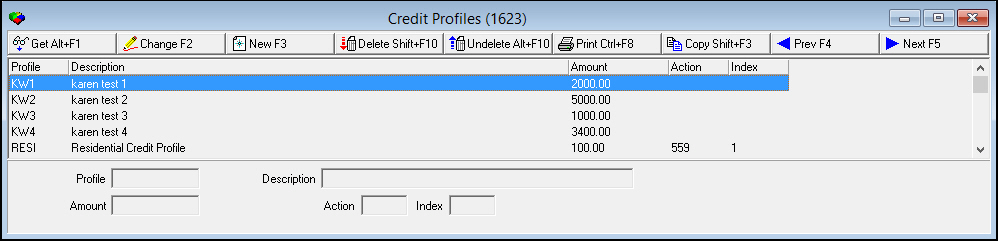
The following graphic shows Credit Profiles as the program opens.
Field/Column Descriptions
The following table describes the fields and columns used in the main window of Agency 6.
|
Field/Column |
Description |
|
Profile |
Profile code. |
|
Description |
Description of the profile. |
|
Amount |
Total account balance allowed. |
|
Action / Index |
Action and index number tied to the user profile that can create work orders or service tickets when the balance exceeds the profile. |
Using Common Functions
See the reference document Common Functions in SBN for more information.
Button Functions
The following table displays the buttons, describes the shortcut keys, actions and functionality.
|
Button |
Name |
Shortcut Key |
Action |
Description |
|
|
Get Record |
alt+f1 |
1623/ 1 |
View details of selected record. |
|
|
Change Record |
f2 |
1623/ 2 |
Change selected record. |
|
|
New Record |
f3 |
1623/ 3 |
Create new record. |
|
|
Delete Record |
shift+f10 |
1623/ 4 |
Delete selected record. |
|
|
Select Record to Undelete |
alt+f10 |
1623/ 5 |
Restore deleted record. |
|
|
Print Selected Records |
ctrl+f8 |
1623/ 6 |
Print selected record. |
|
|
Copy Current Record |
shift+f3 |
Copy current record. |
|
|
|
Previous |
f4 |
Scroll to previous record. |
|
|
|
Next |
f5 |
Scroll to next record. |
|
|
|
Exit without saving |
esc |
Exit without saving changes to selected record. |
|
|
|
Save Existing Record |
enter |
Save changes to selected record. |











Modifications and Updates to Credit Profiles
The following table lists modifications and updates to the Credit Profiles document.
|
Mod Number |
Date |
Description |
|
n/a |
8/28/14 |
Images updated. |