
Start Here
SBN Services are the background services that automate an SBN installation. They run unattended on a Windows or Linux server, connect to the SBN data server, and carry out the recurring work an operation depends on: generating and distributing reports, printing, sending email alarms and email reports, paging and SMS, forwarding signals, running front ends, generating alarms, loading camera media, and more. Everything an operator would otherwise have to trigger by hand happens on a schedule or on an event.
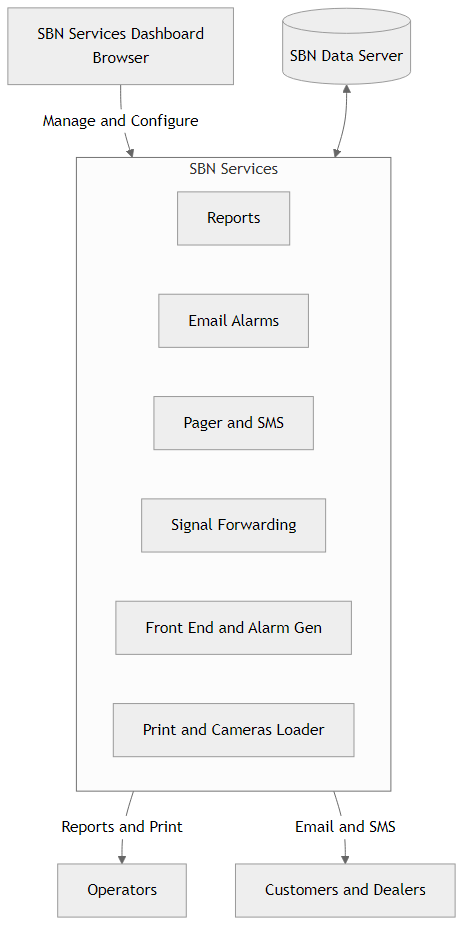
The services ship together in a single package. One installer places the full set on the server, registers the ones you enable as system services, and writes each service its own .settings file. Adding a service later is a matter of enabling it, not running a second install.
The catalog is grouped by purpose. Common covers the services nearly every installation runs — Reports, Print, Fax, Email Alarms, Email Reports, Pager, Background Tasks, Skills, Open/Close, Watchdog, Heartbeat, and Auto Failover. Dispatching covers eDispatch, Alerts, Signal Forwarding, and Auto Action. Interfaces covers the outward-facing integrations such as Batch Payments, PSAP Lookup, Sales, Remote Panel, Access Control, Dialer, Purchase Order, SCAIP, and RTSP. Cameras and Cameras Loader handle video integrations including AXIS, Immix, Videofied, and ViewNow. Front End, Nats Front End, and Algen are numbered categories where you create as many instances as the receiver load requires.
All of them are managed from the browser-based SBN Services Dashboard. The Dashboard lists every installed service with its live state, starts and stops them, creates and removes numbered instances, edits each service's settings with validation, streams logs, and browses declared output folders such as the Reports PDF directory. It replaces the older desktop Service Manager and can be reached from any machine that can browse to the server.
Where to go next
- Installing & Uninstalling — installing the package, enabling services, upgrading, and removing them.
- Dashboard — the browser console: service state, settings, logs, instances, and output folders.
- Service Manager to Dashboard — moving from the desktop Service Manager to the Dashboard.
- Per-service pages live under
/help/SBN-Services/Services/— one page per service, covering its settings and behavior. For example Report Service, Email Alarm Service, and Signal Forwarding Service.