
Marketing Events
Marketing Events
Marketing Events
Program #: 1856
Module: System Administration
Overview
Use Marketing Events (program #1856) to flag marketing events that change the status of a marketing record. The flags indicate whether the marketing record represents an active lead or a lead that should be considered sold.
Note: All of the events in Marketing Events are already pre-created by IBS. You cannot create new events in SBN.
To access this program, select Marketing Events (program #1856) from the main menu of SBN.
The Marketing Events Window
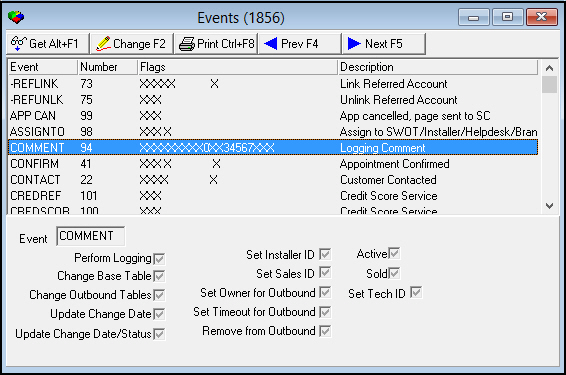
The following graphic Marketing Events as the program opens. The upper pane displays previously defined marketing events.
Column Descriptions
The following table describes the columns used in Marketing Events.
|
Column |
Description |
|
Event |
The name of the selected marketing event. |
|
Number |
SBN-assigned index number of the selected marketing event. |
|
Flags |
Xs correspond to flags selected for the selected marketing event. O You may change the flags for a marketing event only if the corresponding fields open for changes when you choose Change Record. |
|
Description |
Text description of the selected marketing event. |
Field Descriptions
The following table describes the fields used in Marketing Events.
|
Field |
Description |
|
Event |
The name of the selected marketing event. |
|
Flags |
|
|
Perform Logging |
If this box displays a check mark, SBN creates a log record when you save a record with this marketing event. |
|
Change Base Table |
If this box displays a check mark, records with the selected marketing event change the base table. |
|
Change Outbound Tables |
If this box displays a check mark, records with the selected marketing event change the outbound table. |
|
Update Change Date |
If this box displays a check mark, records with the selected marketing event updates the last change date for the record. |
|
Update Change Date/Status |
If this box displays a check mark, records with the selected marketing event updates both the status and the last change date for the record. |
|
Set Installer ID |
If this box displays a check mark, SBN attaches the installer ID to a record with the selected marketing event. |
|
Set Sales ID |
If this box displays a check mark, SBN attaches the sales ID to records with the selected marketing event and displays the ID in the SC ID field of Marketing (program #562). If this box displays a check mark, activity in the following events trigger an update to the status: l 14 l 30 l 33 l 34 l 35 l 38 O SBN does not pre-set this flag. You must manually select it. |
|
Set Owner for Outbound |
If this box displays a check mark, SBN attaches the user ID as the owner of the outbound record. |
|
Set Timeout for Outbound |
If this box displays a check mark, records with the selected marketing event start a timer for the outbound record. |
|
Remove from Outbound |
If this box displays a check mark, SBN removes records with the selected marketing event from the outbound queue. |
|
Active |
If this box displays a check mark, records with the selected marketing event are active leads. |
|
Sold |
If this box displays a check mark, records with the selected marketing event should be considered sold. |
|
Set Tech ID |
If this box displays a check mark, SBN attaches the technician ID to records with the selected marketing event and displays the ID in the Tech ID field of Marketing (program #562). O SBN does not pre-set this flag. You must manually select it. |
Using Common Functions
See the reference document Common Functions in SBN for more information.
Button Functions
The following table displays the buttons, describes the shortcut keys, actions, and functionality.
|
Button |
Name |
Shortcut Key |
Action |
Description |
|
|
Get |
ALT+F1 |
1856/ 1 |
Get record. |
|
|
Change |
F2 |
1856/ 2 |
Change selected record. |
|
|
|
CTRL+F8 |
1856/ 6 |
Print selected records. |
|
|
Previous |
F4 |
1856/ 999 |
Select last record. |
|
|
Next |
F5 |
1856/ 999 |
Select next record. |





Modifications and Updates to Marketing Events
The following table lists modifications and updates to the Marketing Events document.
|
Mod Number |
Date |
Description |
|
n/a |
8/19/14 |
Images updated. |
|
n/a |
11/25/14 |
Note added about events pre-created by IBS. |