
Concentrator Port Line
Concentrator Port Line
Concentrator/Port/Line
Program #: 1680
Module: Utilities
Overview
Use Concentrator/Port/Line (program #1680) to associate a specific combination of concentrator, port number, and line number with a text description. When option mo237 is on and SBN receives an alarm signal from the specified concentrator, port, and line number, SBN displays the associated text description from this program in the Alog Misc 3 column of the Alarm Log tab in program #559.
Navigating to Concentrator/Port/Line
Use the following steps to access the Concentrator/Port/Line program:
1. From the main SBN toolbar, select Menu.
2. From the drop-down menu, select Go To.
3. In the Go To Program dialog box, type in "1680" and press ENTER.
w The Concentrator/Port/Line window opens.
The Concentrator/Port/Line Window
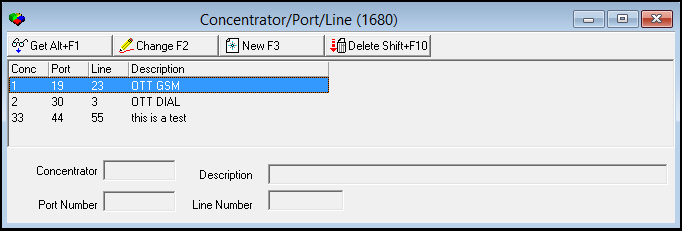
The following graphic shows Concentrator/Port/Line as the program opens.
Field/Column Descriptions
The following table describes the fields and columns used in Concentrator/Port/Line.
|
Field/Column |
Description |
|
Concentrator |
Concentrator from which an alarm must originate in order for the selected text description to appear in the Alarm Log. |
|
Port Number |
Port number from which an alarm must originate in order for the selected text description to appear in the Alarm Log. |
|
Line Number |
Line number from which an alarm must originate in order for the selected text description to appear in the Alarm Log. |
|
Description |
Text description that appears in the Alog Misc 3 column of the Alarm Log when SBN receives an alarm from the selected concentrator, port, and line number combination. Option mo237 must be on in order for SBN to display this description in the Alarm Log. |
Viewing Details of a Concentrator/Port/Line Combination
Use the following steps to view concentrator/port/line combination details:
1. Select the concentrator/port/line combination you want to view.
2. Choose Get Record.
w The combination details appear in the fields in the lower pane.
Creating a Concentrator/Port/Line Combination
Use the following steps to create a new concentrator/port/line combination:
1. Choose New Record.
w The fields in the lower pane open for changes.
2. Enter details for the concentrator/port/line combination.
3. Choose Save.
w The new combination appears in the list in the upper pane.
Changing a Concentrator/Port/Line Combination
Use the following steps to change the description of a concentrator/port/line combination:
1. From the upper pane, select the concentrator/port/line combination you want to change by double-clicking or choosing Get Record.
w The combination details appear in the lower pane.
2. Choose Change Record.
w The Description field in the lower pane opens for changes.
3. Change the description as necessary.
4. Choose Save.
Deleting a Concentrator/Port/Line Combination
Use the following steps to delete a concentrator/port/line combination:
1. From the upper pane, select the concentrator/port/line combination you want to delete by double-clicking or choosing Get Record.
w The combination details appear in the lower pane.
2. Choose Delete Record.
w A confirm dialog box opens: "Are you sure?"
3. Choose Yes.
4. SBN removes the concentrator/port/line combination from the list in the upper pane.
Button Functions
The following table displays the buttons, describes the shortcut keys, actions and functionality.
|
Button |
Name |
Shortcut Key |
Action |
Description |
|
|
Get Record |
alt+f1 |
1680/ 1 |
View details of selected concentrator/port/line combination. |
|
|
Change Record |
f2 |
1680/ 2 |
Change details of selected concentrator/port/line combination. |
|
|
New Record |
f3 |
1680/ 3 |
Create new concentrator/port/line combination. |
|
|
Delete Record |
shift+f10 |
1680/ 4 |
Delete selected concentrator/port/line combination. |




Modifications and Updates to Concentrator/Port/Line
The following table lists modifications and updates to the Concentrator/Port/Line document.
|
Mod Number |
Date |
Description |
|
07.79.22806, 08.79.09314, 08.79.09421, 07.79.22981 |
11/19/13 |
Created document |
|
n/a |
8/28/14 |
Images updated. |