
Bulletins
Bulletins
Bulletins
Program #: 1720
Module: System Administration
Overview
Use Bulletins (program #1720) to create messages for a user group, a specific branch, or all users. If a bulletin is for all users, it is a Global Bulletin.
If a bulletin is available for a module, the flashing symbol for bulletins appears in the status bar when you enter the module. Similarly, the flashing symbol for bulletins appears in the status bar
-
If a bulletin is available that matches a record you have open
-
A global bulletin is available
Double-click on the flashing symbol to access Bulletins to read the available bulletin. If you have a record open on your screen when you double-click the flashing bulletin symbol, you can only view bulletins that match that record. You must clear that information from your screen in order to view any other bulletins. For more information on the status bar, see SBN Status Bar.
If option sv059 is on, when you access an installation with an assigned bulletin (group type: Service) in Data Entry Master and Basics (program #559), the bulletin text window automatically displays.
To access this program, select Bulletins (program #1720) from the main menu of SBN.
The Bulletins Window
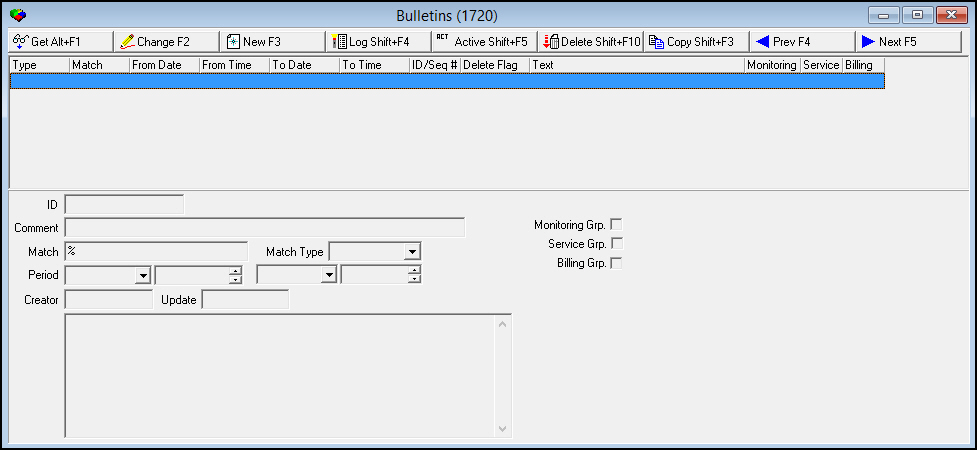
The following graphic shows Bulletins as the program opens. The window displays active bulletins.
Field/Column Descriptions
The following table describes the fields and columns used in the main window of Bulletins.
|
Field/Column |
Description |
||||||||||||||||||||||||||||
|
Type |
Displays the type of bulletin. |
||||||||||||||||||||||||||||
|
Match |
Displays the criterion that matched for viewing the bulletin. |
||||||||||||||||||||||||||||
|
From Date |
Displays the date that the selected bulletin becomes effective. |
||||||||||||||||||||||||||||
|
From Time |
Displays the time that the selected bulletin becomes effective. |
||||||||||||||||||||||||||||
|
To Date |
Displays the date through which the selected bulletin is effective. |
||||||||||||||||||||||||||||
|
To Time |
Displays the time through which the selected bulletin is effective. |
||||||||||||||||||||||||||||
|
ID/Seq # |
Displays the unique number that identifies the selected bulletin. O The sequence number (/#), identifies the version of the selected bulletin. |
||||||||||||||||||||||||||||
|
Delete Flag |
If this column displays an X, the selected bulletin has been deleted. |
||||||||||||||||||||||||||||
|
Text |
Displays the text of the selected bulletin. |
||||||||||||||||||||||||||||
|
ID |
SBN-generated ID number for the bulletin. |
||||||||||||||||||||||||||||
|
Comment |
Type a text comment about the bulletin. |
||||||||||||||||||||||||||||
|
Match |
Type the mask that must match in order to view the bulletin. |
||||||||||||||||||||||||||||
|
Match Type |
Select the type of bulletin. Choose from the following options to limit the bulletins by:
For example, if you want to attach a bulletin to a specific branch, select BRANCH as the Match Type and type the branch number in the Match field. |
||||||||||||||||||||||||||||
|
Monitoring Group |
Select this check box to designate the selected bulletin for Monitoring. |
||||||||||||||||||||||||||||
|
Service Group |
Select this check box to designate the selected bulletin for the Service Log tab. |
||||||||||||||||||||||||||||
|
Billing Group |
Select this check box to designate the selected bulletin for Billing. |
||||||||||||||||||||||||||||
|
Period |
|||||||||||||||||||||||||||||
|
Date - From |
Select the date the bulletin becomes effective. |
||||||||||||||||||||||||||||
|
Time - From |
Select the time the bulletin becomes effective. |
||||||||||||||||||||||||||||
|
Date - To |
Select the date through which the bulletin is effective. |
||||||||||||||||||||||||||||
|
Time - To |
Select the time through which the bulletin is effective. |
||||||||||||||||||||||||||||
|
Creator |
Identifies the user who creates the bulletin. |
||||||||||||||||||||||||||||
|
Update |
Identifies the user who changes the bulletin. |
||||||||||||||||||||||||||||
|
Bulletin Text (No label) |
Insert text of bulletin. |
||||||||||||||||||||||||||||
Accessing the Bulletins Window in Data Entry or Contract Master
To access the Bulletins window in Data Entry or Contract Master, complete the following steps.
1. Access Data Entry (program #559) or Contract Master (program #548).
2. Click the Bulletins icon  in the SBN status bar.
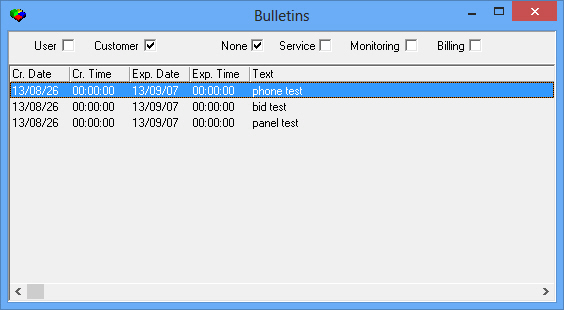
w The following window appears.
Field/Column Descriptions
The following table describes the fields and columns used in the Bulletins window.
|
Field |
Description |
|
User |
Select this check box to display all bulletins for your user ID. |
|
Customer |
Select this check box to display all bulletins for the selected CID. |
|
None |
Select this check box to display all bulletins that do not have the Monitoring Group, Service Group, or Billing Group check box selected in program #1720. |
|
Service |
When this check box is selected, SBN displays service bulletins. This check box is selected by default when you open the Bulletins window while in the Service Log tab of program #559. |
|
Monitoring |
When this check box is selected, SBN displays monitoring bulletins. This check box is selected by default when you open the Bulletins window while in any tab of program #559 except the Service Log tab. |
|
Billing |
When this check box is selected, SBN displays billing bulletins. |
|
Cr. Date. |
Date the bulletin was created. |
|
Cr. Time |
Time the bulletin was created. |
|
Exp. Date |
Date that the bulletin is set to expire. |
|
Exp. Time |
Time that the bulletin is set to expire. |
|
Text |
Text of the bulletin. |
Using Common Functions
See the reference document Common Functions in SBN for more information.
Viewing the Log of Bulletins
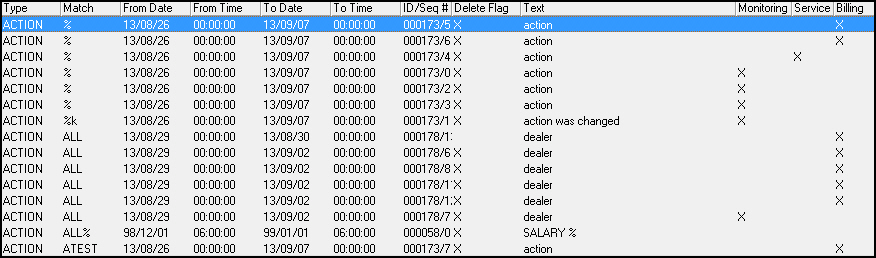
You may view a log of all bulletins, both active and inactive. In Bulletins, choose Display Log.
‰ The log displays all bulletins, sorted alphabetically by Bulletin Type.
Viewing Active Bulletins
You may easily return to a display of active bulletins. In Bulletins, choose Display Active Records.
‰ The log displays active bulletins.
Example
The graphic above displays two active bulletins: one defined with a mask and one global.
-
Defined with a mask - Users see a flashing Bulletin symbol in their SBN status bar when they access any record associated with the branch BLDR2 between 6/03/20 and
7/03/20. -
Global - All users see a flashing Bulletin symbol in their SBN status bar between 17:00 on 6/03/20 and 8:00 on 6/03/21.
Button Functions
The following table displays the buttons, describes the shortcut keys, actions, and functionality.
|
Button |
Name |
Shortcut Key |
Action |
Description |
|
|
Get |
ALT+F1 |
1720/ 1 |
Get record. |
|
|
Change |
F2 |
1720/ 2 |
Change selected record. |
|
|
New |
F3 |
1720/ 3 |
Create new record. |
|
|
Log |
SHIFT+F4 |
1720/ 4 |
Display log. |
|
|
Active |
SHIFT+F5 |
1720/ 5 |
Display active records. |
|
|
|
CTRL+F8 |
1720/ 6 |
Print selected records. |
|
|
Delete |
SHIFT+F10 |
1720/ 7 |
Delete selected record. |
|
|
Previous |
F4 |
1720/ 999 |
Select last record. |
|
|
Next |
F5 |
1720/ 999 |
Select next record. |









Modifications and Updates to Bulletins
The following table lists modifications and updates to the Bulletins document.
|
Mod Number |
Date |
Description |
|
08.79.09378, 07.79.22906 08.79.09353, 07.79.22877 |
09/04/2013 |
Replaced Group field with Monitoring Group, Service Group, and Billing Group check boxes. Service bulletins now appear by default while the user is in the Service Log tab of program #559, and monitoring bulletins appear while the user is in any tab of program #559 besides the Service Log tab. |
|
n/a |
08/14/2014 |
Images updated. |
F1 Help
| Delphi Forms | mobulletinform |
| Program Numbers | 1720 |