
Service Type Groups
Service Type Groups
Service Type Groups
Module: Utilities
Overview
Use Service Type Groups (program #1692) to associate various service types from program #1892 into groups. Assign a message to each service type group from Standard Text (program #1828).
Company 120 uses this program for web applications.
Navigating to Service Type Groups
Use the following steps to navigate to Service Type Groups:
1. From the main SBN toolbar, select Menu.
2. From the drop-down menu, select Go To.
3. In the Go To Program dialog box, type in "1692" and press enter.
w The Service Type Groups program opens.
The Service Type Groups Window
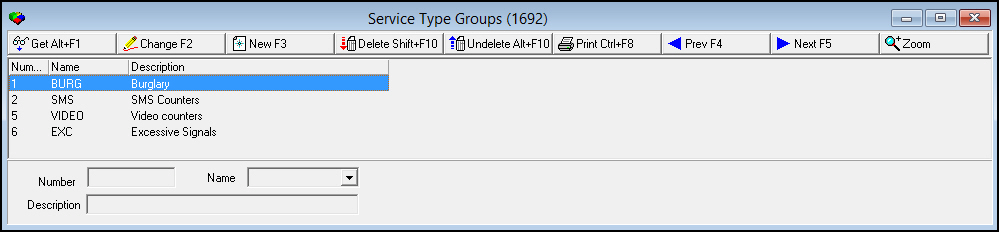
The following graphic displays Service Type Groups as the program opens. The window displays previously defined service type groups.
Field/Column Descriptions
The following table describes the fields and columns used in Service Type Groups.
Field/Column |
Description |
Number |
SBN-generated ID number of the selected service type group. |
Name |
Name of the selected service type group. (This menu originates from program #1828). |
Description |
Description of the selected service type group. (SBN populates this field with the text description of the selected standard message from program #1828.) |
Viewing Details of a Service Type Group
Use the following steps to view service type group details:
1. Select the service type group you want to view.
2. Choose Get Record.
w The service type group details appear in the fields in the lower pane.
Creating a Service Type Group
Use the following steps to create a new service type group:
1. Choose New Record.
w The fields in the lower pane open for changes.
2. Enter details for the service type group.
3. Choose Save.
w The new service type group appears in the list in the upper pane.
Changing a Service Type Group
Use the following steps to change a service type group:
1. From the upper pane, select the service type group you want to change by double-clicking or choosing Get Record.
w The service type group details appear in the lower pane.
2. Choose Change Record.
w The fields in the lower pane open for changes.
3. Change details as necessary.
4. Choose Save.
Deleting a Service Type Group
Use the following steps to delete a service type group:
1. From the upper pane, select the service type group you want to delete by double-clicking or choosing Get Record.
w The service type group details appear in the lower pane.
2. Choose Delete Record.
w A confirm dialog box opens: "Are you sure?"
3. Choose Yes.
4. SBN removes the service type group from the list in the upper pane.
Restoring a Deleted Service Type Group
Use the following steps to restore deleted service type groups:
1. Choose Select Record to Undelete.
w The Undelete window appears.
2. In the Undelete window, find the service type group you want to restore and double-click it, or choose [ENTER].
w SBN restores the service type group to the list in the upper pane.
Zooming into the Sublevel
Choose Zoom to view the two sublevel tabs for Service Type Groups:
The Service Type tab
The Family tab
The Service Type Tab
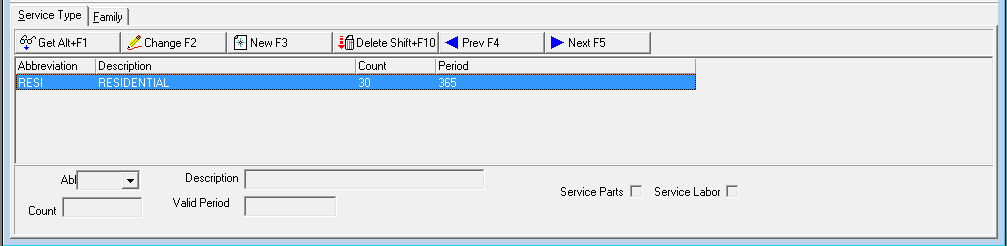
The following graphic shows the Service Type tab in which you can attach service types to service type groups.
Field/Column Descriptions
The following table describes the fields and columns used in the Service Type tab.
Field/Column |
Description |
Abbreviation |
Abbreviation that identifies the selected service type. (This menu originates from program #1892.) |
Description |
Text description of the selected service type. |
Count |
Count for the selected service type. |
Valid Period |
Number of days for which the selected service type is valid. |
Service Parts |
Service parts that are "Non-Chargeable" when checked when out-dating a service request. If checked, user will receive an entry on the work order that states the parts are free. |
Service Labor |
Service labor that is "Non-Chargeable" when checked when out-dating a service request. If checked, user will receive an entry on the work order that states the services are free. |
The Family Tab
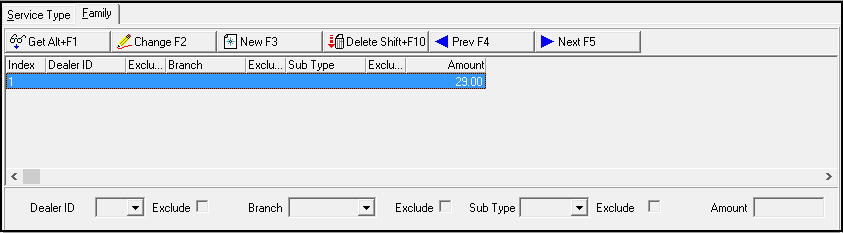
The following graphic shows the Family tab in which you can define a cycle fee for a service type group with a particular dealer, branch, and/or subscriber type.
Assign service type groups to items in program #1535. When you create a cycle fee for an item with the selected service type group on an installation with the selected dealer, branch, and/or subscriber type, SBN applies the amount defined in this tab to the cycle fee.
Field/Column Descriptions
The following table describes the fields and columns used in the Family tab.
Field/Column |
Description |
Index |
SBN-assigned index number. |
Dealer ID |
Dealer ID to which the cycle fee applies. (This menu originates from program #1537.) |
Exclude (Dealer) |
Select this check box to indicate that the cycle fee does not apply to the selected dealer. |
Branch |
Branch ID to which the cycle fee applies. (This menu originates from program #1530.) |
Exclude (Branch) |
Select this check box to indicate that the cycle fee does not apply to the selected branch. |
Sub Type |
Subscriber type to which the cycle fee applies. (This menu originates from program #1534.) |
Exclude (Sub Type) |
Select this check box to indicate that the cycle fee does not apply to the selected subscriber type. |
Amount |
Cycle fee amount for the selected dealer, branch, and/or subscriber type. |
Button Functions
The following table displays the buttons, describes the shortcut keys, actions and functionality.
Button |
Name |
Shortcut Key |
Action |
Description |
Service Type Groups Main |
||||
|
Get Record |
ALT+F1 |
1692/ 1 |
View details of selected service type group. |
|
Change Record |
F2 |
1692/ 2 |
Change details of selected service type group. |
|
New Record |
F3 |
1692/ 3 |
Create new service type group. |
|
Delete Record |
shift+f10 |
1692/ 4 |
Delete selected service type group. |
|
Select Record to Undelete |
alt+f10 |
1692/ 5 |
Restore deleted service type groups. |
|
Print Selected Records |
ctrl+f8 |
1692/ 6 |
Print displayed service type groups. |
|
Previous |
f4 |
Go to previous service type group. |
|
|
Next |
f5 |
Go to next service type group. |
|
|
Zoom in/out of sublevel |
1692/10 |
Access Service Type tab in sublevel. |
|
Service Type Tab |
||||
|
Get |
ALT+F1 |
1692/11 |
View details of selected service type. |
|
Change |
f2 |
1692/12 |
Change details of selected service type. |
|
New |
f3 |
1692/13 |
Add new service type to selected group. |
|
Delete |
shift+f10 |
1692/14 |
Delete selected service type. |
|
Previous |
f4 |
1692/11 |
Go to previous service type. |
|
Next |
f5 |
1692/11 |
Go to next service type. |
Family Tab |
||||
|
Get |
ALT+F1 |
1692/21 |
View details of selected cycle fee. |
|
Change |
F2 |
1692/22 |
Change details of selected cycle fee. |
|
New |
F3 |
1692/23 |
Add new cycle fee to selected service type group. |
|
Delete |
SHIFT+F10 |
1692/24 |
Delete selected cycle fee. |
|
Previous |
F4 |
1692/21 |
Go to previous cycle fee. |
|
Next |
F5 |
1692/21 |
Go to next cycle fee. |









Modifications and Updates to Service Type Groups
The following table lists modifications and updates to the Service Type Groups document.
Mod Number |
Date |
Description |
n/a |
09/02/14 |
Images updated. |
n/a |
12/15/17 |
Images updated. |
07.88.25594, 08.87.11210, 07.87.25565, 08.87.11175, 07.87.25521 |
12/15/17 |
Added Labor and Parts check boxes to Service Type Group screen. |