
Statement Information Groups
Statement Information Groups
Statement Information Groups
Module: System Administration
Overview
Use Statement Information Groups (program #1800) to define statement information groups. You can use statement information groups in several ways:
-
To allow subscribers with multiple accounts to have a single mailing address.
-
To build mail groups for data entry.
-
To use in commercial applications in which contracts and invoices are created for each physical location, but you need to create one statement for the corporate headquarters to inform them that all invoices have been sent.
To access this program, select Statement Information Groups (program #1800) from the main menu of SBN.
The Statement Information Groups Window
The following graphic shows Statement Information Groups. The upper pane displays previously defined statement information groups.
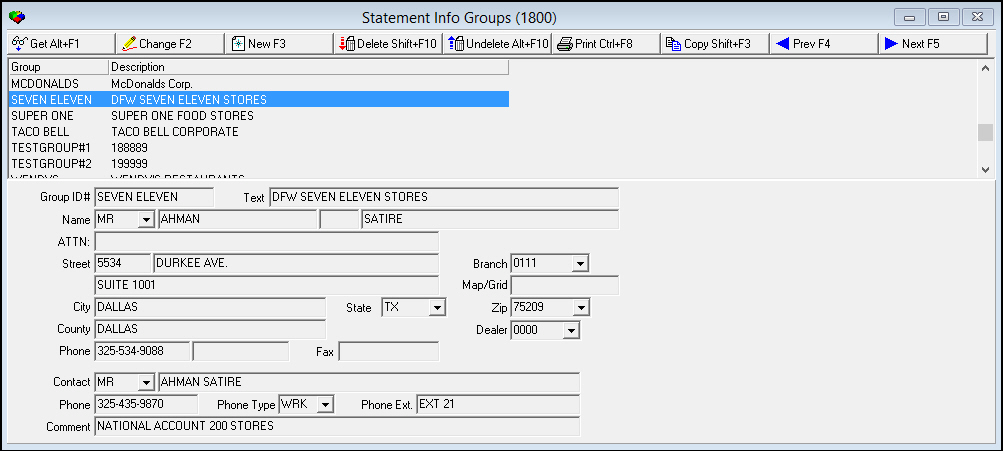
Field/Column Descriptions
The following table describes the fields and columns used in Statement Information Groups.
|
Field/Column |
Description |
|
Group ID# |
Identifies the selected statement information group. |
|
Description/Text |
Text description of the selected statement information group. |
|
Title |
You may type a title for the person who receives the statement for the selected information group. |
|
First Name (No label) |
You may type the first name of the person who receives the statement for the selected information group. |
|
Middle initial (No label) |
You may type the middle initial of the person who receives the statement for the selected information group. |
|
Last Name (No label) |
You must type the last name of the person who receives the statement for the selected information group. |
|
ATTN |
Name to use for correspondence. |
|
Street Number |
Street number (part of the address for the person who receives the statement for the selected information group). |
|
Street - Name (No label) |
Street name (part of the address for the person who receives the statement for the selected information group). |
|
Branch |
Branch associated with the selected information group. (This menu originates from program #1530.) |
|
Additional Street |
Additional street information (part of the address for the person who receives the statement for the selected information group), if applicable. |
|
Map/Grid |
Map coordinates of the address. |
|
City |
City (part of the address for the person who receives the statement for the selected information group). |
|
State |
State (part of the address for the person who receives the statement for the selected information group). This field holds a maximum of 60 characters. |
|
Zip |
Zip code (part of the address for the person who receives the statement for the selected information group). |
|
County |
County in which the address is located. |
|
Dealer |
Dealer associated with the selected information group. (This menu originates from program #1537.) |
|
Phone |
Phone number of the person who receives the statement for the selected information group. |
|
Phone (No label) |
Additional phone number of the person who receives the statement for the selected information group |
|
Fax |
Fax number of the person who receives the statement for the selected information group |
|
Contact (Title) |
You may type a title for the contact. |
|
Contact - Name |
Name of the contact. |
|
Phone |
Phone number of the contact. |
|
Phone Type (No label) |
Type of phone. |
|
Phone Ext. |
Phone extension number, if applicable. |
|
Comment |
Free-form text about the statement or the contact. |
Using Common Functions
See the reference document Common Functions in SBN for more information.
Button Functions
The following table displays the buttons, describes the shortcut keys, actions, and functionality.
|
Button |
Name |
Shortcut Key |
Action |
Description |
|
|
Get |
ALT+F1 |
1800/ 1 |
Get record. |
|
|
Change |
F2 |
1800/ 2 |
Change selected record. |
|
|
New |
F3 |
1800/ 3 |
Create new record. |
|
|
Delete |
SHIFT+F10 |
1800/ 4 |
Delete selected record. |
|
|
Undelete |
ALT+F10 |
1800/ 5 |
Restore deleted record. |
|
|
|
CTRL+F8 |
1800/ 6 |
Print selected records. |
|
|
Copy |
SHIFT+F10 |
1800/ 999 |
Copy selected group. |
|
|
Previous |
F4 |
1800/ 999 |
Select last record. |
|
|
Next |
F5 |
1800/ 999 |
Select next record. |









Modifications and Updates to Statement Information Groups
The following table lists modifications and updates to the Statement Information Groups document.
|
Mod Number |
Date |
Description |
|
n/a |
8/26/14 |
Images updated. |
F1 Help
| Delphi Forms | blinfogroupsform |
| Program Numbers | 1800 |