
Business Unit Access
Business Unit Access
Business Unit Access
Program #: 1647
Module: Utilities
Overview
Use Business Unit Access (program #1647) to include or exclude business unit types from a user access profile. In the Users tab of Personnel (program #1811), you may assign a business unit access profile to a user ID. When option ba480 is on, SBN only allows users to access contracts and installations associated with the business unit types included in the user's selected business unit access profile. When option ba480 is off, the business unit access restriction is not active.
Navigating to Business Unit Access
Use the following steps to access the Business Unit Access program:
1. From the main SBN toolbar, select Menu.
2. From the drop-down menu, select Go To.
3. In the Go To Program dialog box, type in "1647" and press ENTER.
w The Business Unit Access window opens.
The Business Unit Access Window
The following graphic shows Business Unit Access as the program opens.

Field/Column Descriptions
The following table describes the fields and columns used in Business Unit Access.
Field/Column |
Description |
Profile/Abbr |
Abbreviation for the selected business unit access profile. |
Description |
Description of the selected business unit access profile. |
Creating a Business Unit Access Profile
Use the following steps to create a business unit access profile:
1. Choose New Record.
w The fields in the lower pane open for changes.
2. Enter details for the access profile.
3. Choose Save.
w The new business unit access profile appears in the list in the upper pane.
Changing a Business Unit Access Profile
You can change the description of an existing business unit access profile.
Use the following steps to change an access profile description:
1. From the upper pane, select the business unit access profile you want to change by double-clicking or choosing Get Record.
w The access profile details appear in the lower pane.
2. Choose Change Record.
w The Description field opens for changes.
3. Change the description as necessary.
4. Choose Save.
Deleting a Business Unit Access Profile
Use the following steps to delete a business unit access profile:
1. Select the business unit access profile you want to delete.
2. Choose Delete Record.
w The business unit access profile no longer appears in the list of profiles.
Restoring a Deleted Business Unit Access Profile
Use the following steps to restore deleted business unit access profiles:
1. Choose Select Record to Undelete.
w The Undelete window appears.
2. In the Undelete window, find the access profile you want to restore and double-click it, or choose [ENTER].
w SBN restores the business unit access profile to the list in the upper pane.
Zooming into the Sublevel
Business Unit Access contains a sublevel with two tabs:
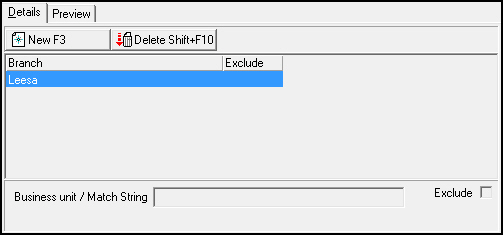
The Details tab - in which you define masks that determine which business unit types a user can access
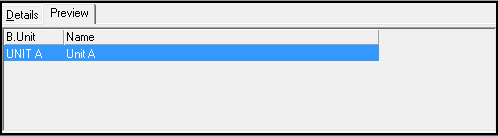
The Preview tab - in which you may view all business unit types included in a business unit access profile
The Details Tab
The following graphic shows the Details tab. The tab displays previously defined masks.
Field/Column Descriptions
The following table describes the fields and columns used in the Details tab.
Field/Column |
Description |
Business Unit/Match String |
Business unit type or a match string that identifies the business unit types that users with this profile may access. |
Exclude |
If this field displays an X, users with this profile may not access contracts or installations with the selected business unit type or match string. |
The Preview Tab
The following graphic shows the Preview tab. The Preview tab displays all business unit types included in the selected business unit access profile.
Field/Column Descriptions
The following table describes the fields and columns used in the Preview tab.
Field/Column |
Description |
Business Unit |
Business unit types that users with this profile may access. |
Name |
Description of the selected business unit type. |
Button Functions
The following table displays the buttons, describes the shortcut keys, actions and functionality.
Button |
Name |
Shortcut Key |
Action |
Description |
|
Get Record |
alt+f1 |
1647/ 1 |
View details of selected record. |
|
Change Record |
f2 |
1647/ 2 |
Change selected record. |
|
New Record |
f3 |
1647/ 3 |
Create new record. |
|
Delete Record |
shift+f10 |
1647/ 4 |
Delete selected record. |
|
Select Record to Undelete |
alt+f10 |
1647/ 5 |
Restore deleted record. |
|
Print Selected Records |
ctrl+f8 |
1647/ 6 |
Print selected record. |
|
Previous Record |
f4 |
View details of previous record. |
|
|
Next Record |
f5 |
View details of next record. |
|
|
Zoom In/Out of Sublevel |
F10 |
1647/10 |
Access sublevel tabs. |
|
Tear Away Selected Tab |
F7 |
1647/10 |
View sublevel tabs in separate window. |










Modifications and Updates to Business Unit Access
The following table lists modifications and updates to the Business Unit Access document.
Mod Number |
Date |
Description |
n/a |
8/28/14 |
Images updated. |
F1 Help
| Delphi Forms | ubusacbsprofform |
| Program Numbers | 1647 |