
AFANP Queue
AFANP Queue
AFANP Queue
Module: System Administration
Overview
AFANP Queue (program #1848) allows you to view signal information for AFANP zones.
To access this program, choose AFANP Queue (program #1848) from the main menu of SBN.
The AFANP Queue Screen
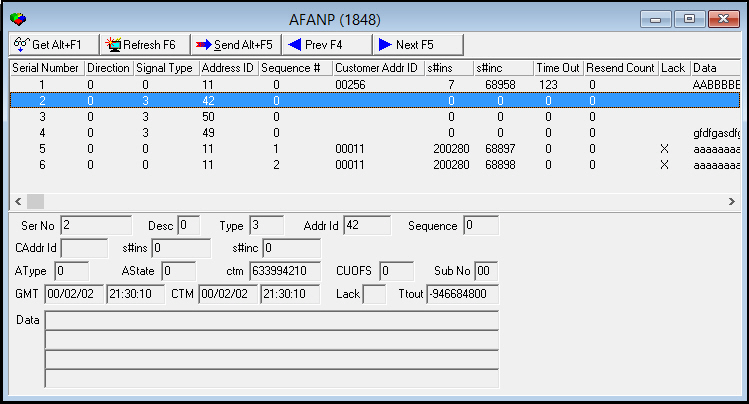
The following graphic shows the AFANP Queue screen as the program opens.
Field/Column Label Descriptions
The following table lists the field and column descriptions in the AFANP Queue screen.
|
Field/Column Label |
Description |
|
Address ID |
Identifies the agency. This number originates from the AFANP field in program #1547. |
|
Sequence # |
The sequence number for this message transmission. |
|
Customer Addr ID |
Customer AFANP number. |
|
s#ins |
SBN internal customer s#ins number. |
|
s#inc |
Incident number. |
|
Time Out |
Time out. |
|
Resend Count |
Resend Count |
|
Lack |
For IBS testing only. |
|
Data |
Message. |
|
Ser No |
Unique index number. |
|
Desc |
Description information. |
|
Type |
Signal type. |
|
AType |
Identifies the type of alarm. |
|
AState |
Identifies the state of the alarm. |
|
ctm |
For IBS testing only. |
|
CUOFS |
For IBS testing only. |
|
Sub No |
Sub-installation number. |
|
GMT Date |
For IBS testing only. |
|
GMT (Time - No label) |
For IBS testing only. |
|
CMT Date |
Date the transmission occurred, in customer time. |
|
CMT (Time - No label) |
Time the transmission occurred, in customer time. |
|
Lack |
For IBS testing only. |
|
Ttout |
For IBS testing only. |
|
Data |
Free-form text message. |
Viewing Details of a Signal in the AFANP Queue
To view details of a signal in the AFANP Queue
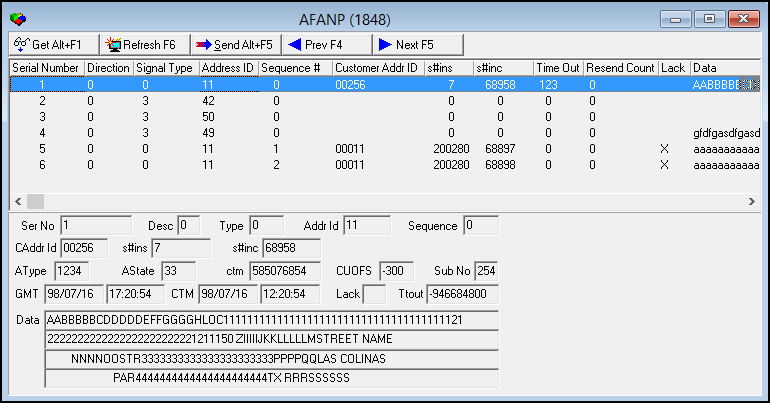
1. In AFANP Queue (program #1848), select the signal for which you want to view details.
2. Choose Get Record.
‰ The fields in the lower portion of the screen fill with the details of the selected AFANP queue.
Button Functions
The following table displays the buttons, describes the shortcut keys, actions, and functionality.
|
Button |
Name |
Shortcut Key |
Action |
Description |
|
|
Get |
ALT+F1 |
1848/ 1 |
Get record. |
|
|
SQL Refresh |
F6 |
1848/ 2 |
Refresh SQL redord. |
|
|
Send to another user |
ALT+F5 |
1848/ 3 |
Send record to an alternate user. |
|
|
Previous |
F4 |
1848/ 999 |
Select last record. |
|
|
Next |
F5 |
1848/ 999 |
Select next record. |





Modifications and Updates to AFANP Queue
The following table lists modifications and updates to the AFANP Queue document.
|
Mod Number |
Date |
Description |
|
n/a |
08/14/14 |
Images updated. |