
AC Controllers
AC Controllers
AC Controllers
Module: Account Management Overview
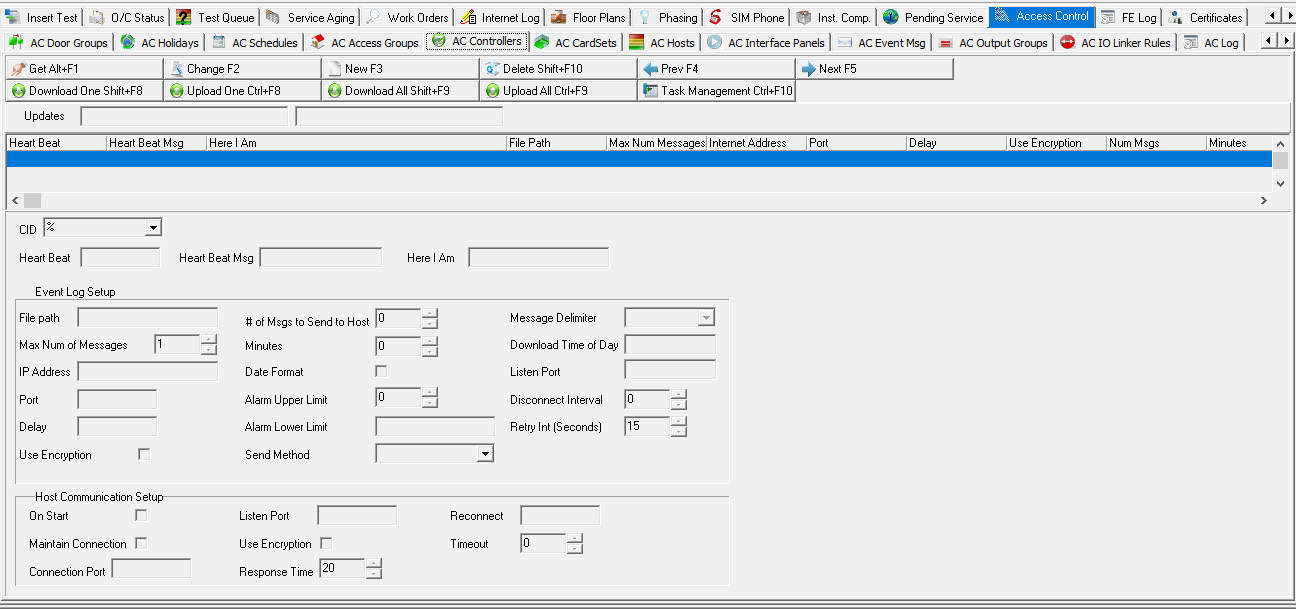
The AC Controllers tab allows you to setup properties on your VertX controller. It is also used to set up communication with hosts. Hosts pass messages and data to and from the VertX controller. To access this program, select Data Entry (program #559) from the main menu of SBN, choose the AC Access Groups tab. Then select the AC Controllers tab.
Field/Column Heading Descriptions
The following table describes the fields and column headings used in the AC Controllers tab.
Column |
Description |
Updates |
Current update status. |
CID |
Unique identifier for a controller. |
Heart Beat |
|
Heart Beat Msg |
|
Here I Am |
|
Event Log Setup |
|
File Path |
|
Max Num of Messages |
|
IP Address |
|
Port |
|
Delay |
|
Use Encryption |
Select this checkbox if you want to encrypt the messages sent to the host. |
# of Msgs to Send to Host |
Indicates the total number of messages in your queue waiting to be sent to the Host machine. |
Minutes |
|
Date Format |
Select this checkbox if you want to use a date format for messages. |
Alarm Upper Limit |
|
Alarm Lower Limit |
|
Send Method |
Indicate the method by which messages are sent to the host. |
Message Delimiter |
|
Download Time of Day |
Indicates the time at which messages are downloaded to the host. |
Listen Port |
|
Disconnect Interval |
Indicates how long messages will attempt to connect to the host before disconnecting and ceasing connectivity. |
Retry Int (Seconds) |
Indicates, in seconds, the interval between connection attempts to the host. |
Host Communication Setup |
|
On Start |
Select this checkbox if you want the Host to setup connectivity each time the host machine is started. |
Maintain Connection |
Select this checkbox if you want the Host to remain connected despite connectivity status. |
Connection Port |
|
Listen Port |
|
Use Encryption |
Select this checkbox if you want to encrypt the messages sent to the host. |
Response Time |
|
Reconnect |
|
Timeout |
|
Function Button Descriptions
The following table displays the buttons, describes the short-cut keys, actions and functionality.
Button |
Name |
Short Cut Key |
Action |
Description |
|
Get |
ALT+F1 |
559/561 |
Get record. |
|
Change |
F2 |
559/562 |
Change selected record. |
|
New |
F3 |
559/563 |
Create new record. |
|
Delete |
Shift+F10 |
559/564 |
Delete selected record. |
|
Previous |
F4 |
Select last record. |
|
|
Next |
F5 |
Select next record. |
|
|
Req Download of One Tab |
Shift+F8 |
559/565 |
Request to download one tab from the access control system. |
|
Req Upload of One Tab |
Ctrl+F8 |
559/566 |
Request to upload one tab to the access control system. |
|
Req Download of All Tab |
Shift+F9 |
559/567 |
Request to download all tabs from the access control system. |
|
Req Upload of All Tab |
Ctrl+F9 |
559/568 |
Request to upload all tabs to the access control system. |
|
Task Management |
Shift+F10 |
559/569 |
Open a web page on the HID host hardware. |









Modifications and Updates to AC Controllers
The following table lists modifications and updates to the AC Controllers document.
Mod Number |
Date |
Description |
n/a |
09/09/2014 |
Images updated. |
n/a |
03/27/2020 |
Images updated. |