
Start Here
SBN Media is a set of services that allows connectivity to cameras, telephony, and alarm devices. SBN Media uses a micro service architecture, using NATS to provide the glue.
Media sources and telephony lines arrive at the device and connector services, media processing and alarm handling run as separate services on the bus, and the results are delivered to SBN for operators to act on. To install SBN Media on a host, connect it to your infrastructure, and keep it up to date, see Installing and Configuring SBN Media (SBN-Media/installation).
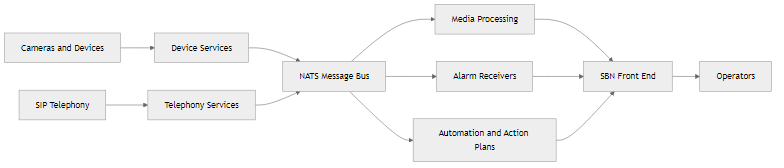
Services overview
SBN Media operates in a micro service architecture. The services are either internal - packaged with the main sbn-media executable - or external - provided by an external program. In general, the services operate together and can be controlled by the sbn-media executable.
The following commands are available to control a service.
Configuration
SBN Media uses a file based approach to configure the services. The configuration is accessed by the services in the local path, using the following hierarchy.
sbn-media.local.yamlprovides the base configuration. This should contain host specific configuration.config/*.yamlprovides individual configuration files for each service. The base configuration takes precedence on any files found here.
SBN Media is pre-configured with a default configuration. This default configuration can be accessed by ejecting the configuration.
This will eject the default configuration into ./config. Individual options can then be viewed and set. Note ejecting the configuration will overwrite any existing configuration. It is therefore advisable to only view the configuration and override anything specific in sbn-media.local.yaml.
Only key configuration options are discussed in this document. Others should be viewed by ejecting the configuration.
Logging
Each service logs to their own files. The file location is specified in the configuration.
The log files are not automatically removed.
The file location must be writable by the user running the service. In addition, each service logs to logserver which collects a central log of all running services on a specific host. The log server also provides a snapshot of log entries via the SBN Media dashboard.
The logserver service will use the file location above as the path to store its logs.
Watchdog
The SBN Media watchdog provides a monitoring service that confirm the health of individual services will stop and start services as necessary.
The basic configuration of the watchdog is:
Services
SBN Media is made up of the services listed below. Most are packaged with SBN Media; a few are provided by external programs. Each service is summarised here; fuller descriptions and configuration for each will be available on its own page.
Infrastructure and control
Service | Description |
|---|---|
| Message bus that connects all SBN Media services. |
Monitors service health and starts or stops services as needed. | |
External web entry point used by SBN Video clients and the dashboard. | |
Collects logs from all services on a host. | |
Searches collected logs for analysis. | |
Relays video through firewalls so streams reach clients on most networks. | |
Runs Lua scripts for call control and IVR. | |
Runs action-plan scripts for automated alarm response. | |
Queues incidents for action-plan processing. | |
Handles interactive voice (IVR) for outbound calls. | |
Generates supervisory signals from the state of the system. | |
Duplicates a network connection to capture signal traffic. | |
Answers queries against the flow-log store. | |
Stores re-identification data for video analytics. |
Connectors
Service | Description |
|---|---|
Connects SBN Media to SIP trunks and PBX systems. | |
Connects browser-based SBN Video clients. | |
| Routes calls between SBN Media SIP servers. |
Routes inbound calls per line - loops them back, bridges them to an operator or another PBX, or rejects them. |
Devices
Device services connect a media source, such as a camera or a call, to SBN Media.
These services share common behaviour and configuration - see Device Streams.
Service | Description |
|---|---|
Connects to RTSP camera streams. | |
Plays back streams previously captured by the recorder. | |
Streams from local video files. | |
Connects to call (RTP) media streams, generally telephony. | |
| Mixes the audio from several streams into one. |
Connects to YourSix cameras. | |
Manages device configuration. |
Devices are accessed from the SBN Video client using a URL format. Some examples:
rtsp: rtsp://host@user:password?key=value,key2=value2recorded: recorded://deviceid?startTime=2006-01-02T15:04:05Z07:00hiknet: hiknet://deviceid?key=ABCDEFsipmedia: sipmedia://call-idwebrtc peer: peer://peerid
An external HikVision connector (hikvision) connects to a HikVision ProConnect camera.
Media processing and analytics
Service | Description |
|---|---|
Converts camera streams into a format browsers can play. | |
| Records media streams to storage. |
Detects objects in video using AI models. | |
Detects scene changes in camera streams. | |
Recognizes tones such as DTMF in audio. | |
Converts text into spoken audio, for example for IVR. | |
Translates audio from one language to another. | |
| Provides AI language features for vision and text. |
Stores annotations used to train detection models. | |
Stores snapshot images for reviewing detections. |
Alarm and signal handling
Service | Description |
|---|---|
Receives alarms over the phone (DTMF) - ContactID, P100, CPC, TSA, TSA-IBS, and more. | |
Sends alarms over the phone (DTMF), such as P100. | |
Receives alarms over IP, such as DC-09. | |
Sends and receives SCAIP alarm messages. | |
Injects signals and events into SBN. | |
| Integrates with the Safe Line Orion platform. |
Sends alarms to an MLR2 receiver. |