
Camera Types
Camera Types
Camera Types
Module: System Administration
Overview
Use Camera types (#2516) in parallel with Cameras Tab. This program allows for specific Dealer-definitions for various camera types.
Navigating to Camera Types
Use the following steps to navigate to Monitoring:
1. From the main SBN toolbar, select Menu.
2. From the drop-down menu, select Go To [ALT+F1].
3. In the Go To Program dialog box, type in "2516."
w The Camera Types program opens.
The Camera Types Window
The Camera Types window contains two panes:
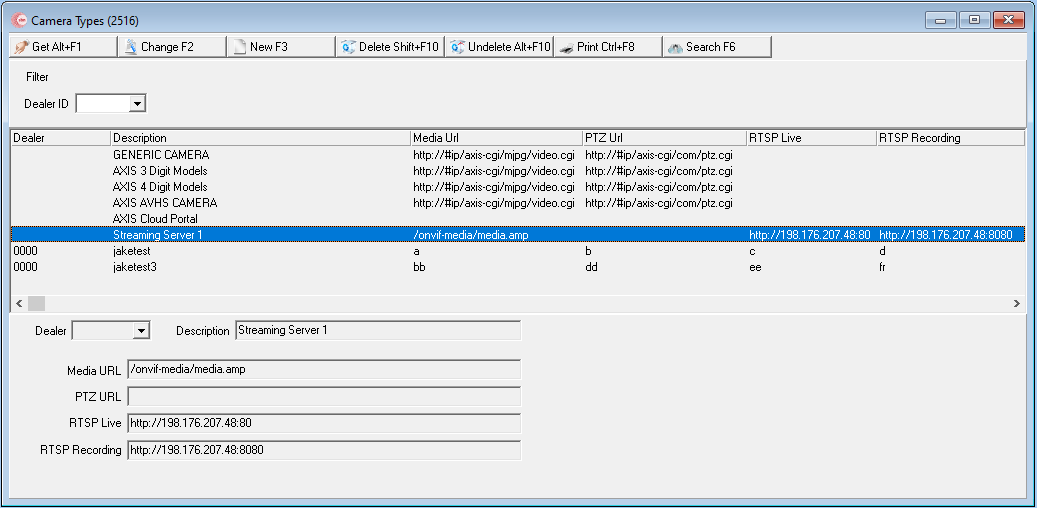
The Filter pane (upper) which can sort/display all camera types or filter them by their Dealer ID.
The Set-up pane (lower) is how a user creates a camera type.
The following graphic shows Camera Types as the program opens.
Field/Column Descriptions
The following table describes the fields and columns used in Camera Types.
Field/Column |
Description |
Filter pane |
|
Dealer ID |
ID of the Dealer doing the Monitoring |
Set-up pane |
|
Dealer ID |
Select a dealer from the dropdown if the camera type is specific to that dealer only. |
Description |
Add a description such as camera name, make, model to uniquely identify the camera type. |
Media URL |
If applicable, add the URL where media can be accessed from. |
RTZ URL |
If applicable, add the URL where the PTZ controls can be accessed from. |
RTSP Live |
If applicable, add the URL and/or port where the RTSP Live streams can be accessed from. For additional information, please see RTSP services in SBN Service Manager. |
RTSP Recording |
If applicable, add the URL and/or port where the RTSP Recording can be accessed from. For additional information, please see RTSP services in SBN Service Manager. |
Related Programs
The following table lists programs related to Camera Types.
Program |
Number |
Document Link |
Description |
Cameras |
N/A |
View information related to the Cameras tab. |
|
SBN Service Manager |
N/A |
View information related to the RTSP service. |
Button Functions
The following table displays the buttons, describes the shortcut keys, actions, and functionality.
Button |
Name |
Shortcut Key |
Action |
Description |
|
Get |
Alt+F1 |
2516/1 |
Select an existing record (Camera Type) |
|
Change |
F2 |
2516/2 |
Edit an existing record (Camera Type) |
|
New |
F3 |
2516/3 |
New Record (Camera Type) |
|
Delete |
Shift+F10 |
2516/4 |
Delete Record (Camera Type) |
|
Undelete |
Alt+F10 |
2516/5 | Undelete a record (Camera Type) |
|
Ctrl+F8 |
2516/6 |
Print a list of Camera Types | |
|
Search |
F6 |
2516/1 |
Search Camera Types by Dealer ID |
|
Exit |
Esc |
2516/2 |
Exit |
|
Enter |
2516/3 |
Save |
Modifications and Updates to Camera Types
The following table lists modifications and updates to the Camera Types document.
Mod Number |
Date |
Description |
| 07.93.26721, 08.93.12028, 07.93.26817, 08.93.12094 | 11/02/21 |
Document created. |