
Aged Work in Process Report
Report #: 2070
Module: Account Generation
Overview
Use the Aged Work in Process Report to display a list of incomplete work orders, by age, from Marketing (program #562), Data Entry Master and Basics (program #559), and Contract Master (program #548).
This report sorts work orders by either Branch or Branch and Sales Person ID. Additionally, the report can group work orders in sections of workable and non-workable work orders based on the work order approval date versus the run date of the report. The report excludes work orders not flagged as �Include in Job Costing� in Work Order Types (program #1796) and work orders attached to a contract with a Cancelled status.
This document covers the following topics:
Navigating to Aged Work in Process
The Aged Work in Process Report
Navigating to Aged Work in Process
Use the following steps to access the Aged Work in Process report:
1. From the main SBN toolbar, select Menu.
2. From the drop-down menu, select Go To [ALT+F1].
3. In the Go To Program dialog box, type "2070."
w Aged Work in Process opens.
Aged Work in Process Options
You can manipulate the Aged Work in Process Report functionality through the use of the following options. For detailed information on an option and its default setting, see SBN Options.
Option fe007 - When this option is on, SBN enables the fax gateway, allowing you to fax reports.
Option fe009 - When this option is on, select a valid email address in the Email field to which SBN emails the report.
Option rptprof - When this option is on, SBN limits information on specific reports by using the Branch/Dealer profile from the user's Personnel record. The reports does not provide any warning that it may not contain all the data requested.
The Aged Work in Process Report
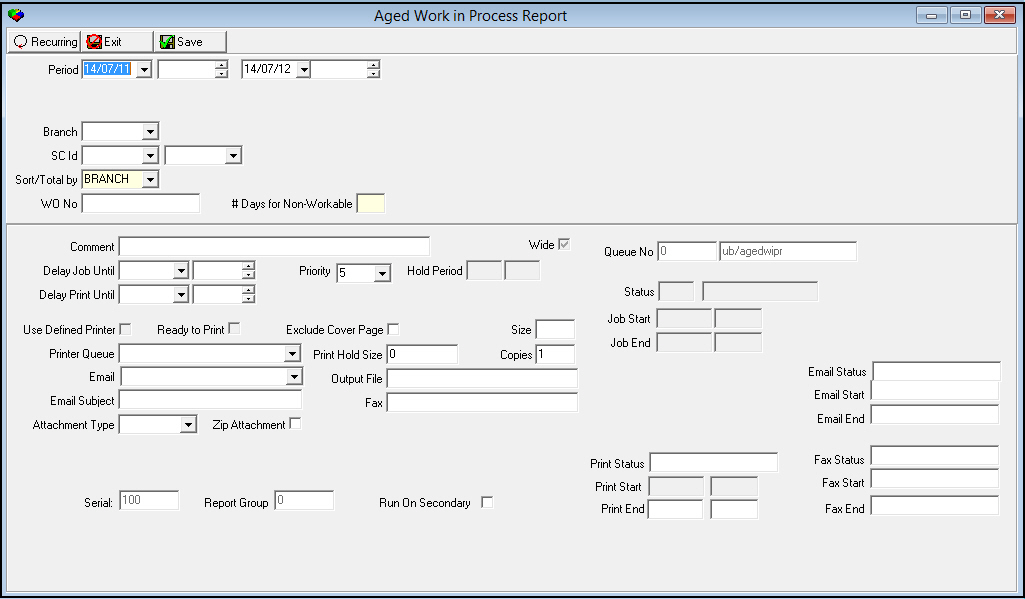
This report window contains two panes. Use the upper pane to define the content of the report, and use the lower pane to define the job output (how, when, and where you want to print the report). The following graphic shows Aged Work in Process as the report opens.
Field Descriptions
The following table describes the fields used in the upper pane of the Aged Work in Process Report
|
Field |
Description |
|
Period |
Select a range of dates and times to limit the report. Only work orders with an original work order approval time within the range appear in the report. Select the beginning date of the range. Note: This field defaults to today’s date. |
|
From Time (No label) |
Select the beginning time of the report range. |
|
To Date (No label) |
Select the ending date of the range. Note: This field defaults to tomorrows’s date. |
|
To Time (No label) |
Select the ending time of the range. |
|
Branch |
Select a branch from the drop-down menu to limit the report to work orders created in that branch. (This menu originates from program #1530.) Note: If you leave this field blank, the report includes all branches. Note: If option rptprof is on, branch restrictions apply. |
|
SC ID |
Select a range of sales person IDs from the drop-down menu to limit the report to work orders associated with sales person IDs within the range. Select the beginning sales person ID of the range. (This menu originates from program #1539.) Note: If you leave this field blank, the report includes all sales person IDs. |
|
To (No label) |
Select the ending sales person ID of the range. (This menu originates from program #1539.) Note: If you leave this field blank, the report includes all sales person IDs. |
|
Sort/Total By |
Select a sorting parameter for this report from the drop-down menu. |
|
WO No |
Type a specific work order number to limit the report to that work order. Note: If you leave this field blank, the report includes all work order numbers. |
|
# Days for Non-Workable |
Type the minimum number of days from the original approval date to the run date of the report for the report to consider a work order Non-Workable. |
Note: See Report Parameters Pane for information on the fields in the lower pane, which are the same in every report.
Running and Viewing a Report
Use the following steps to run and view a report:
1. In Aged Work in Process, define the parameters in the upper and lower panes of the report.
2. Choose Save to save the report to the Report Queue.
3. In Report Queue (program #1558), choose Own to display the report list.
4. In the report list, locate the Aged Work in Process Report.
5. When SBN displays 'DON' or 'RDY' in the Status column, the report is ready.
6. Double-click on the report.
w The Aged Work in Process window opens.
7. Choose Display Report.
w The Print Preview window opens.
Report Example 1
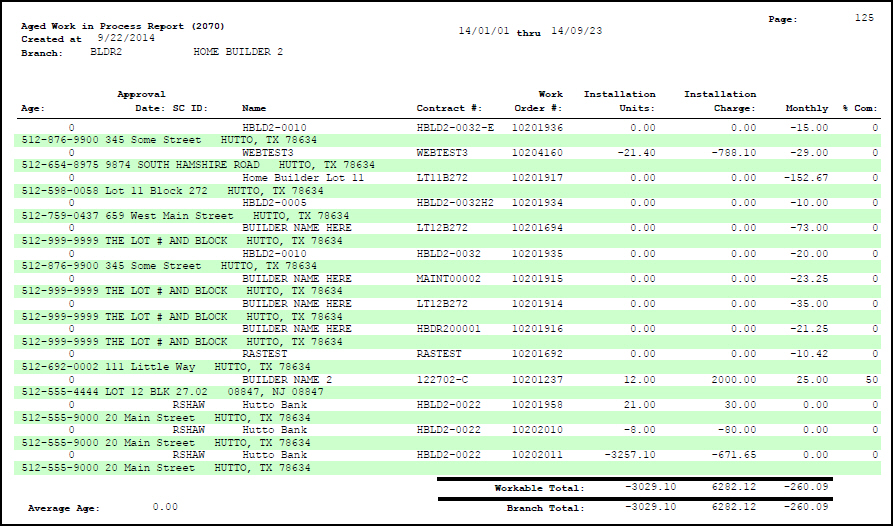
The following graphic shows an example of the output of the Aged Work in Process report sorted by Branch. This version of the report breaks by branch and sorts in the following order:
-
Branch
-
Sales person ID
-
Age - greatest to least
Column Descriptions
The following table describes the columns used in the Branch output of the report.
|
Column |
Description |
|
_____ thru _____ |
Identifies the selected period. |
|
Branch |
Branch ID and name. |
|
Age |
The number of days between the original approval date of the work order and the run date of the report. The report sorts work orders by Age - greatest to least. |
|
Approval Date |
Original approval date of the work order. |
|
SC ID |
ID of the sales consultant associated with the work order. |
|
Name |
Installation or inquiry name. |
|
Contract # |
Contract number associated with the work order, if applicable. |
|
Work Order # |
Work order number. |
|
Installation Units |
Installation units associated with the work order. Note: The report includes items flagged on the work order as EXCHANGE. Note: To calculate units, this report only uses the items in the WIP tab of the work order that have the Labor check box selected in Items (program #1535). |
|
Installation Charge |
Total one-time fees from the work order, minus any partial billing or pre-billing. |
|
Monthly |
Monthly cycle fees from the work order. |
|
% Com |
Percent of the work order completed, based on (total billed) / (total sell price). |
|
(No label) |
A second line of data for each work order that displays the following installation information: l Phone l Street address l City l State l Zip l Latest comment in the Event Log for the selected installation. |
|
WORKABLE |
This section of the report includes open work orders that are less than 100% complete and have an original approval date more recent than the number of days typed in the Non-workable parameter. |
|
Workable Total |
Displays totals for all work orders in the Workable section for the following columns: l Installation units l Installation Charge l Monthly |
|
NON-WORKABLE |
This section of the report includes open work orders that are less than 100% complete and have an original approval date older than the number of days typed in the Non-workable parameter. |
|
Non-workable Total |
Displays totals for all work orders in the Non-workable section for the following columns: l Installation units l Installation Charge l Monthly |
|
Average Age |
Average age, in days, of the work orders in both the WORKABLE and NON-WORKABLE sections. |
|
Branch Total |
Displays totals for all work-orders in both the WORKABLE and NON-WORKABLE sections for the following columns: l Installation units l Installation Charge l Monthly |
|
Grand Total |
Displays totals for all work orders for all branches for the following columns: l Installation units l Installation Charge l Monthly |
Report Example 2
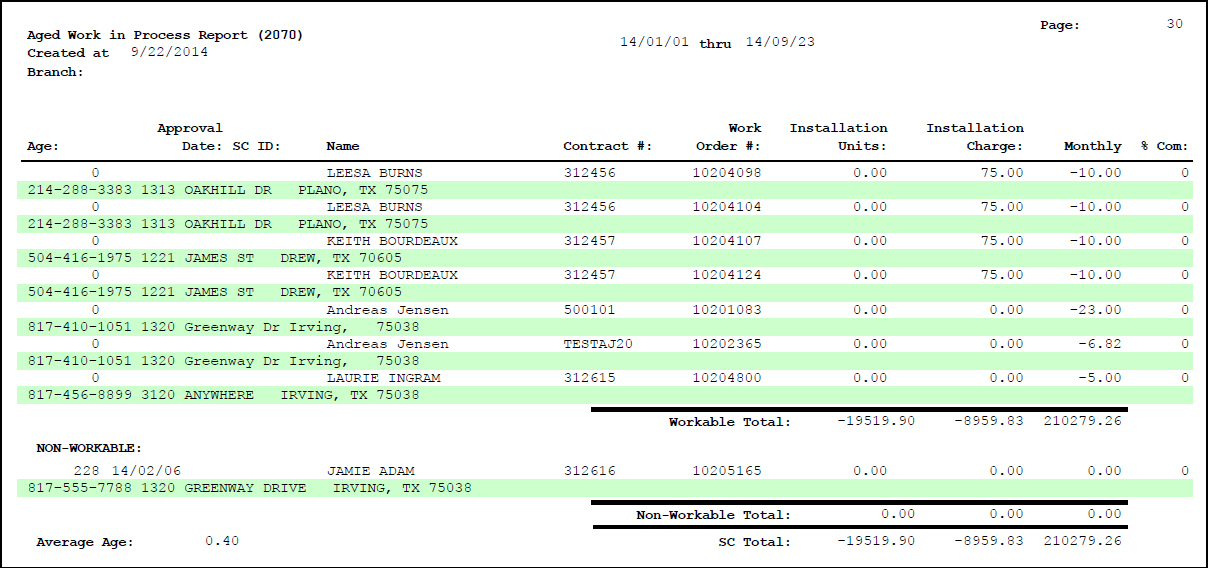
The following graphic shows an example of the output of the Aged Work in Process report sorted by Branch and Sales Person ID. This version of the report breaks by sales person ID and sorts in the following order:
-
Branch
-
Sales person ID
-
Age - greatest to least
Column Descriptions
The following table describes the columns used in the Branch and Sales ID output of the report.
|
Column |
Description |
|
_____ thru _____ |
Identifies the selected period. |
|
Branch |
Branch ID and name. |
|
Age |
The number of days between the original approval date of the work order and the run date of the report. The report sorts work orders by Age - greatest to least. |
|
Approval Date |
Original approval date of the work order. |
|
SC ID |
ID of the sales consultant associated with the work order. |
|
Name |
Installation or inquiry name. |
|
Contract # |
Contract number associated with the work order, if applicable. |
|
Work Order # |
Work order number. |
|
Installation Units |
Installation units associated with the work order. Note: The report includes items flagged on the work order as EXCHANGE. Note: To calculate units, this report only uses the items in the WIP tab of the work order that have the Labor check box selected in Items (program #1535). |
|
Installation Charge |
Total one-time fees from the work order, minus any partial billing or pre-billing. |
|
Monthly |
Monthly cycle fees from the work order. |
|
% Com |
Percent of the work order completed, based on (total billed) / (total sell price). |
|
(No label) |
A second line of data for each work order that displays the following installation information: l Phone l Street address l City l State l Zip l Latest comment in the Event Log for the selected installation. |
|
WORKABLE |
This section of the report includes open work orders that are less than 100% complete and have an original approval date more recent than the number of days typed in the Non-workable parameter. |
|
Workable Total |
Displays totals for all work orders in the Workable section for the following columns: l Installation units l Installation Charge l Monthly |
|
NON-WORKABLE |
This section of the report includes open work orders that are less than 100% complete and have an original approval date older than the number of days typed in the Non-workable parameter. |
|
Non-workable Total |
Displays totals for all work orders in the Non-workable section for the following columns: l Installation units l Installation Charge l Monthly |
|
SC Total |
Displays totals for all work-orders for the selected sales person ID in both the WORKABLE and NON-WORKABLE sections for the following columns: l Installation units l Installation Charge l Monthly |
|
Average Age |
Average age, in days, of the work orders in both the WORKABLE and NON-WORKABLE sections for the selected sales person ID. |
|
Average Age |
Average age, in days, of the work orders in both the WORKABLE and NON-WORKABLE sections. |
|
Branch Total |
Displays totals for all work orders in both the WORKABLE and NON-WORKABLE sections for the following columns: l Installation units l Installation Charge l Monthly |
|
Grand Total |
Displays totals for all work orders for all branches for the following columns: l Installation units l Installation Charge l Monthly |
Related Programs
The following table lists programs related to the Aged Work in Process Report.
|
Program |
Number |
Document Link |
Description |
|
Marketing |
562 |
The report displays incomplete work orders created in this program. |
|
|
Data Entry Master and Basics |
559 |
The report displays incomplete work orders created in this program. |
|
|
Contract Master |
548 |
The report displays incomplete work orders created in this program. |
|
|
Printer Profile Updates |
1559 |
Use a defined printer in this program to print reports. |
|
|
Branch Profiles |
1530 |
Limit the report to specific Branches that are defined in this program. |
|
|
Report Default Parameters |
1561 |
Use this program to set the default parameters for each report. |
|
|
Report Priorities |
1509 |
Use this program to set the report priority default. |
|
|
Sales Persons |
1539 |
N/A |
Define sales persons and use their IDs to limit the report to. |
|
Report Queue |
1558 |
Use this program to view the status of the report you are running. View the report description. |
|
|
Marketing Events |
1856 |
Define marketing events and actions that appear in the Event Log. |
Button Functions
The following table displays the buttons, describes the shortcut keys, actions, and functionality.
|
Button |
Name |
Shortcut Key |
Action |
Description |
|
|
Recurring |
alt+f1 |
2070 |
Open fields for recurring/template reports. |
|
|
Exit |
esc |
2070 |
Exit without saving changes to selected record. |
|
|
Save |
enter |
2070 |
Save changes to selected record. |



Modifications and Updates to Aged Work in Process
The following table lists modifications and updates to the Aged Work in Process document.
|
Mod Number |
Date |
Description |
|
n/a |
02/18/09 |
document rewritten |
|
07.02.18229 |
04/29/09 |
Alternate unit calculation |
|
n/a |
7/11/14 |
Updated images. |