
Telemarketers
Telemarketers
Telemarketers
Module: System Administration
Overview
If you have administrative authority, you can use Telemarketers (program #1750) to view or change a telemarketer’s contact information. However, you must first add the telemarketer to the database in Personnel (program #1811).
Navigating to Telemarketers
Use the following steps to navigate to Telemarketers:
1. From the main SBN toolbar, select Menu.
2. From the drop-down menu, select Go To [ALT+F1].
3. In the Go To Program dialog box, type in "1750."
w The Telemarketers program opens.
The Telemarketers Window
The following graphic shows Telemarketers after a user performs a search.
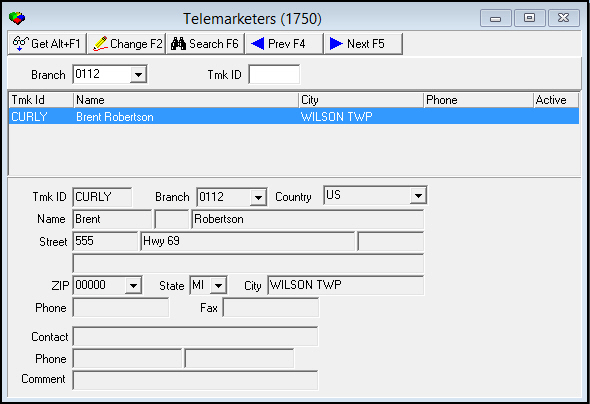
Field/Column Description
The following table describes the fields and columns used in Telemarketers.
|
Field/Column |
Description |
|
Search Parameters |
|
|
Branch |
You may select a branch to search for telemarketers associated with that branch. This field accepts wildcards. |
|
Tmk ID |
You may enter a telemarketer ID to search for a particular telemarketer. This field accepts wildcards. |
|
Search Results |
|
|
Tmk ID |
The telemarketer's ID code. |
|
Name |
The telemarketer’s name. |
|
City |
The telemarketer’s city. |
|
Phone |
The telemarketer’s phone number. |
|
Active |
If this column displays a -, the telemarketer is inactive. |
|
Telemarketer Details |
|
|
Tmk ID |
The selected telemarketer's ID code. |
|
Branch |
Branch associated with the selected telemarketer. |
|
Country |
Country in which the selected telemarketer is located. |
|
Name |
The selected telemarketer’s first name. |
|
Middle Initial (No label) |
The selected telemarketer’s middle initial, if available. |
|
Last Name (No label) |
The selected telemarketer’s last name. |
|
Street (Number) |
Street number (part of the selected telemarketer’s address). |
|
Street Name (No label) |
Street name (part of the selected telemarketer’s address). |
|
Apartment Number (No label) |
Apartment number, if applicable (part of the telemarketer’s address). |
|
Additional Address Info (No label) |
Additional address information, if applicable. |
|
Zip |
Zip code of the selected telemarketer's location. |
|
State |
State where the selected telemarketer is located. (This field holds a maximum of 60 characters.) |
|
City |
City in which the selected telemarketer is located. |
|
Phone |
The selected telemarketer’s phone number. |
|
Fax |
The selected telemarketer’s fax number. |
|
Contact |
Name of a contact for the selected telemarketer. |
|
Phone |
Primary phone number for the contact. |
|
Phone 2 (No label) |
Secondary phone number for the contact. |
|
Comment |
Free-form text comment about the selected telemarketer or contact. |
Searching for Telemarketers
In order to view telemarketer information, you must perform a search for telemarketers. You can search for
-
Telemarketers associated with a particular branch
-
Individual telemarketers
Use the following steps to search for telemarketers associated with a branch:
1. In Telemarketers, select a branch from the Branch menu.
2. Choose Search.
w SBN displays all telemarketers associated with the selected branch.
Use the following steps to search for a specific telemarketer:
1. In Telemarketers, enter a telemarketer’s ID in Tmk ID.
2. Choose Search.
w SBN displays the selected telemarketer.
Using Common Functions
See the reference document Common Functions in SBN for more information.
Button Functions
The following table displays the buttons, describes the shortcut keys, actions, and functionality.
|
Button |
Name |
Shortcut Key |
Action |
Description |
|
|
Get |
ALT+F1 |
1750/ 1 |
Get record. |
|
|
Change |
F2 |
1750/ 2 |
Change selected record. |
|
|
Search |
F6 |
1750/ 7 |
Display telemarketers based upon search parameters. |
|
|
Previous |
F4 |
1750/ 999 |
Select last record. |
|
|
Next |
F5 |
1750/ 999 |
Select next record. |





Modifications and Updates to Telemarketers
The following table lists modifications and updates to the Telemarketers document.
|
Mod Number |
Date |
Description |
|
n/a |
8/26/14 |
Images updated. |