
Alarm Queues
Alarm Queues
Alarm Queues
Module: Account Management
Overview
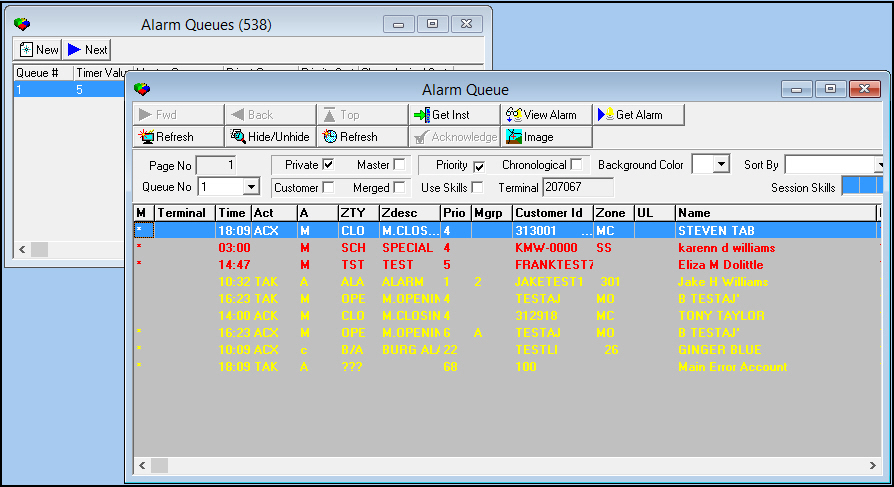
Use the Alarm Queue tab to view all alarms present in SBN that have not yet been resolved and to change and enter alarm queue information. You can change or narrow the list of alarms that you can view by using the display parameters.
All alarm lines in the Alarm Queue tab are color-coded so that you can assess the status of each alarm quickly by referencing the color displayed.
Note: Incidents in the Alarm Queue flash if the operator assigned to that alarm has logged out of SBN. This enables other operators to see the incidents that are no longer assigned to an operator.
Note: If the Use Skills check box is selected both in this tab and the Dispatch tab, new users will only see alarms that match their skills. This prevents operators from handling alarms that they are not qualified to handle. When new users navigate to the Dispatch tab, all alarms currently assigned to the terminal that do not match the their skills are unassigned and sent back to the general alarm pool.
This document covers the following topics:
Alarm Queues (Program #538)
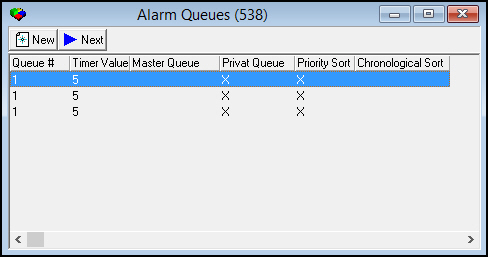
The Alarm Queues program can display multiple alarm queues in one window.
Using the Alarm Queues Grid
Use the following steps to add alarm queues to the line item grid:
1. In Alarm Queues, choose New.
w The Alarm Queue tab opens.
2. Once the tab is open, choose New again.
w This adds the selected queue to the Alarm Queues grid.
You can continue adding multiple alarm queues to the grid.
Note: Choosing Next scrolls to the next line in the Alarm Queues grid. The alarm queue selected then displays in a new window. When you reach the end of the list, choosing Next wraps around to the first line in the grid.
Related Programs
The following table lists programs related to Alarm Queues.
Program |
Number |
Document Link |
Description |
Zones tab |
N/A |
The Protected Area and Text fields populate from the data in this tab. |
|
Maintenance Ticket Generation |
701 |
Any service tickets generated appear as log entries in the Alarm Log. |
|
Data Entry Master and Basics |
559 |
The program from which you can access the Alarm Log. |
|
Send Email |
706 |
N/A |
The program from which you can send an email containing Alarm Log entries. |
Dispatch tab |
N/A |
Incidents currently being handled in the Dispatch tab flash in the Alarm Log. The color in the Alarm log appears in the Alarm Log list in this tab when option mo160 is on. |
Button Functions
The following table displays the buttons, actions, and functionality.
Button |
Name |
Action |
Description |
|
New |
538/1 |
View the Alarm Queue tab. Add alarm queues to line item grid. |
|
Next |
538/2 |
Scroll to the next queue in the grid and display the alarm queue selected. |


Modifications and Updates to Alarm Queues
The following table lists modifications and updates to the Alarm Queues document.
Mod Number |
Date |
Description |
n/a |
12/22/08 |
document rewritten |
n/a |
07/17/14 |
Images updated. |