
Service Tickets Report
Service Tickets Report
Service Tickets Report
Report #: 2008
Module: Account Management
Overview
Use the Service Tickets report to print a record of service requests. User’s branch restrictions apply.
The report defaults to include the Service Worksheet and Service Log. The Service Log area is limited to four lines. You may select parameters to print a large group of tickets for
Specific dates
Installers
Technicians
Regions
Priorities
You can also print a single ticket number by using the Request No field.
Use one of the following methods to access this report:
In the Service Queue (program #547), choose Print.
Select Service Tickets (report #2008) from the main menu of SBN.
The Service Tickets Report
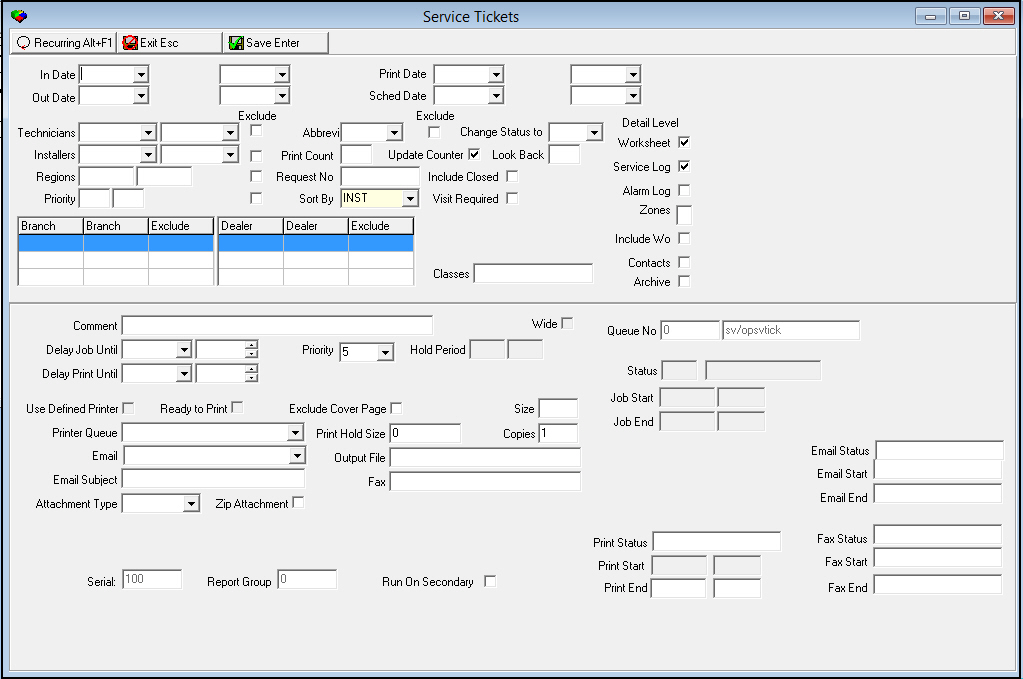
This window contains two panes: use the upper pane to define the content of the report; use the lower pane to define the job output - how, when, and where you want to print the report.
Note: See Report Parameters Pane for information on the fields in the lower pane, which are the same in every report.
Field Descriptions
The following table describes the fields used in the upper pane of this report.
Note: You can use wildcard characters in selected fields. For more information about using wildcards, see Using Wildcard Characters in the reference document, Searches.
Field |
Wildcards Allowed |
Description |
In Date Range |
||
In
Date - From |
No |
You may select a range of dates to limit the report to service requests that occurred within the range. Select the beginning date of the range. |
In
Date - To |
No |
You may select a range of dates to limit the report to service requests that occurred within the range. Select the ending date of the range. |
Print Date Range |
||
Print
Date - From |
No |
You may select a range of dates to limit the report to service tickets that were last printed within the range. Select the beginning date of the range. |
Print
Date - To |
No |
You may select a range of dates to limit the report to service tickets that were last printed within the range. Select the ending date of the range. |
Out Date Range |
||
Out
Date - From |
No |
You may select a range of dates to limit the report to service tickets that were outdated within the range. Select the beginning date of the range. |
Out
Date - To |
No |
You may select a range of dates to limit the report to service tickets that were outdated within the range. Select the ending date of the range. |
Sched Date Range |
||
Sched Date - From (No label) |
No |
You may select a range of dates to limit the report to service tickets that were scheduled for service within the range. Select the beginning date of the range. |
Sched
Date - To |
No |
You may select a range of dates to limit the report to service tickets that were scheduled for service within the range. Select the ending date of the range. |
Technician Range |
||
Technician - From (No label) |
No |
You may select a range of technician IDs to print service tickets for technician IDs within that range. Select the beginning technician ID of the range. |
Technician
- To |
No |
You may select a range of technician IDs to print service tickets for technician IDs within that range. Select the ending technician ID of the range. |
Exclude |
No |
You may exclude a range of technician IDs from the report by selecting the range of technician IDs and then entering a check mark in this box. |
Status |
No |
You may select a status to limit the report to service tickets with that status. |
Exclude |
No |
You may exclude service tickets with a specific status by selecting the status and then entering a check mark in this box. |
Change Status To |
No |
You may select a status to change all tickets from the current status (selected in the previous status field) to this new status. |
Worksheet |
No |
Enter a check mark in this box to include the worksheet in the report. |
Installers Range |
||
Installer
- From |
No |
You may select a range of installer IDs to limit the report to service tickets for installer IDs within the range. Select the beginning installer ID of the range. (This menu originates from programs #1811 and #1543.) |
Installer
- To |
No |
You may select a range of installer IDs to limit the report to service tickets for installer IDs within the range. Select the ending installer ID of the range. (This menu originates from programs #1811 and #1543.) |
Exclude |
No |
You may exclude a range of installer IDs for the report by selecting the range and then entering a check mark in this box. |
Print Count |
No |
You may type the number of times the service ticket has previously been printed to limit the report to service tickets that have been printed that number of times. |
Update Counter |
No |
Enter a check mark in this box have SBN update the print counter when printing this ticket. |
Look Back |
No |
Type the number of days to exclude from today’s date from printing. SBN bases the calculation on excluding tickets with an (online date >= the schedule date) - (the look back days). |
Service Log |
No |
Enter a check mark in this box to include the last four lines of the service history on the ticket. |
Region Range |
||
Region
- From |
No |
You may type a range of regions to limit the report to service tickets associated with regions within that range. Type the beginning region of the range. |
Region
- To |
No |
You may type a range of regions to limit the report to service tickets associated with regions within that range. Type the ending region of the range. |
Exclude |
No |
You may exclude a range of regions from the report by typing the range and then entering a check mark in this box. |
Request No |
No |
You may type a specific service request number to print a service ticket for that service request. |
Include Closed |
No |
Enter a check mark in this box to include outdated requests in the ticket printing. |
Alarm Log |
No |
Enter a check mark in this box to include up to the last 15 items in the alarm log. |
Priority Range |
||
Priority
- From |
No |
You may type a range of priorities to limit the report to service tickets with priorities within the range. Type the beginning priority of the range. |
Priority
- To |
No |
You may type a range of priorities to limit the report to service tickets with priorities within the range. Type the ending priority of the range. |
Exclude |
No |
You may exclude a range of priorities from the report by typing the range and then entering a check mark in this box. |
Sort By |
No |
You must select a sorting parameter for the report: l Branch l Installer Company Name l Installer l Schedule Date l Service Request Number l Technician |
Visit Requested |
No |
Enter a check mark in this box to limit the report to service tickets that have a status that requires a service visit. |
Branch Ranges |
||
Branch |
No |
You may select up to three ranges of branches to limit the report to branches within the ranges. Select the beginning branch number of a range. (These menus originate from program #1530.) |
Branch |
No |
You may select up to three ranges of branches to limit the report to branches within the ranges. Select the ending branch number of a range. (These menus originate from program #1530.) |
Exclude |
No |
You may exclude ranges of branches from the report by selecting the ranges and then entering a check mark in the corresponding Exclude box. |
Dealer |
||
Dealer |
No |
You may select up to three ranges of dealer IDs to limit the report to dealer IDs within the ranges. Select the beginning dealer ID of a range. (These menus originate from program #1537.) |
Dealer |
No |
You may select up to three ranges of dealer IDs to limit the report to dealer IDs within the ranges. Select the ending dealer ID of the range. (These menus originate from program #1537.) |
Exclude |
No |
You may exclude ranges of dealer IDs from the report by selecting the ranges and then entering a check mark in the corresponding Exclude box. |
Zones |
No |
Type an uppercase X in this field to include a list of zones on the printed tickets. O This report now supports Global Zones. |
Include WO |
No |
Enter a check mark in this box to include the work order details for the work order attached to the service request. |
Contacts |
No |
Enter a check mark in this box to include the contacts listed in the action plans for the customer. |
Classes |
Yes |
Type a mask, using wildcards, to define the class fields to include on the printed tickets. O For more information about using wildcards, see Using Wildcard Characters in the reference document, Searches. |
Running and Viewing a Report
For information on running and viewing a report, see Running and Viewing a Report in the reference document Common Functions in SBN.
Report Example
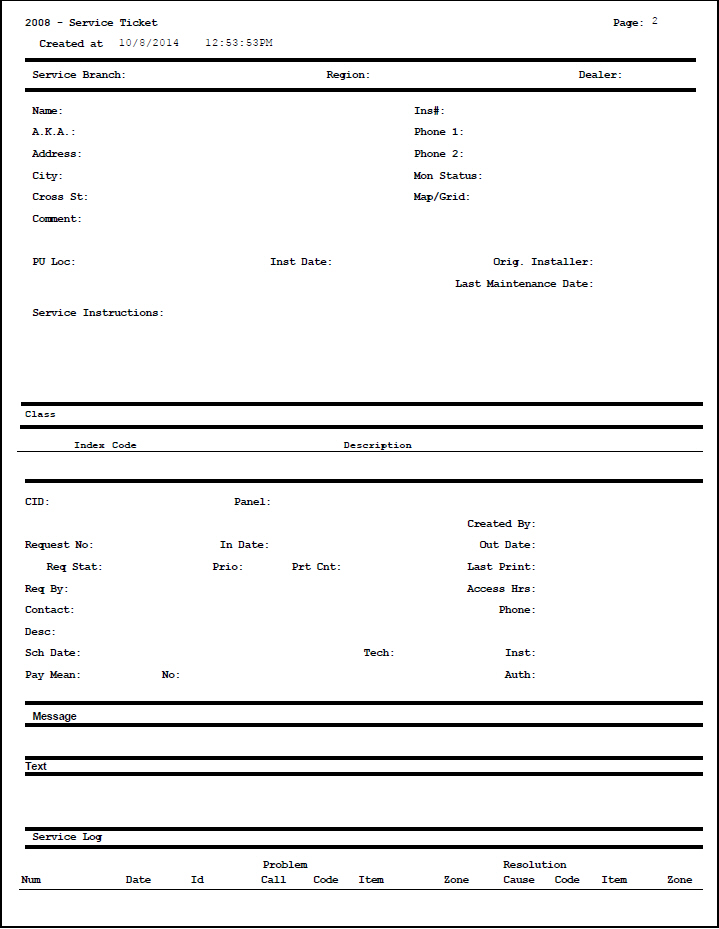
The following graphics show an example of the output of the Service Tickets report.
Column Descriptions
The following table describes the columns used in the output of the report.
Column |
Description |
Service Branch |
|
Service Branch |
Service branch assigned to this installation. |
Region |
Service region assigned to this installation. |
Dealer |
Dealer ID assigned to this installation. |
Name |
Name on the installation. |
Ins# |
Installation number. |
AKA |
Alias of the name on the installation. |
Phone 1 |
Phone number 1 for the installation. |
Address |
Installation address. |
Phone 2 |
Additional phone number for the installation. |
City |
Installation city. |
Mon Status |
Current monitoring status for the installation. |
Cross St |
Cross street of the installation address. |
Map / Grid |
Map or Grid number for the installation address. |
Comment |
Comment entered on the Data Entry Basics tab. |
PU Loc |
pane location. |
Inst Date |
Date when the system was installed. |
Orig. Installer |
Installer ID of the person who originally installed the system. |
Last Maintenance Date |
Displays the last maintenance date for the installation. O If this installation has had no maintenance, the date displays 50/01/01. |
Service Instructions |
Instructions entered in the Data Entry Basics tab. |
Class |
|
Class |
Class flags used to track services provided, which are entered in Data Entry. |
Contacts |
If included, displays the contacts associated with the installation. |
CID |
CID number of the installation. |
pane |
pane type assigned to this CID. |
Created By |
User ID for the person that entered the service ticket. |
Request No |
SBN-assigned service request number. |
In Date |
Date the service ticket was entered. |
Out Date |
Date the service ticket was completed. |
Req Status |
Current status of the request. |
Prio |
Priority of the request. |
Prt Cnt |
Number of times the ticket has been printed. |
Last Print |
Date and time the ticket was last printed. |
Req By |
Person who requested the service. |
Access Hrs |
Hours the installation is accessible for service. |
Contact |
Person to contact regarding this service. |
Phone |
Phone number for the contact. |
Desc |
Description of the request. |
Sch Date |
Date the service is scheduled. |
Tech |
Technician ID assigned to the service ticket. |
Inst |
Installer ID assigned to the service ticket. |
Pay Mean |
Payment method for the service. |
No |
Payment number: l A credit card number l A bank account number |
Auth |
Authorization number for the payment. |
Problem/Resolution |
|
Problem |
Defines the problem occurring at the installation. |
Call |
Reason the customer called. |
Code |
Problem code for the type of problem experienced. |
Item |
Item code for the malfunctioning item. |
Zone |
Zone in which the problem occurred. O This report now supports global zones. |
Resolution |
Displays the resolutions reached on the problems defined. |
Cause |
Reason for the problem. |
Code |
Code for how the problem was resolved. |
Item |
Item code for replaced or repaired item. |
Zone |
Zone where the problem occurred. |
Zones |
|
Zone |
Unique number that identifies the zone. |
Area |
Abbreviation for a designated area within a zone. |
Code |
Code indicating the zone’s signal type. |
Zty |
Alarm type generated for this zone. |
C |
Code for the way signals are handled on this zone. l blank or + - SBN passed signals to the Alarm Queue l - - SBN threw all signals away l = - SBN logged all signals and did not pass them to the Alarm Queue |
Pr |
Priority for alarms received from this zone. |
Grp |
Monitoring group code attached to this zone. |
UL |
Code for this zone’s UL security grade. |
Plan |
Identifies the action plan that this zone followed when Dispatch received the signal. |
Text |
SBN-generated description of the zone, based on its zone type. |
Protected Area |
Location of the premises protected under this zone. |
Sch |
Open/Close Schedule number this zone follows. |
T |
If this column displays an X, the selected zone is a test zone. |
F |
If this column displays an X, an event on the selected zone was remotely transferred to a fire department. |
Alarm Log |
|
Date |
Date this event entered the Alarm Log; based on the customer’s time zone. |
Time |
Specific time this event entered the Alarm Log; based on the customer’s time zone. |
Event |
Type of event for this incident. For example, alarm, false, or missing. |
Zone Type |
Alarm type generated for this zone. |
Pri |
Priority (1-99) of the signal that was received. |
WorkSheet This section contains many fields for the technicians or installers to complete as they complete service. |
|
Button Functions
The following table displays the buttons, describes the shortcut keys, actions, and functionality.
Button |
Name |
Shortcut Key |
Action |
Description |
|
Recurring |
Alt+F1 |
2008 |
Open fields for recurring/template reports. |
|
Exit |
Esc |
2008 |
Exit without saving. |
|
Save |
Enter |
2008 |
Save existing record. |



Modifications and Updates to Service Tickets Report
The following table lists modifications and updates to the Service Tickets Report document.
Mod Number |
Date |
Description |
n/a |
7/29/14 |
Images updated. |