
Error Accounts
Program #: 1794
Module: System Administration
Overview
Use Error Accounts (program #1794) to define masks so that SBN directs signals from unknown CIDs to specific error accounts. If a signal from an unknown CID does not match a defined mask, SBN sends the signal to the generic error account.
Note: For more information on generic error accounts, see Concentrator.
To access this program, select Error Accounts (program #1794) from the main menu of SBN.
Error accounts catch customer signals whose account ID nobody recognizes. They are distinct from account 0000, which carries the alarms SBN raises about itself; see Alarm Supervisor. For the full path a signal takes from receiver to alarm, see Signal Path.
The Error Accounts Window
The following graphic shows Error Accounts as the program opens. The window displays previously defined error accounts.
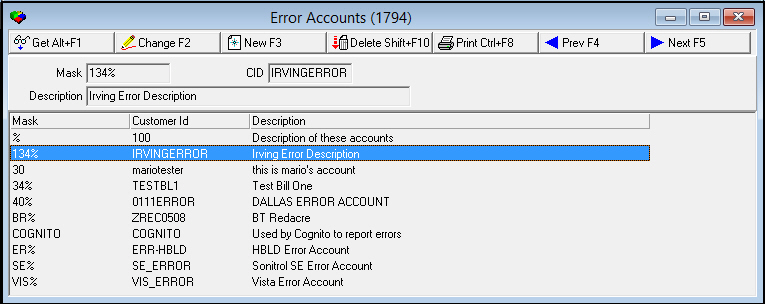
Field/Column Descriptions
The following table describes the fields and columns used in Error Accounts.
|
Field/Column |
Description |
|
Mask |
Mask that SBN uses to select signals to send to the corresponding CID. You may use wildcards in the mask. For example, a mask of 132% would send all error signals that matched the mask to error account 132ERROR. For more information on using wildcards, see Using Wildcard Characters. O You may attach several masks to the same error account CID. |
|
CID |
CID of the error account: l Must be a valid CID created in Data Entry l Must have an active monitoring status l Does not need defined zones |
|
Description |
Description of the error account. |
Using Common Functions
See the reference document Common Functions in SBN for more information.
Button Functions
The following table displays the buttons, describes the shortcut keys, actions, and functionality.
|
Button |
Name |
Shortcut Key |
Action |
Description |
|
|
Get |
ALT+F1 |
1794/ 1 |
Get record. |
|
|
Change |
F2 |
1794/ 2 |
Change selected record. |
|
|
New |
F3 |
1794/ 3 |
Create new record. |
|
|
Delete |
SHIFT+F10 |
1794/ 4 |
Delete selected record. |
|
|
|
CTRL+F8 |
1794/ 6 |
Print selected records. |
|
|
Previous |
F4 |
1794/ 999 |
Select preceding record. |
|
|
Next |
F5 |
1794/ 999 |
Select next record. |







Modifications and Updates to Error Accounts
The following table lists modifications and updates to the Error Accounts document.
|
Mod Number |
Date |
Description |
|
n/a |
8/18/14 |
Images updated. |
|
|
|
|
|
|
|
|
F1 Help
| Delphi Forms | maerractform |
| Program Numbers | 1794 |