
Pay Reject Codes
Pay Reject Codes
Pay Reject Codes
Module: System Administration
Overview
Use Pay Reject Codes (program #1726) to define reject codes that financial institutions use to indicate why payments have been rejected. When rejected payment files from financial institutions are imported into SBN with invoice numbers and reject codes, SBN uses the sequence of events defined for the reject code to determine how to proceed with payment collection for an invoice.
To access this program, choose Pay Reject Codes (program #1726) from the main menu of SBN.
The Pay Reject Codes Window
The following graphic shows Pay Reject Codes after a search. The window is blank when the program first opens.
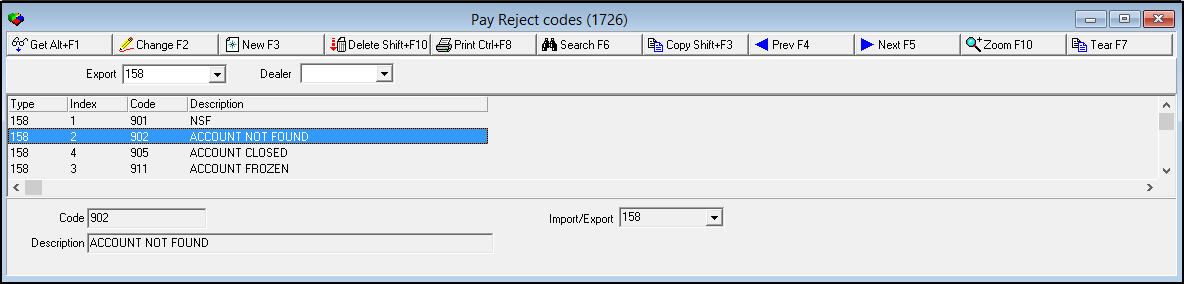
Field/Column Descriptions
The following table describes the fields and columns used in Pay Reject Codes.
|
Field/Column |
Description |
|
Search Parameters |
|
|
Export |
You may select an export to search for reject codes for that export type. |
|
Dealer |
You may select a dealer to search for reject code events for that dealer. Events for the selected dealer appear in the Details tab in the sublevel. (This menu originates from program #1537.) |
|
Detail Columns and Fields |
|
|
Type/Import |
Import type of the selected reject code. |
|
Index |
Number that indicates when the reject code was created. (1-first, 2-second, etc.) |
|
Code |
Numbers or letters that identify the reject code. |
|
Description |
Text description of the reject code. |
Using Common Functions
See the reference document Common Functions in SBN for more information.
Zooming into the Sublevel
Use the Details tab to attach events to reject codes. These events determine whether rejected payments are presented for payment again, how many times, and at specified intervals.
The Details Tab
The following graphic shows the Details tab. The tab displays previously defined events for the selected reject code.
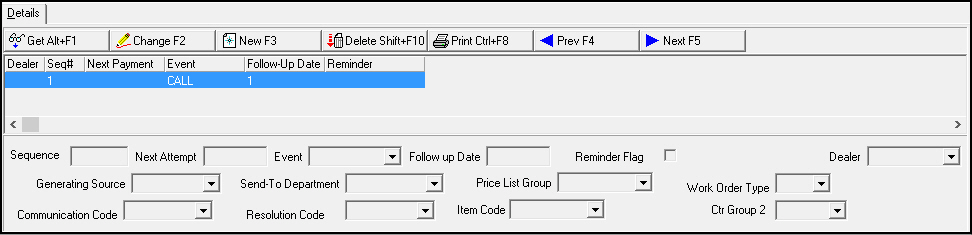
Field/Column Descriptions
The following table describes the fields and columns used in the Details tab.
|
Field/Column |
Description |
|
Sequence |
Sequence number of the selected event, indicating in what order each event takes place when a payment is rejected with the selected reject code. |
|
Next Payment/Attempt |
Number of days after a payment is rejected before the payment is presented to the financial institution again. |
|
Event |
Event code of the selected event. (This menu originates from program #1793.) |
|
Follow Up Date |
Number of days after a payment is rejected before a collector makes a follow-up call to determine if payment should be presented again. |
|
Reminder Flag |
Indicates if the event includes a reminder. (This flag is customer specific and has no SBN functionality.) |
|
Dealer |
Dealer associated with the selected event. (This menu originates from program #1537.) |
|
Generating Source |
Choose from the options in this dropdown menu to select the source of the pay rejection. |
|
Send To Department |
Choose from the options in this dropdown menu to select the department to receive the pay rejection. |
|
Price List Group |
Choose from the options in this dropdown menu to select the price list group to be used to determine the pay rejection. |
|
Work Order Type |
Choose from the options in this dropdown menu to select the type of work order being used. |
|
Communication Code |
Choose from the options in this dropdown menu to select the communication code being used. |
|
Resolution Code |
Choose from the options in this dropdown menu to select the resolution code being used. |
|
Item Code |
Choose from the options in this dropdown menu to select the item code (along with the code, description, one time fee, one time fee tax included, cycle fee, cycle fee tax included, and item code 2) being used. |
|
Ctr Group 2 |
Choose from the options in this dropdown menu to select the center group (including the group name and contact name) being used. This field originates from program #1868. |
Button Functions
The following table displays the buttons, describes the shortcut keys, actions, and functionality.
|
Button |
Name |
Shortcut Key |
Action |
Description |
|
|
Get |
ALT+F1 |
1726/ 1 |
View details of selected reject code. |
|
|
Change |
F2 |
1726/ 2 |
Change details of selected reject code. |
|
|
New |
F3 |
1726/ 3 |
Create reject code. |
|
|
Delete |
SHIFT+F10 |
1726/ 4 |
Delete selected reject code. |
|
|
|
CTRL+F8 |
1726/ 6 |
Print currently displayed reject codes. |
|
|
Search |
1726/7 |
Search for reject codes by import type, or search for reject code events by dealer. |
|
|
|
Copy |
1726/ 3 |
Copy selected reject code details into a new reject code record. |
|
|
|
Previous |
F4 |
Go to previous reject code. |
|
|
|
Next |
F5 |
Go to next reject code. |
|
|
|
Zoom |
1726/10 |
Access the Details tab in the sublevel. |
|
|
|
Tear |
F5 |
1726/10 |
View the Details tab in a separate window. |











Modifications and Updates to Pay Reject Codes
The following table lists modifications and updates to the Pay Reject Codes document.
|
Mod Number |
Date |
Description |
|
n/a |
8/21/14 |
Images updated. |
|
07.82.23721, 07.81.23632, 08.81.09815, 07.81.23605, 08.81.09792 |
10/31/14 |
Added new fields to Details Tab, |