
Setting up a Profile
A profile in the compilers tells runsql, isqlline, runcreate, and the set_* family which database to talk to and where the SQL source tree lives. You need at least one profile before you can run any command.
Profiles are stored in the compilers' settings.json (see Getting Started for path).
What a profile contains
Field | Purpose |
|---|---|
| Where the database lives. |
|
|
| Credentials. Write-once; the compilers never echo the password back to the screen. |
| The company number (typically |
| Used by |
| Local path to your SQL source tree (see "RAW mode vs SQL source" below). |
|
|
| Default database for that profile. Optional; can also be passed per-command. |
| Short names you can pass instead of the full profile name. |
set_profile
Run set_profile with no arguments to launch the main menu:
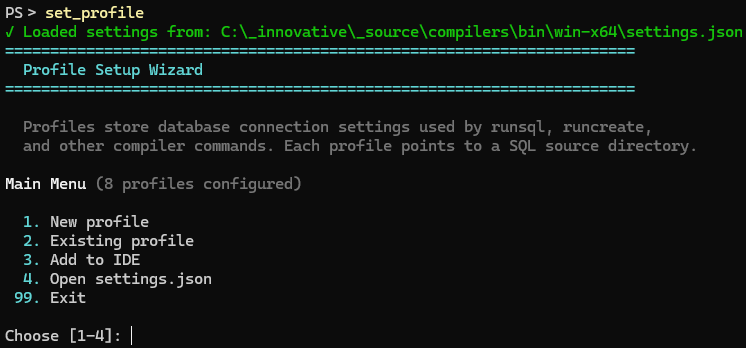
Pick Create new profile, then walk through the prompts:
- Profile name — short, all-caps by convention (e.g.
SBNA,SRM_LOCAL,STAGING). - Platform —
SybaseorMSSQL. - Host — IP or hostname.
- Port — defaults to
5000for Sybase,1433for MSSQL. - Username / Password — service account that can run DDL.
- Company number — almost always
101. - SQL source path — local checkout of the SQL source tree (see below).
- Raw mode? —
nfor normal use;yonly if you need to drive a database that has no matching local source tree (see below). - Aliases — optional comma-separated short names.
[Screenshot: terminal showing the create-profile prompt sequence, with one or two answers filled in]
When you finish, the profile is written to settings.json and the menu re-displays it.
set_profile menu tree
You can jump straight into any leaf by passing the profile name and using the --test, --view, --edit, --copy, or --delete flags. See Headless creation below.
RAW mode vs SQL source
Two ways the compilers find SQL files:
Normal (with SQL_SOURCE)
SQL_SOURCE points at a local checkout of the SQL source tree, e.g. C:\src\current.sql on Windows or ~/src/current.sql on Linux/macOS. The compilers resolve runcreate $ir>...>file paths against this root and apply placeholder substitution (&dbpro&, &users&, etc.) before sending SQL.
This is what you want for any normal development workflow against an Innovative-managed source tree.
RAW mode (RAW_MODE = true)
SQL_SOURCE is ignored. SQL files are sent as-is with no placeholder resolution. Use RAW mode when:
- Driving a database that doesn't follow the SBN source-tree layout (e.g. the Atlas help-page MSSQL DB).
- Compiling SQL written outside the IBS source tree.
- Running ad-hoc scripts where you control the literal SQL.
Switch a profile to RAW mode with set_profile --edit <NAME> --raw. The next runsql/isqlline against that profile will skip placeholder resolution.
Testing the profile
Once the profile exists, exercise it before you trust it:
This runs every test in sequence:
Test | What it proves |
|---|---|
SQL source | The path in |
Connection | The compilers can log in with the stored credentials and run |
Options |
|
Table locations |
|
Changelog |
|
Symlinks | The profile's expected symlinks (optional) point at the right targets. |
Run a single test with --what connection (or any of the other names above). To resolve a different placeholder for the options test, pass --resolve <NAME>.
Connection failures in headless mode print the error and exit 0 — wrap the call and inspect output if you need to react.
Headless creation
For scripted setup (CI, install scripts, agents), every menu action has a CLI equivalent. The flags below are mutually exclusive primary actions.
Examples:
Where to next
- Running a Command — once your profile passes
--test all, runisqllineandrunsqlagainst it.