
CID Status (Active/Inactive Accounts)
CID Status (Active/Inactive Accounts)
CID Status (Active/Inactive Accounts)
Program #: 1829
Module: System Administration
Overview
CID Status (program #1829) displays all active/inactive accounts. SBN considers an account active if it has an open/close schedule defined in Data Entry or if it has a Test Interval of 24 hours or less. (SBN considers a CID with a Test Interval of 0 (zero) inactive unless it has an open/close schedule.)
Navigating to CID Status
Use the following steps to navigate to CID Status:
1. From the main SBN toolbar, select Menu.
2. From the drop-down menu, select Go To [ALT+F1].
3. In the Go To Program dialog box, type in "1829."
w The CID Status (Active/Inactive Accounts) program opens.
The CID Status Window
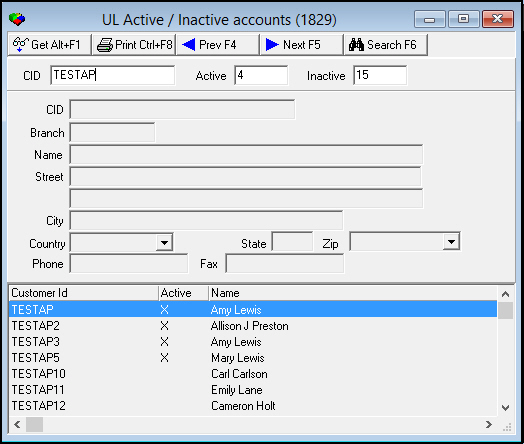
The fields and columns in the CID Status window remain empty until you perform a search. The window contains three panes:
-
The upper pane - in which you select search parameters
-
The middle pane - which displays details of a selected CID
-
The lower pane - which displays results that match the search
The following graphic displays CID Status after a search has been performed.
Field/Column Descriptions
The following table describes the fields and columns used in CID Status.
|
Field/Column |
Description |
|
CID |
Type a CID to search for active/inactive accounts associated with that CID. O This field accepts a wildcard string to search for all accounts that contain that string. |
|
Active |
Total of active accounts that match the search. |
|
Inactive |
Total of inactive accounts that match the search. |
|
CID |
Identifies the customer account. |
|
Branch |
Identifies the branch associated with the selected CID. |
|
Name |
Name of the account holder for the selected CID. |
|
Street |
Street (part of the address of the account holder). |
|
Street 2 (No label) |
Additional street information, if applicable. |
|
City |
City (part of the address of the account holder). |
|
State |
State in which the account holder is located. (This field holds a maximum of 60 characters.) |
|
Zip |
Zip code (part of the address of the account holder). |
|
Country |
Country in which the account holder is located. |
|
Phone |
Primary phone number of the account holder. |
|
Fax |
Fax number of the account holder. |
|
Customer ID |
Identifies the selected CID. |
|
Active |
If this column displays an X, the account is active. |
|
Name |
Name of the account holder. |
Searching for a CID Status
You must perform a search for CID statuses to view accounts.
Use the following steps to search for a CID Status:
1. In CID Status, type a CID or search string in the CID field.
Note: For example, you could type �5%3� to search for all CIDs that contain 5, any number, and 3.
2. Choose Search.
w The lower pane displays the results that match the search.
Using Common Functions
See the reference document Common Functions in SBN for more information.
Modifications and Updates to CID Status (Active/Inactive Accounts)
The following table lists modifications and updates to the CID Status (Active/Inactive Accounts) document.
|
Mod Number |
Date |
Description |
|
n/a |
8/14/14 |
Images updated. |