
SonIP Workstation Prototype
SonIP Workstation Prototype
SonIP Workstation Prototype
Overview
This document contains the suggested pseudocode for the SonIP Workstation Prototype. The intention of the workstation is to get a head start on SBN integration. The workstation can help users meet the following objectives:
-
Save time. The time spent creating the prototype will be significantly less than the time SBN has to spend accomplishing the same steps.
-
Assure users that the SBN workstation will adhere to the standard for workstations under SonIP.
-
Users can save a lot of phone calls and help from SonIP team members to SBN and prevent a lot of ‘bugs’ in the initial phase.
The SonIP Workstation Prototype
The following graphic shows the SonIP Workstation Prototype window.
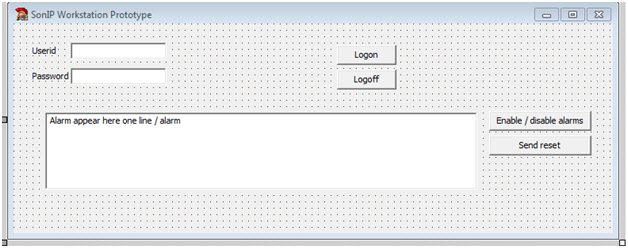
The following is the suggested pseudocode for the SonIP Workstation Prototype.
1. The Logon button connects the workstation to SonIP and enables the Enable/Disable Alarms button.
2. The Logoff button disconnects the workstation from SonIP and disables the Enable/Disable Alarms button.
3. Pressing Enable/Disable Alarms registers the workstation with the event router and the workstation starts receiving alarms.
4. Alarms appear in the text field in the center. Just enough information to determine that the event has taken place is necessary. The event should be recorded in the Event Log.
5. When the workstation starts receiving alarms, it enables the Send Reset button.
6. Pressing Send Reset resets the panel and performs the logging in the Event Log.
7. If the reset is successful, the Send Reset button is disabled and the program returns to step 4.
8. Pressing Enable/Disable Alarms again stops the alarm distribution process.
Modifications and Updates to SonIP Workstation Prototype
The following table lists modifications and updates to the SonIP Workstation Prototype document.
|
Mod Number |
Date |
Description |