
Comp Info Tracing
Comp Info Tracing
Comp Info Tracing
Program #: 555
Module: System Administration
Overview
Use Comp Info Tracing (program #555) to view the history of running the following tasks on a Primary or Secondary server:
-
Monitoring
-
Data Entry
-
Service
-
Marketing
-
Work Orders
-
Scheduling
-
Billing/Contracts
To access this program, select Comp Info Tracing (program #555) from the main menu of SBN.
The Comp Info Tracing Window
The following graphic shows Comp Info Tracing as the program opens.
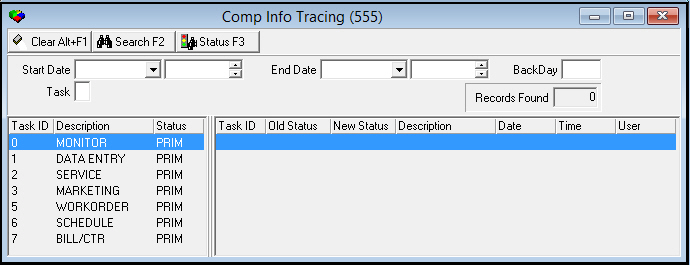
Field Descriptions
The following table describes the fields used in Comp Info Tracing.
|
Column |
Description |
|
Period |
|
|
Start Date |
You may select a range of dates to search for tasks in which the status changed during the range. Select the beginning date of the range. |
|
Start Time |
You may select a range of time to search for tasks in which the status changed during the range. Select the beginning time of the range. |
|
End Date |
You may select a range of dates to search for tasks in which the status changed during the range. Select the ending date of the range. |
|
End Time |
You may select a range of time to search for tasks in which the status changed during the range. Select the ending time of the range. |
|
Back Day |
Type a number of days to look back to limit the search to changes that occurred during that number of days. |
|
Task |
Identifies the task by indexed placement. |
|
Records Found |
Displays the number of records that match your search parameters. |
Column Descriptions
The following table describes the columns used in Comp Info Tracing.
|
Field/Column |
Description |
|
Current Status of Tasks |
|
|
Task |
Identifies the indexed placement of the task |
|
Description |
Text description of the task. |
|
Status |
Current status of the task. |
|
History of Changes |
|
|
Task ID |
Identifies the indexed placement of the task. |
|
Old Status |
Identifies the status of the task before the change. |
|
New Status |
Identifies the status of the task after the change. |
|
Description |
Text description of the task. |
|
Date |
Date on which the status of the task changed. |
|
Time |
Time at which the status of the task changed. |
|
User |
ID of the user who changed the status of the task. |
Searching for Changes to Status
You may search for changes to the status of tasks by selecting your search parameters and then choosing Search. The columns in the lower right pane of the window display the changes to status that match your search parameters.
Refreshing the Status
Choose Status Refresh to refresh the display.
Button Functions
The following table displays the buttons, describes the shortcut keys, actions, and functionality.
|
Button |
Name |
Shortcut Key |
Action |
Description |
|
|
Clear Search |
ALT+F1 |
555/ 1 |
Clears the search fields. |
|
|
Search |
F2 |
555/ 2 |
Searches tasks based upon the entered parameters. |
|
|
Status |
F3 |
555/ 3 |
Refreshes the listed information in order to display the newly entered task. |


Modifications and Updates to Comp Info Tracing
The following table lists modifications and updates to the Comp Info Tracing document.
|
Mod Number |
Date |
Description |
|
n/a |
8/15/14 |
Images updated. |