
Billing Import
Billing Import
Billing Import
Module: Accounting
Overview
Use Billing Import (program #549) to import payment batches without accessing Open Batches (program #1577).
To access this program, select Billing Import (program #549) from the main menu of SBN.
The Billing Import Window
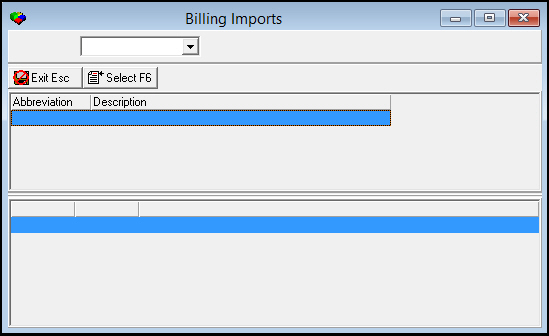
The following graphic shows Billing Import as the program opens. The window displays the imports available for your company.
Column Descriptions
The following table describes the columns used in the Billing Import window.
|
Column |
Description |
|
Abbreviation |
Displays the type of import. |
|
Description |
Displays the SBN-assigned system number of the import and the name of the import. |
Importing a Payment Batch
Use the following steps to import a payment batch:
1. From Billing Import, select the payment import type you want to run.
2. Choose Select Import.
w The Billing Import dialog box appears.
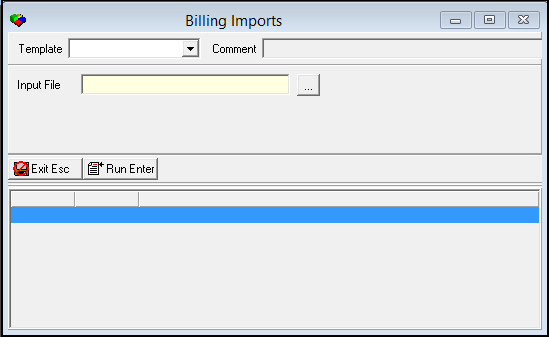
3. Type the name of the file you want to import or choose  to search for a file.
Note: The Template menu originates from program #1591. Templates defined for the selected import type appear in the menu.
4. Choose Run Export.
5. Choose Save.
Button Functions
The following table displays the buttons, describes the shortcut keys, actions, and functionality.
|
Button |
Name |
Shortcut Key |
Action |
Description |
|
|
Exit without saving |
esc |
Exit without saving changes to selected record. |
|
|
|
Select Export |
f6 |
Import a payment batch. |


Modifications and Updates to Billing Import
The following table lists modifications and updates to the Billing Import document.
|
Mod Number |
Date |
Description |
|
n/a |
7/31/14 |
Images updated. |