
Using Themes in SBN
SBN 95 introduced a Themes menu that lets each user pick a Windows VCL visual style for the SBN.exe interface. This page explains how to switch themes, where the choice is stored, and a few behaviors — including the deliberate white grid while editing — that clients have asked about.
Overview
SBN's Themes menu is a wrapper around the Delphi VCL style engine (TStyleManager). The menu is built dynamically at startup from every style installed with the SBN.exe build, so the list you see on your machine matches what IBS packaged for that release (typical Windows-10-era styles: Windows, Windows10, Carbon, Glow, Luna, etc.; the exact list can differ between builds).
Your choice is saved per Windows user under HKEY_CURRENT_USER\...\VCL_STYLE and is re-applied the next time SBN.exe starts — so you only need to set it once per workstation login.
Getting There
Menu: SBN.exe main menu
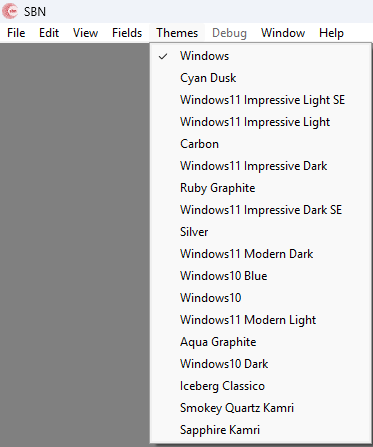
Using the Themes Menu
That's the whole interaction — there is no separate Save button and no restart required.
Important — Close All Forms Before Switching
SBN enforces a rule on theme changes: no other forms can be open. If you have an Account form, Alarm Queue, Change screen, or any other window visible when you click a theme, SBN pops up this message and aborts the switch.
This is intentional. Mid-session restyle of a VCL control tree — especially grids and custom-drawn panels — can leave stale colors on the screen until the form is closed and reopened. Closing everything first prevents the artifacts and guarantees a clean re-render.
How to apply: close all open SBN windows, return to the main menu, then pick your theme.
Editable Grids Go White in Edit Mode (By Design)
This white-in-edit behavior is intentional and was reinforced in 08.95.0005.0002 (SR 52758). Under dark or medium-contrast styles, a themed editable cell was hard to distinguish from a read-only cell, so editable cells are forced white while active. If you see a grid that stays white after you exit edit mode, that's a bug — report it.
Alarm Queue & Alarm Log Background Color
The Alarm Queue & Alarm Log screen honors the per-queue background color configuration.
Where the Setting Is Stored
Because the key lives under HKEY_CURRENT_USER, every Windows login on the same machine can have a different SBN theme, and there is no machine-wide or dealer-wide theme setting.