
Offers Flow
Offers Flow
Offers Flow
Program #: 1663
Module: Utilities
Overview
Use Offers Flow (program #1663) to define the steps that SBN takes to determine whether a customer is eligible to receive a discount offer in the Customer Offers tab of Contract Master (program #548). Assign an offer flow type to each offer in the Chart field of Offers (program #1665).
Note: Offer types OFFID, OFNU, and AFNU must have steps 0, 1, and 2 set up in program #1686 in order for the offer flow used by Company 106 to function properly in the Customer Offers tab of program #548.
This program is client-specific for Company 106.
Navigating to Offers Flow
Use the following steps to access the Offers Flow program:
1. From the main SBN toolbar, select Menu.
2. From the drop-down menu, select Go To.
3. In the Go To Program dialog box, type in "1663" and press ENTER.
w The Offers Flow window opens.
The Offers Flow Window
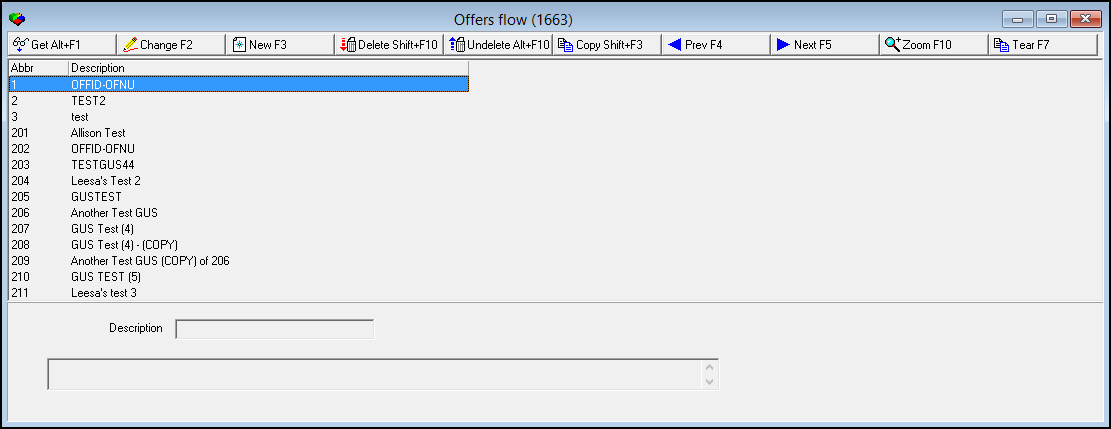
The following graphic shows Offers Flow as the program opens.
Field/Column Descriptions
The following table describes the fields and columns used in Offers Flow.
Field/Column |
Description |
Type/Abbr |
ID number of the offer flow type. |
Description |
Description of the offer flow type. |
Text (No label) |
Free-form text about the offer flow type. |
Creating an Offer Flow Type
Use the following steps to create an offer flow type:
1. Choose New Record.
w The fields in the lower pane open for changes.
2. Enter details for the offer flow type.
3. Choose Save.
w The new offer flow type appears in the list in the upper pane.
Changing an Offer Flow Type
You can change the description of an existing offer flow type.
Use the following steps to change an offer flow type:
1. From the upper pane, select the offer flow type you want to change by double-clicking or choosing Get Record.
w The offer flow type details appear in the lower pane.
2. Choose Change Record.
w The fields in the lower pane open for changes.
3. Change as necessary.
4. Choose Save.
Deleting an Offer Flow Type
Use the following steps to delete an offer flow type:
1. Select the offer flow type you want to delete.
2. Choose Delete Record.
w The offer flow type no longer appears in the list in the upper pane.
Restoring a Deleted Offer Flow Type
Use the following steps to restore deleted offer flow types:
1. Choose Select Record to Undelete.
w The Undelete window appears.
2. In the Undelete window, find the offer flow type you want to restore and double-click it, or choose [ENTER].
w SBN restores the offer flow type to the list in the upper pane.
Zooming into the Sublevel
Offers Flow contains a sublevel in which you define the steps that SBN takes to determine whether a customer is eligible to receive an offer in the Customer Offers tab of Contract Master (program #548).
Actions 1663/10-14 control access to the Details tab and its buttons.
The Details Tab
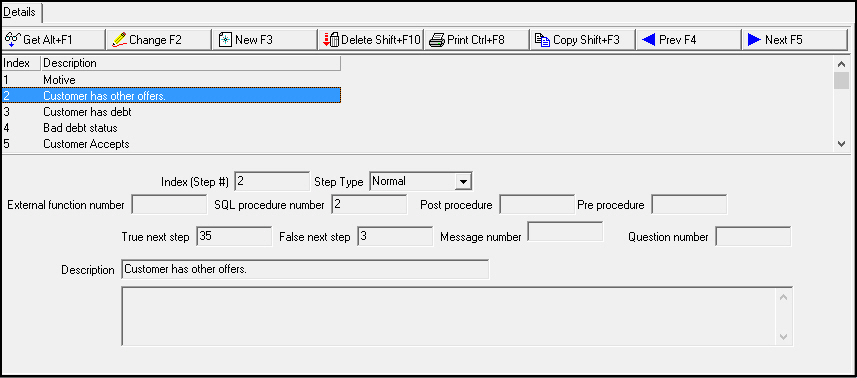
The following graphic shows the Details tab. The tab displays previously defined steps for the selected offer flow type.
Field/Column Descriptions
The following table describes the fields and columns used in the Details tab.
Field/Column |
Description |
Index (Step #) |
Number of the selected step in the offer flow. |
Step Type |
Type of step. The available types are:
|
External Function Number |
External function called by the selected step. You may define either an external function or a SQL procedure for each step, not both. |
SQL Procedure Number |
SQL procedure called by the selected step. You may define either an external function or a SQL procedure for each step, not both. |
Post Procedure |
Stored procedure to call to populate data on the screen after the selected step has been executed. |
Pre Procedure |
Stored procedure to call to calculate data entered in the window before validation of the selected step. |
True Next Step |
Next step number to proceed to if the external function or SQL procedure returns a true (or positive) answer. |
False Next Step |
Next step number to proceed to if the external function or SQL procedure returns a false (or negative) answer. |
Message Number |
Function for this field to be determined. |
Question Number |
Function for this field to be determined. |
Description |
Text description of the step. |
Text (No label) |
Free-form text about the step. |
Button Functions
The following table displays the buttons, describes the shortcut keys, actions and functionality.
Button |
Name |
Shortcut Key |
Action |
Description |
|
Get Record |
alt+f1 |
1663/ 1 |
View details of selected record. |
|
Change Record |
f2 |
1663/ 2 |
Change selected record. |
|
New Record |
f3 |
1663/ 3 |
Create new record. |
|
Delete Record |
shift+f10 |
1663/ 4 |
Delete selected record. |
|
Select Record to Undelete |
alt+f10 |
1663/ 5 |
Restore deleted record. |
|
Copy Current Record |
SHIFT+f3 |
1663/ 1 |
Copy the selected record and details of the selected record into a new record. **This is different from the normal behavior of the copy function in all other definition programs. |
|
Previous Record |
f4 |
1663/ 1 |
View details of previous record. |
|
Next Record |
f5 |
1663/ 1 |
View details of next record. |
|
Zoom In/Out of Sublevel |
F10 |
1663/ 1 |
Access sublevel tab. |
|
Tear Away Selected Tab |
F7 |
1663/ 1 |
View sublevel tab in separate window. |










Modifications and Updates to Offers Flow
The following table lists modifications and updates to the Offers Flow document.
Mod Number |
Date |
Description |
07.79.22889, 08.79.09366 |
11/27/2013 |
Document created |
08.80.09597, 07.80.23287 |
05/05/2014 |
Revised definition of Copy Current Record button. |
n/a |
09/19/14 |
Images updated. |