
Connection string for MSSQL
Custom Connection String for MSSQL
SBN Client supports custom connection strings on MSSQL by entering a connection-string template in registry
Registry location for connection string template
When connecting to MSSQL the login-process will search the registry for a “ConnectionString” in the following places:
- HKEY_LOCAL_MACHINE\Software\IBS\SBN\General\Server\<ServerName>
- HKEY_LOCAL_MACHINE\Software\IBS\SBN\General
- HKEY_CURRENT_USER\Software\IBS\SBN\General\Server\<ServerName>
- HKEY_CURRENT_USER\Software\IBS\SBN\General
Where <ServerName> is the name of the server as it appears in the Server dropdown in the login-window.
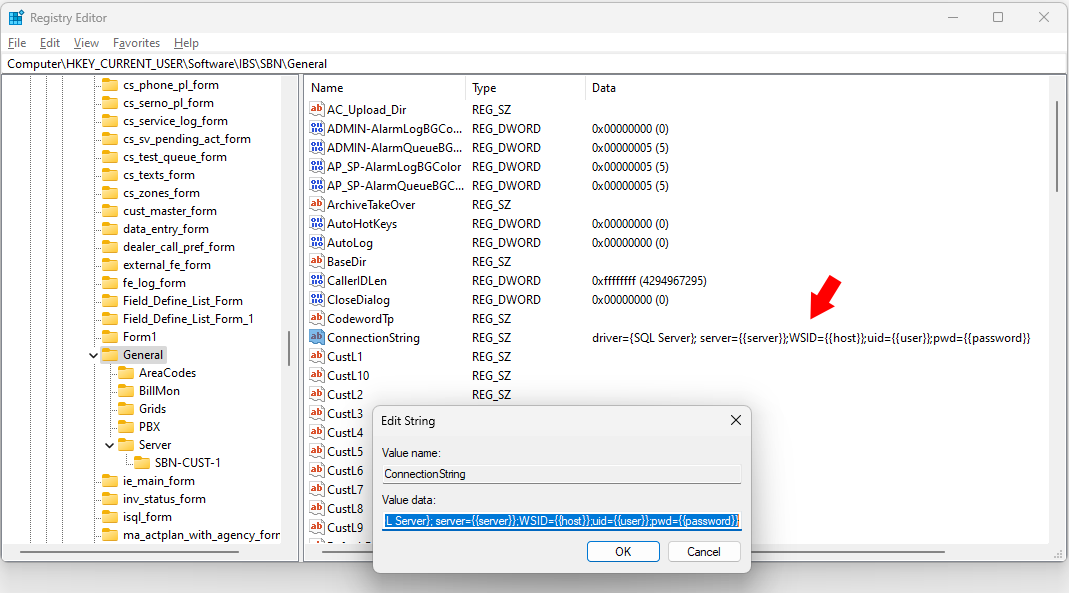
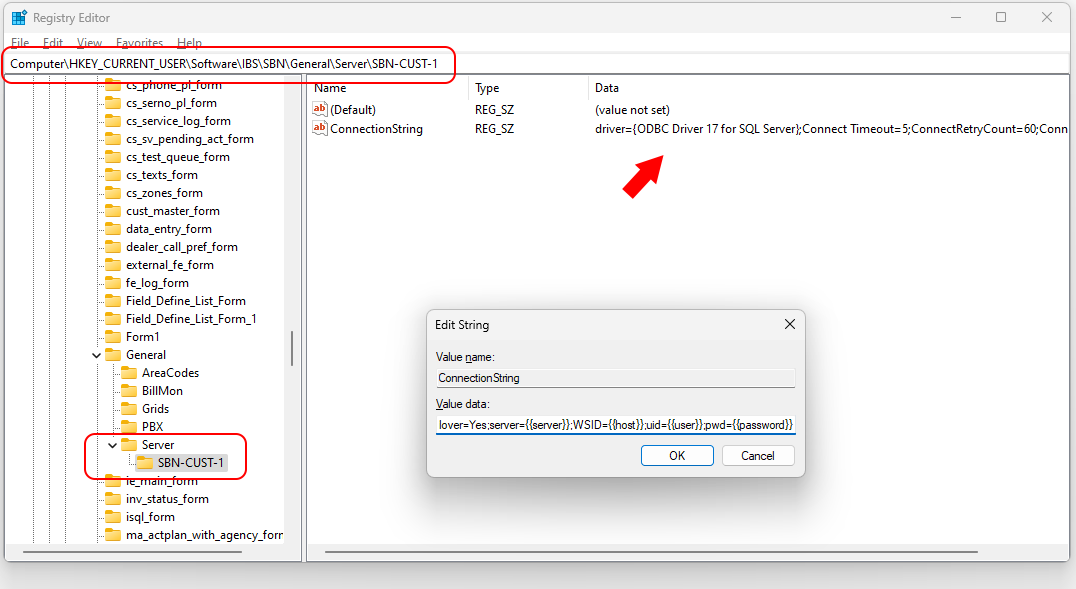
Connection string template format
Before submitting the ConnectionString to the MSSQL driver, the login process will replace the following placeholders with their respective runtime values
- {{server}} - name of server as it appears in the Server dropdown
- {{user}} - username from User Name text box.
- {{password}} - password from the Password text box
- {{host}} - Computer hostname
Examples of connection string templates:
The default connection string NT authentication on
driver={SQL Server}; server={{server}};Trusted_Connection=yes;WSID={{host}}
The default connection string NT authentication off
driver={SQL Server}; server={{server}};WSID={{host}};uid={{user}};pwd={{password}}
Turbo failover connection string using a ODBC driver:
driver={ODBC Driver 17 for SQL Server};Connect Timeout=5;ConnectRetryCount=60;ConnectRetryInterval=1;MultiSubnetFailover=Yes;server={{server}};WSID={{host}};uid={{user}};pwd={{password}}
Connection string using a ODBC driver with no failover:
driver={ODBC Driver 17 for SQL Server};Connect Timeout=5;ConnectRetryCount=60;ConnectRetryInterval=1;MultiSubnetFailover=No;server={{server}};WSID={{host}};uid={{user}};pwd={{password}}