
Commission Calculation
Commission Calculation
Commission Calculation
Module: System Administration
Overview
The Commission Calculation system combines several programs to offer precise commission calculation based on the items contained in the Work Order program. SBN uses the contract attached to the work order to calculate commission.
You can limit commission amounts by percentages defined in:
-
Commission Sources (program #1806)
-
Commission Branches (program #1807)
-
Commission Work Order Types (program #1808)
-
Commission Cycle Discount Factor (program #1584)
These percentages increase or decrease the amount of commission given to the resources defined in the work order.
Use Commission Items (program #1810) to define the base commission amount for individual items. You can define commission amounts on either percentage or flat fees for both One-time and Cycle Fees contained in the work order. You can also calculate commission for packages and multiple packages. (Enter commission for packages in Commission Sources/Packages program #1852.)
The total commission paid for a work order depends on a complex formula that takes into account all amounts, percentages, and restrictions.
Note: Options ba432 and ba433 activate an alternate commission calculation formula for company 150.
The Commission Calculation Window
You can access this window from the Work Order Detail window when you use the Show Commission Calculation [ALT+F1]. For more specific information about viewing this program from Work Orders, see Work Orders.
The Commission Calculation window contains four panes:
-
The Commission Summary Pane
-
The Commission Modifiers Pane
-
The Personnel Information Pane
-
The Item Information Pane
Commission Calculation displays the various factors required in calculating the commission for each person on all items and types of commission.
The following graphic shows Commission Calculation with information displayed.
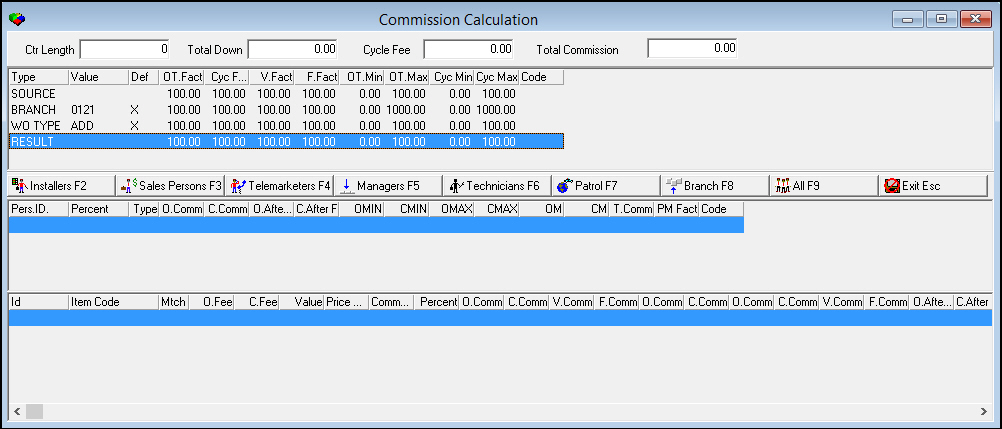
The Commission Summary Pane
The Commission Summary pane displays the total amounts from the work order. The following graphic shows the Commission Summary pane with information displayed.

Field Descriptions
The following table describes the fields used in the Commission Summary pane of Commission Calculation.
|
Field |
Description |
|
Ctr Length |
Contract length, in months, as specified in the work order. If the work order does not specify a contract length, SBN calculates commission based on the contract length from Contract Master (program #548). |
|
Total Down |
Total amount paid down for the work order. |
|
Cycle Fee |
Total cycle fees for the work order. |
|
Total Commission |
Total calculated commission for the work order. |
The Commission Modifiers Pane
Use the Commission Modifiers pane of Commission Calculation to display the factors used to calculate commission. Three programs specifically affect how SBN calculates commission:
-
Commission Source (program #1806)
-
Commission Branch (program #1807)
-
Commission Work Order Types (program #1808)
These programs control the restrictions on commissions. In these programs you enter
-
Specific percentages for factors
-
Maximums and minimums based on
q Specific sources
q Branches
q Work order types
In the Commission Modifiers pane, each program displays a line that shows the factors for each program and the Result line shows the result of multiplying all the factor lines together. The following graphic shows the Commission Modifiers pane with information displayed in each line.

Column Descriptions
The following table describes the columns used in Commission Modifiers.
|
Column |
Description |
|
Type |
Type of modifier. l Source - based on Commission Sources (program #1806) l Branch - based on Commission Branches (program #1807) l WO Type - based on Commission Work Order Types (program #1808) |
|
Value |
Value in the work order matched up with the one defined in the Sources, Branches, or Work Order Types; used to limit the commission calculation. |
|
Default |
If this column displays an X, a value did not match specifically and SBN found and used a default line. |
|
One Time Factor |
One-time fee factor percentage that limits the amount of one-time fee percentage commission given. O This factor does not affect One-time flat fee commission. |
|
Cycle Factor |
Cycle fee factor percentage that limits the amount of cycle fee percentage commission given. O This factor does not affect the cycle fee flat fee commission. |
|
Value Factor |
Adjustment value percentage that limits the amount of cycle fee percentage commission given. |
|
Fixed Factor |
Flat fee adjustment value percentage that limits the amount of flat fee commission given. O This factor does not affect the percentage commission given. |
|
One Time Minimum |
One time fee minimum percentage of commission given. |
|
One Time Maximum |
One time fee maximum percentage of commission given. |
|
Cycle Minimum |
Cycle fee minimum percentage of commission given. |
|
Cycle Maximum |
Cycle fee maximum percentage of commission given. |
|
Code |
A one-character, user-definable code that indicates that a source commission match has occurred. (This menu originates from program #1854.) |
The Personnel Information Pane
The following graphic shows the Personnel Information pane of Commission Calculation with information displayed.

Column Descriptions
The following table describes the columns used in the Personnel Information pane of Commission Calculation.
|
Column |
Description |
|
Personnel ID |
Personnel ID of the resource receiving the commission. |
|
Percent |
Percentage of the sale associated with this resource. |
|
Type |
Commission type. (This menu originates from program #1805.) |
|
One Time Commission |
Total one-time commission for all of the items on the work order. |
|
Cycle Commission |
Total cycle fee commission for all of the items on the work order. |
|
One Time After Fact |
Total one time commission for all items after being multiplied by the Factor percentage. |
|
Cycle After Fact |
Total cycle fee commission for all items after being multiplied by the Factor percentage. |
|
One Time After Min |
Total one time commission after being multiplied by the One Time minimum percentage. |
|
Cycle After Min |
Total cycle fee commission after being multiplied by the Cycle minimum percentage. |
|
One Time After Max |
Total one time commission after being decreased by the one time maximum percentage. If the commission is less than the maximum percentage, the field displays 0.00. |
|
Cycle After Max |
Total cycle fee commission after being decreased by the cycle fee maximum percentage. If the commission is less than the maximum percentage, the field displays 0.00. |
|
One Time Multiplier |
Number used to adjust one-time commission to meet the Minimum or Maximum amount. |
|
Cycle Multiplier |
Number used to adjust cycle commission to meet the Minimum or Maximum amount. |
|
Total Commission |
Total amount of commission to pay. |
|
Fact from Package Maximum |
Maximum allowable amount of commission after factor for a package or source. Defined in program #1852. |
|
Code |
Commission codes that apply to the calculation. These codes come from the commission modifier lines. |
Viewing Calculated Commission by Personnel Type
Use the following buttons or hotkeys to view the calculated commission for the selected work order by
-
Personnel type
q Installers [F2]
q Sales Persons [F3]
q Telemarketers [F4]
q Managers [F5]
q Technicians [F6]
-
Patrol [F7]
-
Branch [F8]
-
Display for All Users [F9]
The Item Information Pane
The following graphic shows the Item Information pane of Commission Calculation.

Column Descriptions
The following table describes the columns used in the Item Information pane of Commission Calculation.
|
Column |
Description |
|
ID |
Personnel ID of the resource receiving commission for the item. |
|
Item Code |
Item code from the work order. |
|
Match |
Code that reveals a match with a commission option. The following code definitions apply: l PID - Price List, Item, Date l PI - Price List, Item l PD - Price List, Date l ID - Item, Date l P - Price List l I - Item l D - Date l SP - Source/Package match |
|
One Time Fee |
Total one time fee (minus any discounts) for the item from the work order. |
|
Cycle Fee |
Total cycle fee (minus any discounts) for the item from the work order. |
|
Value |
Total cycle fees multiplied by the number of months in the contract. |
|
Price List |
Price List code. (This menu originates from program #1533) |
|
Commission Flag |
If this column displays an X the item is flagged for additional commission distribution adjustment. |
|
Percent |
Commission distribution percentage. Percentage fraction of the commission to distribute to this individual for the item. |
|
One Time Commission |
Percentage of one time fees used to calculate commission. |
|
Cycle Commission |
Percentage of cycle fees used to calculate commission. |
|
Value Commission |
Percentage of the total cycle fees for the length of the contract used to calculate commission. |
|
Fixed Commission |
Percentage of fixed cost used to calculate commission. |
|
One Time Commission |
Actual amount of one time fee commission paid. |
|
Cycle Commission |
Actual amount of cycle fee commission paid. |
|
One Time Commission |
Amount of one time fee commission before SBN figures factors into the calculation. |
|
Cycle Commission |
Amount of cycle fee commission before SBN figures factors into the calculation. |
|
Value Commission |
Amount of value commission before SBN figures factors into the calculation. |
|
Flat Commission |
Amount of flat commission before SBN figures factors into the calculation. |
|
One Time After Factor |
One time commission amount after SBN applies factor percentage. |
|
Cycle After Factor |
Cycle fee commission amount after SBN applies factor percentage. |
|
Value After Factor |
Value fee commission amount after SBN applies factor percentage. |
|
Fixed After Factor |
Fixed fee commission amount after SBN applies factor percentage. |
|
Code |
Commission codes that apply to the calculation. These codes come from the commission modifier lines. |
|
Line |
Line index number of the item from the work order. |
|
Recurring Fixed Commission |
Actual amount of recurring fixed commission paid. |
|
Recurring Cycle Commission |
Actual amount of recurring fixed commission paid. |
|
Recurring Fixed Commission |
Total amount of recurring fixed commission before SBN figures factors into the calculation. |
|
Recurring Cycle Commission |
Total amount of recurring cycle commission before SBN figures factors into the calculation. |
|
Rec Fix After Fact |
Amount of recurring fixed commission after SBN applies factor percentage. |
|
Rec cycle After Fact |
Amount of recurring cycle commission after SBN applies factor percentage. |
|
One Time Discount % |
One time discount factor that reduces the percentage of commission paid by the discount percentage amount. Calculation Equation: [Base Comm% - (Discount% * Discount Factor)] = Commission % |
|
Cycle Discount % |
Cycle fee discount factor that reduces the percentage of commission paid by the percentage amount of discount. Calculation Equation: [Base Comm% - (Discount% * Discount Factor)] = Commission % |
|
One Time Discount Factor |
Percentage amount of discount given for that item on the work order. |
|
Cycle Discount Factor |
Percentage amount of discount given for that item on the work order. |
|
Adjusted One Time Fee % |
Percentage of adjustment given on the total one-time fees for the work order in the Adjust Total on Work Order tab. |
|
Cycle Fee Adjustment % |
Percentage of adjustment given on the total cycle fees for the work order in the Adjust Total on Work Order tab. |
Commission Calculation Examples
The following sections show examples of how SBN calculates different types of commission.
One-Time Commission
The following example shows the one-time fee for an item, the amount of commission for the item, and the commission calculation.
Item Fees
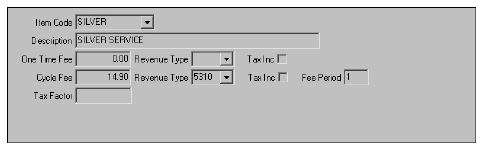
Commission Calculation

One Time Fee = $30.00
One Time % = 10.00%
Adjusted Commission = $3.00
Cycle Fee Commission
The following example shows the cycle fee prices for an item, the amount of commission for the cycle fee, and the commission calculation.
Item Fees

Amount of Commission
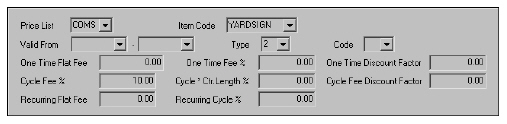
Commission Calculation
Cycle Fee = $5.00
Cycle Fee % = 10.00%
Commission After Factor = $.50
Value Commission
The value commission is a percentage of the total cycle fees for the length of the contract. The following example shows the cycle fee for the item, the amount of commission for the contract length, and the commission calculation.
Note: When the account does not contain a contract, the commission calculation uses the number from the Contract Length field in the Work Order window.
Item Fees
Amount of Commission
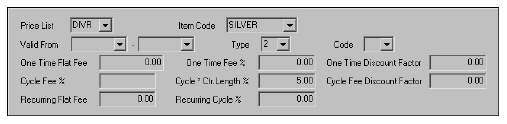
Commission Calculation

Cycle Fee = $14.90
Cycle * Ctr Length % = 5.00%
Contract Length = 12
Total Commission = $8.94
Modifications and Updates to Commission Calculation
The following table lists modifications and updates to the Commission Calculation document.
|
Mod Number |
Date |
Description |
|
n/a |
8/15/14 |
Images updated. |