
Service Request Codes
Service Request Codes
Service Request Codes
Program #: 1525
Module: System Administration
Overview
Use Service Request Codes (program #1525) to define types and priorities of requested service. If you use automatic scheduling for maintenance and inspections, create separate codes for these types so that the dispatcher can identify these for scheduling purposes.
The menu of defined Service Request Codes appears
In the Service Request window
On the detail schedule board
In the Service Queue
To access this program, select Service Request Codes (program #1525) from the main menu of SBN.
The Service Request Codes Window
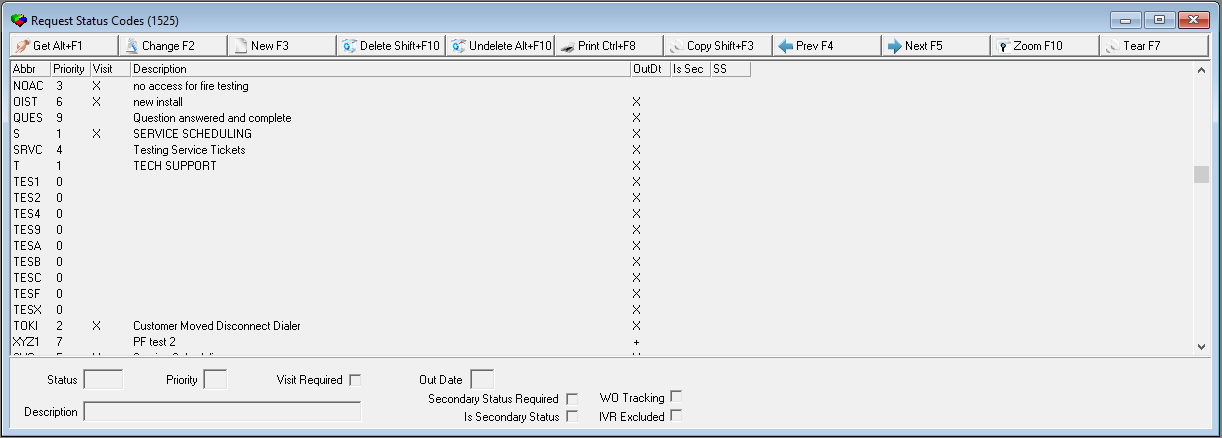
The following graphic shows Service Request Codes as the program opens.
Field/Column Descriptions
The following table describes the fields and columns used in Service Request Codes.
Field/Column |
Description |
Abbr/Status |
Abbreviation that identifies the service request code. |
Priority |
Identifies the priority of the service request code. |
Visit |
Enter a check mark in this field if this service request code requires a service visit. |
Out Date |
Enter an X in this field if this service request code assigns out dates to requests, indicating service is complete. Enter a + in this field if this service request code assigns out dates to requests. When option sv082 is on, SBN also closes the work order associated with a service request if the work order has no items when the service request is changed to a code with a + in this field. Note: The work order associated with the service request must be linked to a contract for SBN to close the work order. |
Description |
Text description of the service request code. |
Secondary Status Required |
If you select this check box for a status code, a Select Secondary Status dialog box appears when you attempt to change the status of a service request from this status in the Service Log tab of Data Entry (program #559). If you do not select a Secondary Status in the dialog box, SBN does not change the service request status. |
Is Secondary Status |
The status codes for which you select this check box appear in the drop-down menu of the Secondary Status field in the Select Secondary Status dialog box of the Service Log tab. |
WO Tracking |
When selected, the service request code has the Self Install checkbox selected when the item is used in the work order. |
IVR Excluded |
Use this attribute to exclude select values from the IVR. If a user attempts to start IVR for a scheduled job linked to a service ticket with an EXCLUDED status, an error message will occur and it will not be added to the IVR queue. |
Using Common Functions
See the reference document Common Functions in SBN for more information.
Zooming into the Sublevel
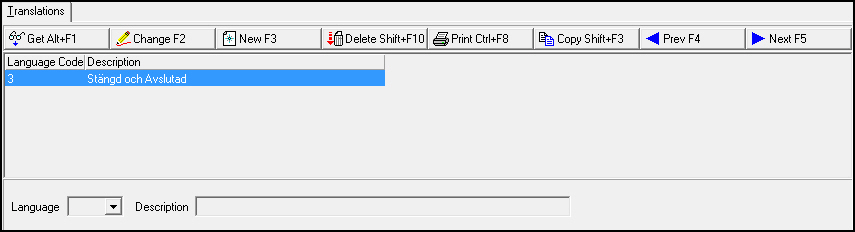
Service Request Codes contains a Translations tab in the sublevel in which you may attach multiple translations to service request codes. Service Request Codes then appear in SBN in the user’s language.
Note: Actions 1525/10-14 control access to the Translations tab and functions.
The following graphic shows the Translations tab. The tab displays previously defined translations for the selected service request code.
Field/Column Descriptions
The following table describes the fields and columns used in the Translations tab.
Field/Column |
Description |
Language Code |
Code that identifies the language of the associated translation. O Contact IBS before using language codes 11-17. |
Description |
Text description, in the associated language, of the selected service request code. |
Modifications and Updates to Service Request Codes
The following table lists modifications and updates to the Service Request Codes document.
Mod Number |
Date |
Description |
n/a |
08/25/14 |
Images updated. |
08.82.09869, 07.82.23727, 08.82.09993, 07.82.23897, 07.82.23973, 08.82.10051, 07.82.23980 |
03/12/15 |
IVR Excluded field added. |
07.91.26349, 08.91.11802, 08.91.11803, 07.91.26350, 07.91.26351, 08.91.11804, 08.91.11805, 07.91.26352, 07.91.26355, 08.91.11809 |
01/27/20 |
New "WO Tracking" field added. Images updated. |