
Copy Data Between Machines
Copy Data Between Machines
Copy Data Between Machines
Module: System Administration
Overview
Use Copy Data Between Machines (program #551) to copy data from one server to another. You can copy all databases or selected databases.
Note: The machine to machine copytask logs output in SOURCESRV_MAN_DESTSERV.out in the /u/r/iwork/process directory.
To access this program, select Copy Data Between Machines (program #0551) from the main menu of SBN.
The Copy Data Between Machines Window
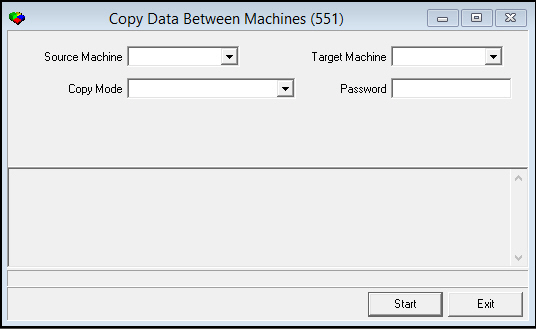
The following graphic shows Copy Data Between Machines as the program opens.
Field Descriptions
The following table describes the fields used in Copy Data between Machines.
|
Field |
Description |
|
Source Machine |
The server name of the machine the data is coming from. |
|
Target Machine |
The server name of the machine the data is going to. |
|
Copy Mode |
Determines which tables will be copied in the process. |
|
Password |
System administrator password for the target machine. |
Copy Modes
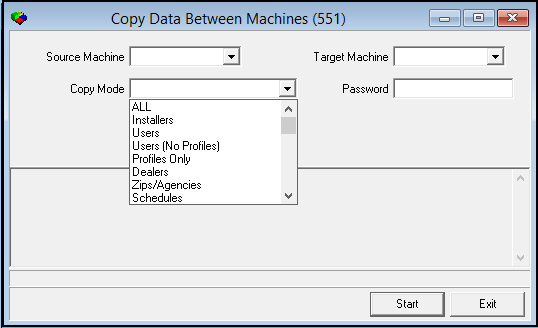
The Copy Data Between Machines program has several copy modes available in the menu.
Copy Mode Descriptions
The following table lists the tables copied by each mode.
|
Copy Mode |
Description |
|
ALL |
Runs all modes listed, one right after another. Also copies customized field definitions. |
|
AP Payments |
ap_payment_types |
|
Billing Balance |
serv_aging |
|
Billing/Contract |
l banks l Billing_globals l bl_aging_levels l bl_aging_queue_users l bl_ctr_defaults l bl_ctr_defaults_det l bl_posting_control l chart_of_accounts l coll_agency_actions l contract_cancel_reason l contract_cancel_status l contract_status l contract_types l external_history l gl_global_account_details l gl_global_accounts l gl_internal_accounts l gl_subscriber_types l group12 l info_groups l internal_payment_types l internal_pmtype_details l internal_revenue_types l invoice_batch_templates l pay_means l payment_reason_codes l pay_terms l price_change_history l price_change_log l price_changes l price_list_commissions l price_list_details |
|
Billing/Contract |
l price_list_incr l price_listsreminder_profiles l reminder_profiles_details l reminder_prof_det_texts l revenue_groups l revenue_type_details l revenue_types l subscriber_types l tax_code_details l tax_profiles_details l tax_profiles l tax_types l transaction_type_details l transaction_types |
|
Branches |
l addresses l branches l branch_regions l contper l ma_branch_misc l ma_branch_misc_phone l ma_branch_misc_text |
|
Bulletin Pages |
l mo_bulletin l mo_bulletin_dtl l mo_bulletin_log |
|
Calendars |
l oc_calendar l oc_holidays |
|
Call-Out Log |
ma_alarmresptick |
|
CIDs |
l ma_alarm_tran l ub_alaid |
|
Commissions |
l commis_branches l commis_prc_items l commis_sources l commis_types l commis_wo_types |
|
Communication |
l communication_codes l communication_keys l communication_media l communication_sources |
|
Concentrator |
conc |
|
Contract Setup |
l bl_aging_levels l bl_ctr_defaults l bl_ctr_defaulst_det l contract_cancel_reason l contract_cancel_status l contract_status l contract_types l pay_means l payment_reason_codes l pay_terms l ub_prebill_types |
|
Dealers |
l addresses l contper l dealers |
|
|
l email_distrib l email_distrib_dtl |
|
Error Accounts |
ma_erroracc |
|
Event Extensions |
ma_eventexts |
|
FEP |
l fe_dcc l fe_hsl |
|
Field Validation |
l field_validations l field_validation_data l monitor_status l subscriber_types |
|
Fire Inspection |
l ma_det_types l ma_insp_agency l ma_insp_types l ma_insp_types_dtl |
|
GUI Preferences |
ub_menu_prefs |
|
INS# |
ub_ins_no |
|
Installer Companies |
l addresses l contper l installer_companies |
|
Installers |
l addresses l contper l installers l personnel l personnel_prof_commis l pers_pay l pers_vru |
|
Inventory/Purchasing |
l addresses l contper l manufacturers l ub_inventory l ub_inventory_log l ub_items_cost l ub_items_items l ub_item_inventory l ub_items_vendor l ub_purc_order l ub_purc_order_items l ub_purc_order_text l ub_purc_order_status l ub_requisition l ub_requisition_items l vendors |
|
Managers |
l addresses l contper l managers l personnel l personnel_prof_commis l pers_pay l pers_vru |
|
Marketing |
l ta_packages l ta_packages_items l ta_packages_programs l ta_packages_sources l tm_products l tm_programs l tm_programbranch l tm_sources l tm_sourcesbranch l tm_sources_log l tm_sourecesprogram |
|
Paging Groups |
l ba_paging_groups l ba_paging_groups_dtl |
|
Panels |
l fe_round_panel l sv_panel_descriptions l sv_panel_types |
|
Passcard Print Ctrl |
ma_passcard_prtctrl |
|
Personnel |
l personnel l pers_pay l personnel_prof_commis l pers_vru l users l user_log l addresses l sales_persons l installers l telemarketers l managers l contper l object_log l technicians |
|
Personnel Hours |
l pers_hours_closed l pers_hours_groups l pers_hours_open l pers_hours_periods l pers_hours_period_start l pers_hours_type |
|
Phone Types |
ba_phone_types |
|
Pricing/Taxes |
l branch_tax_profile l internal_revenue_types l items l price_lists l price_list_commissions l price_list_details l revenue_commissions l revenue_groups l revenue_types l revenue_type_details l tax_code_details l tax_types l tax_profiles l tax_profile_details l texts l transaction_types l ub_price_list_groups l ub_price_list_groups_dtl |
|
Printers |
l c#printers l printer_profiles l printer_profile_details |
|
Profiles Only |
l action_profiles l actions_profile_details l asobject_log l terminals l terminal_profiles l ub_usac_br_prof l ub_usac_br_prof_dtl l ub_usac_br_prof_res l ub_usac_de_prof l ub_usac_de_prof_dtl l ub_usac_de_prof_res l ub_usac_ms_prof |
|
Queue Routing |
ma_queue_routing |
|
Recurring Reports |
l report_char_parms l report_integer_parms l report_money_parms l report_period_parms l report_queue l report_screen_parms |
|
Reminders |
l reminder_profiles l reminder_profile_details l reminder_prof_det_texts |
|
Report Messages |
l ub_report_messages l ub_report_messages_detail |
|
Sales Persons |
l addresses l personnel l personnel_prof_commis l pers_pay l pers_vru l sales_persons |
|
Schedules |
l schedule_cap l schedule_ccap l schedule_ccap_dtl l schedule_req l schedule_work_types l ub_work_codes O Please note these tables are essential for service. |
|
Service Codes |
l fe_round_panel l request_status_codes l sv_actions l sv_call_types l sv_causes l sv_causes_actions l sv_panel_descriptions l sv_panel_types l sv_problems l sv_problems_call_types |
|
Skill Monitor |
ma_skill_monitor |
|
Standard Text |
l standard_text l standard_text_detail |
|
States |
l oc_gmt_to_local l oc_local_to_gmt l oc_timezones l oc_timezone_details l states |
|
Telemarketers |
l addresses l contper l personnel l personnel_prof_commis l pers_pay l pers_vru l telemarketers |
|
UL Grades |
ub_securitygrade |
|
User Logins |
cp_userlogin |
|
Users |
l addresses l action _profile l actions_profile_details l personnel l personnel_prof_commis l pers_pay l pers_vru l terminals l terminal_profiles l ub_usac_br_prof l ub_usac_br_prof_dtl l ub_usac_br_prof_res l ub_usac_de_prof l ub_usac_de_prof_dtl l ub_usac_de_prof_res l ub_usac_ms_prof l users l user_log |
|
Users (No Profiles) |
l addresses l personnel l personnel_prof_commis l pers_pay l pers_vru l users l user_log |
|
Video Tours |
l job_round_bas l job_round_bas_dtl l job_rounds l job_rounds_dtl |
|
Zips/Agencies |
l addresses l agencies l contper l insurance_companies l permit_status_types l permit_types l zips l zips_agencies |
Note: When users are copied from one machine to another, SBN cannot read the user’s current password. If the user already exists on the machine being copied to, the current password for that machine does not change. If the user does not exist on the machine being copied to, SBN creates a default password which consists of the user name repeated in an 8-character field.
For example: The user JOE copied from Machine 1 to Machine 2 (and does not already exist on Machine 2) the new password will be JOEJOEJO.
Copying Data
Use the following steps to copy data between machines:
1. In Copy Data Between Machines (program #0551), select the Source Machine.
2. Select the Target (destination) machine.
3. Select the Copy mode.
Note: For more information, see Copy Mode Descriptions.
4. Type the system administrator password for the Target machine.
5. Choose Start.
‰ SBN asks if you want to continue.
6. Choose Yes.
‰ The process runs and when finished, displays a message that the copy completed successfully.
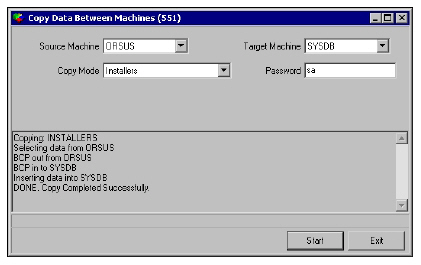
7. Choose Exit, when finished.
Modifications and Updates to Copy Data between Machines
The following table lists modifications and updates to the Copy Data between Machines document.
|
Mod Number |
Date |
Description |
|
n/a |
8/15/14 |
Images updated. |