
Settings
The APIEngine Settings page holds the values APIEngine needs to connect to the SBN data server, sign access tokens, write its log and reach the optional integrations. Saving the page writes App_Data\apiengine.settings.
The page opens only in a browser running on the APIEngine server itself: sign in to the server and browse to the site root, for example https://localhost/. From any other computer the page shows a not-authorized message. In v96 and later the sections are listed down the left side; click a name to jump to it, and click Save Configuration at the bottom of that list to save. The v95 differences are listed at the end.
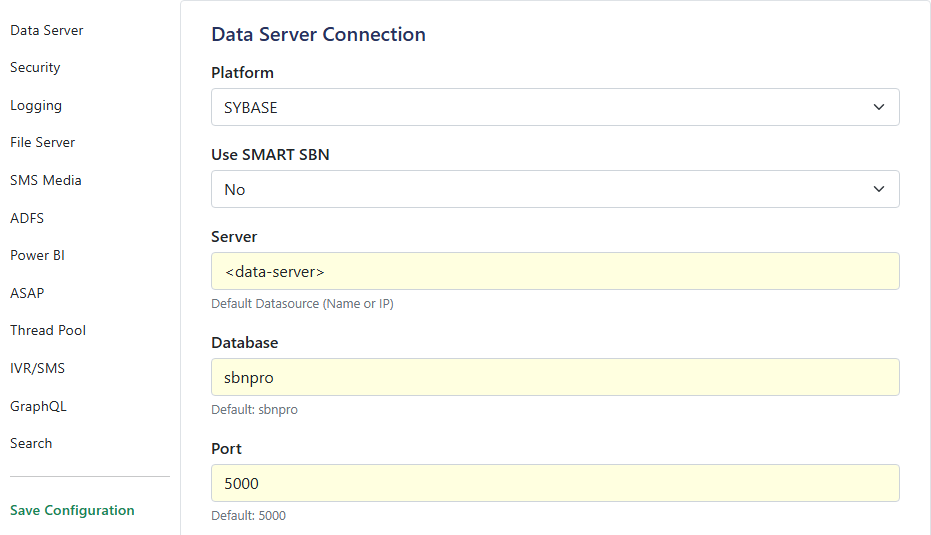
Data Server Connection
Setting | Description |
|---|---|
Platform | The database engine the SBN data server runs on: SYBASE or MSSQL |
Use SMART SBN | Yes lets APIEngine fail over between data servers with SMART SBN. Use No for a single data server |
Server | Host name or IP address of the SBN data server |
Database | The SBN database APIEngine signs in to. Default |
Port | The data server port. Default |
Username | The database login APIEngine uses |
Password | The password for that login |
Charset | Character set for the connection, for example |
Connection Timeout (seconds) | How long to wait when opening a connection |
Test Connection | Opens a connection with the values on screen and reports the result, without saving |
Security
Setting | Description |
|---|---|
Token Secret | The key that signs the access tokens APIEngine issues. Keep it private and use the same value on every server in a farm. Changing it refuses every token issued before the change |
Override Security Parameters | Bypasses the API security checks. Leave off in normal operation |
Token Timeout (minutes) | How long an issued token stays valid when the caller does not ask for a different lifetime |
Logging
Setting | Description |
|---|---|
Maximum File Size (MB) | The size a log file reaches before APIEngine starts a new one |
Maximum File Age (days) | How many days log files are kept |
Exclude Requests | Routes whose inbound request body is not written to the log. One route per line, starting with a slash, for example |
Exclude Responses | Routes whose response body is not written to the log. Same format as Exclude Requests. The status line is still logged |
Exclude Procedures | Stored procedures whose parameter values are not written to the log. One procedure name per line, without a database prefix, for example |
The exclusions take effect when the settings are saved. On v95 builds before 08.95.0011.0001, recycle the application pool after saving a change to Exclude Requests or Exclude Responses.
File Server
Setting | Description |
|---|---|
File Server Path | Root folder for the files APIEngine stores and serves. Required for dealer branding. The test button next to it checks that the folder exists and is writable |
SMS Media
Setting | Description |
|---|---|
SMS Media Directory | Folder for media attached to SMS messages. The test button checks the folder |
Media Reload (seconds) | How often the SMS media folder is re-read |
ADFS
These values connect APIEngine to ADFS single sign-on.
Setting | Description |
|---|---|
Base URL | The ADFS authorization endpoint users are sent to for sign-in |
Stripped URL | The ADFS base address without the endpoint path |
Redirect URI | The address ADFS returns the user to after sign-in. It must match the value registered in ADFS |
Client ID | The application (client) ID registered in ADFS for APIEngine |
Resource | The resource identifier the token is requested for |
Power BI
Setting | Description |
|---|---|
Authority URL | The sign-in authority used to obtain a Power BI token |
Tenant ID | The Power BI tenant ID |
Workspace ID | The workspace that holds the reports to embed |
Client ID | The application (client) ID registered for Power BI |
Client Secret | The secret for that application |
Scope Base | The base scope requested for the token |
Rol | The row-level-security role applied when embedding. Leave blank if not used |
ASAP
Setting | Description |
|---|---|
Central Station Name | Your central station name as registered with ASAP |
Central Station Phone | The contact number sent with ASAP messages |
Central Station ID | The ASAP-assigned central station ID |
Central Station Source ID | The ASAP source ID for this station |
Certificate Path | The client certificate used to authenticate to the ASAP broker. The test button checks the file |
Certificate Password | The password for that certificate |
Broker REST URL | The full ASAP broker URL provided by ASAP |
Max Addresses Per Batch | The number of addresses validated in one pass |
Thread Pool
Setting | Description |
|---|---|
Minimum Worker Threads | Worker threads kept ready for concurrent requests. 0 uses the .NET default. Raise it if requests stall for about 10 seconds under a sudden load |
Minimum IO Threads | I/O threads kept ready for database, file and network work. 0 uses the .NET default |
GC Collect Interval (requests) | Forces a memory clean-up every N requests. 0 turns it off |
Trigger GC Now | Runs a memory clean-up immediately. An action, not a saved value |
IVR/SMS
Setting | Description |
|---|---|
Process IVR via APIEngine | Yes makes APIEngine process IVR (Twilio Voice) records itself |
Process Interactive SMS via APIEngine | Yes makes APIEngine process interactive SMS records itself |
Processing Interval (seconds) | How often APIEngine checks for pending records. Minimum 10 |
GraphQL
Setting | Description |
|---|---|
Enable GraphQL | Yes turns on the GraphQL endpoint at |
Search
Routes installation search to SBN-Search. When turned off, the SBN-Search routes return 503 and run no search. Full setup is on SBN-Search.
Setting | Description |
|---|---|
Enable sbn-search | Yes turns on installation search through SBN-Search |
Timeout (seconds) | How long to wait for SBN-Search, 1 to 300 |
Endpoints | One row per SBN-Search server: its URL (for example |
Test Connection | Checks the first endpoint with the values on screen |
Reports
The connection to the SBN Report Service has no section on this page. It is the ReportServices block in App_Data\apiengine.settings, edited in a text editor. Saving this page resets that block, so re-apply it after each save. Setup is on Reports.
v95 and earlier
The v95 Settings page opens the same way, from the server itself, with these differences:
- The sections are collapsible panels, and each panel has its own Save Settings button.
- The Thread Pool fields are in a section named Performance.
- A Reporting section holds the Crystal Report Destination (.pdf, etc.) Path, the Crystal Report Source (.rpt) Path, the Dealer Branding Images Path and the Data XML Path, used when APIEngine runs Crystal Reports itself. See Reports.
- The ADFS fields repeat for the PATROL and ACUDAS integrations; fill a set only if you use that integration.
- There are no IVR/SMS, GraphQL or Search sections.