
Global Rate Changes
Global Rate Changes
Global Rate Changes
Program #: 1588
Module: Accounting
Overview
Use Global Rate Changes (program #1588) to create batches of global rate changes to existing cycle fees. Once you create a batch of global rate changes, you can define those branches, dealers, contracts, or installations to which the global rate change applies. When a batch has been approved, the increases to cycle fees appear on the next cycle billing.
Note: The system only displays batches with dealers that match the user's Dealer profile.
To access this program, select Global Rate Changes (program #1588) from the main menu of SBN.
The Global Rate Changes Window
The following graphic shows the Global Rate Changes window as the program opens. The window displays previously defined batches of global rate changes.
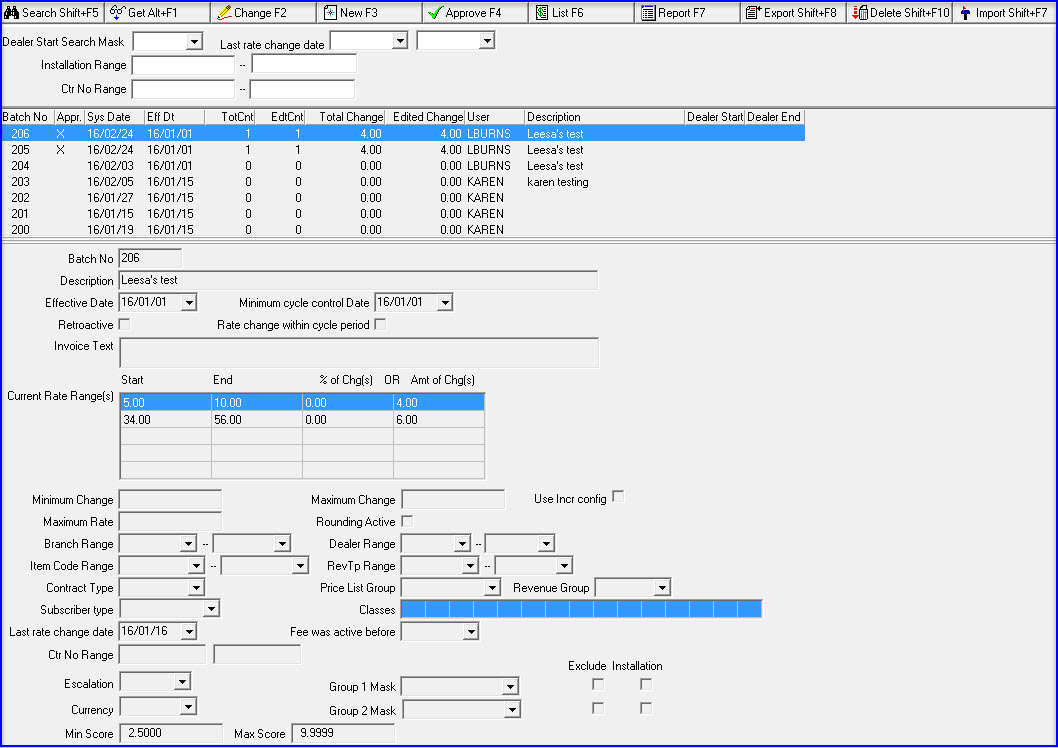
Column Descriptions — Search Results
The following table describes the columns used in the search results pane of Global Rate Changes.
Column |
Description |
Search Parameters |
|
Dealer Start Search Mask |
You may search for batches of global rate changes by the first dealer ID of the range of dealers attached to those batches. O You may use the % wildcard in this field. For more information on using wildcards. O This menu contains only those dealers included in the user’s access profile. |
Last Rate Change Date (Start) |
You may search for batches by a range of Effective Dates on which the rates were last changed. Enter the beginning date of the range. |
Last Rate Change Date (End) |
You may search for batches by a range of Effective Dates on which the rates were last changed. Enter the ending date of the range. |
Installation Range (Start) |
You may search for batches by a range of installations included in the batches. Enter the beginning installation number of the range. |
Installation Range (End) |
You may search for batches by a range of installations included in the batches. Enter the ending installation number of the range. |
Ctr No Range (Start) |
You may search for batches by a range of contracts included in the batches. Enter the beginning contract number of the range. |
Ctr No Range (End) |
You may search for batches by a range of contracts included in the batches. Enter the ending contract number of the range. |
Batch No |
SBN-assigned batch number. |
Approved |
If this column displays an X, the batch has been approved. O Once approved, you cannot change, unapprove, or delete a batch of global rate changes. |
System Date |
Date on which the global rate change was calculated. |
Effective Date |
Date on which the global rate change becomes effective. |
Total Count |
Total number of cycle fees affected by the global rate change, as calculated in the original batch. |
Edited Count |
Total number of cycle fees affected by the global rate change, after editing. |
Total Change |
Total amount of change, based on original calculation. |
Edited Change |
Total amount of change, after editing. |
User |
ID of the user who created the batch of global rate changes. |
Description |
Text description of the batch of global rate changes. |
Dealer Start |
The first dealer ID of the range of dealer IDs attached to the selected batch of global rate changes. |
Dealer End |
The last dealer ID of the range of dealer IDs attached to the selected batch of global rate changes. |
Field Descriptions — Details
The following table describes the fields used in the Detail pane of Global Rate Changes.
Field |
Description |
Batch No |
SBN-assigned batch number. |
Description |
Text description of the batch of global rate changes. |
Effective Date |
Date on which the global rate change becomes effective. |
Minimum Cycle Control Date |
Select a date that is less than or equal to the cycle control date selected on the invoice batch. |
Retroactive |
Enter a check mark in this box to flag the batch of global rate changes as retroactive. O If you enter a check mark in this box, SBN removes the Rate Change Within Cycle Period field from the pane. |
Rate Change Within Cycle Period |
Enter a check mark in this box to flag the global rate changes as effective within a cycle period. O This box does not appear in the pane when the Retroactive box displays a check mark. |
Invoice Text |
You may type text that appears on the first invoice that displays the global rate change. |
Current Rate Range(s) |
|
Current Rate (Start) |
Type the minimum cycle fee of a range of cycle fees to include in the global rate change. O You may enter up to three ranges of cycle fees by using the scroll buttons at the right of the grid. |
Current Rate (End) |
Type the maximum cycle fee of a range of cycle fees to include in the global rate change. O You may enter up to three ranges of cycle fees by using the scroll buttons at the right of the grid. |
Current Rate (% of Change) |
You can type a percent of change in this field or specific dollar amount in the Current Rate field. O You may type a % of change for up to three ranges of cycle fees by using the scroll buttons at the right of the grid. |
Current Rate (Amount of Change) |
You can type a specific dollar amount in this field or a percent of change in the % of Change field. O You may type an amount of change for up to three ranges of cycle fees by using the scroll buttons at the right of the grid. |
Minimum Change |
Type the minimum amount that the global rate changes. |
Maximum Change |
Type the maximum amount that the global rate changes. |
Use Incr Config |
Select this check box to increase rates according to the configuration defined for the selected dealer, branch, and/or subscriber type in Rate Change Configuration (program #1658). |
Maximum Rate |
Type an amount that the new global rate cannot exceed. |
Rounding Active |
Enter a check mark in this box if you want to round the global rate change. |
Round off to Nearest |
If you entered a check mark in the Rounding Active box, type a rounding amount. |
Branch Range |
|
Branch
— From |
You may select a beginning branch of a range of branches to include in the global rate change. This menu originates in program #1530. |
Branch
— To |
You may select an ending branch of a range of branches to include in the global rate change. This menu originates in program #1530. |
Dealer Range |
|
Dealer
— From |
You may select a beginning dealer of a range of dealers to include in the global rate change. This menu originates from program #1537. |
Dealer
— To |
You may select an ending dealer of a range of dealers to include in the global rate change. This menu originates from program #1537. |
Item Code Range |
|
Item
Code — From |
You may select a beginning item code of a range of item codes to include in the global rate change. This menu originates from program #1535. |
Item
Code — To |
You may select an ending item code of a range of item codes to include in the global rate change. This menu originates from program #1535. |
Revenue Type Range |
|
Revenue Type — From (No label) |
You may select a beginning revenue type of a range of revenue types to include in the global rate change. This menu originates from program #1512. |
Revenue
Type — To |
You may select an ending revenue type of a range of revenue types to include in the global rate change. This menu originates from program #1512. |
Price List Group |
You may select a price list group to be affected by the rate change. This menu originates from program #1771. |
Revenue Group |
You may select a revenue group to be affected by the rate change. This menu originates from program #1513. |
Classes |
You may select up to fifteen codes from the drop-down menus for tracking services provided or other customer specific information. (Define installation classes in program #1555.) |
Last Rate Change Date |
If this field is blank, SBN only includes cycle fees that have never been adjusted by the global rate change program. If this field contains a date prior to the current date, SBN excludes any accounts that have had a rate increase since that date. If this field contains the current date, SBN includes all accounts. |
Fee was active before |
Enter a date in this field to include only contracts that had cycle fees active prior to that date. |
Contract Range |
|
Contract - From |
Beginning contract number. |
Contract - To |
Ending contract number. |
Escalation |
You may select a fixed escalation rate at which the batch of global rate changes will increase annually. (This menu originates from program #1636.) |
Currency |
You may select a currency type to apply the rate change to all cycle fees of that particular currency. Leave this field blank to apply the rate change to cycle fees of any currency. (This menu originates from program #1635.) |
Group Masks |
|
Group 1 Mask |
Mask to include only cycle fees for contracts matching the selected mask in Group 1. (This menu originates from program #1868.) |
Exclude |
Check to exclude cycle fees that match the Group 1 Mask. |
Installation |
Check to compare the mask to Installation level. Uncheck to compare mask at Contract basic level. |
Group 2 Mask |
Mask to include only cycle fees for contracts matching the selected mask in Group 1. (This menu originates from program #1868.) |
Exclude |
Check to exclude cycle fees that match the Group 2 Mask. |
Installation |
Check to compare the mask to Installation level. Uncheck to compare mask at Contract basic level. |
Min Score |
Minimum score value allowed is .0000 |
Max Score |
Maximum score value allowed 9.9999 |
Searching for Batches of Global Rate Changes
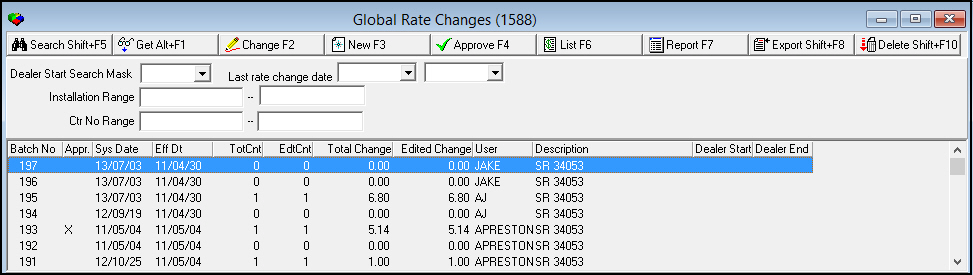
You may search for batches of global rate changes using various parameters. SBN displays the search results by
Batch (in descending order)
Dealer start
Dealer end
Use the following steps to search for batches of global rate changes:
1. Enter your search parameters.
2. Choose Search.
‰ SBN displays the search results in the columns in the Global Rate Changes window.
Note: To match search parameters with Contract instead of Installation, turn on option bl153.
Using Common Functions
See the reference document Common Functions in SBN for more information.
Note: You may only delete unapproved batches of global rate changes.
Creating a Batch of Global Rate Changes
You may create a batch of global rate changes. SBN uses the definition of the batch highlighted in the List pane as a template for the new batch.
Use the following steps to create a batch of global rate changes:
1. In Global Rate Changes, choose New Record.
The fields in the lower pane fill with the details of the batch of global rate changes highlighted in the List pane. The fields are open for new information.
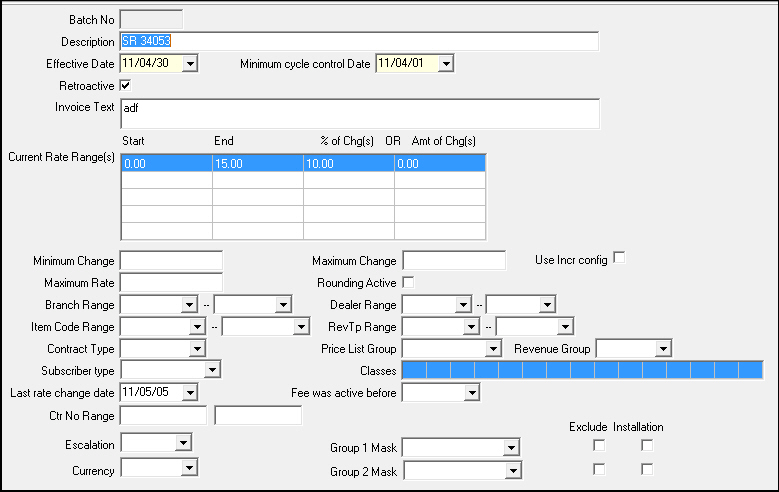
2. Change or enter information, as needed.
3. Choose Save.
‰ SBN asks if you want to start the rate change calculation.
4. Choose Yes.
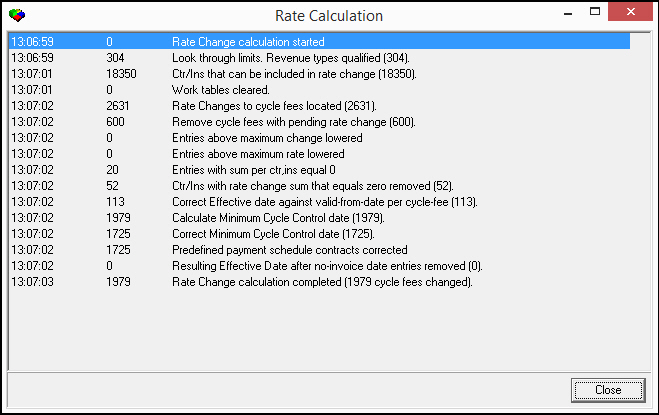
‰ SBN displays the Rate Calculation window as the process runs and assigns a batch number to the new batch of Global Rate Changes.
Note: Global Rate Change calculator uses parameters found in contract branch instead of installation branch.
Approving a Batch of Global Rate Changes
After you have created a batch of global rate changes and made any changes necessary, you need to approve the batch.
Note: Once you approve a batch, you cannot change, unapprove, or delete it.
Use the following steps to approve a batch of global rate changes:
1. In Global Rate Changes, select the batch of global rate changes that you want to approve.
2. Choose Approve Batch.
‰ SBN asks you to confirm that you want to approve the selected batch.
3. Choose Yes.
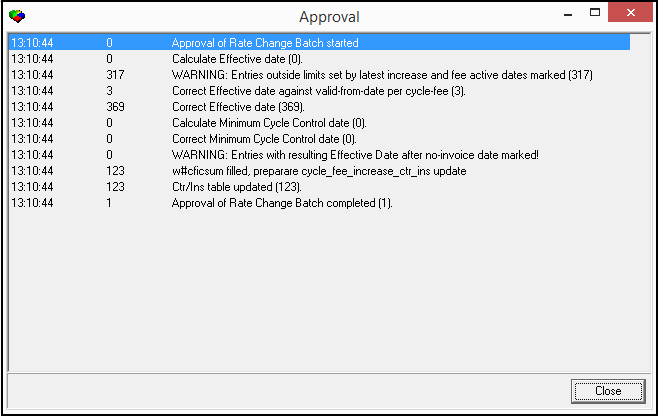
‰ The Approval window appears and displays the approval process.
Accessing the Global Rate Change Summary Report
From Global Rate Changes (program #1588) you can access Global Rate Change Summary (report #1197) by choosing Run Report. For more information on running and viewing this report, see Global Rate Change Summary.
Exporting Batches
From Global Rate Changes you can export batch data out of SBN in the template specified for your company.
Use the following steps to export a batch:
1. In Global Rate Changes, select the batch of global rate changes you want to export.
2. Choose Export.
The Export window appears.
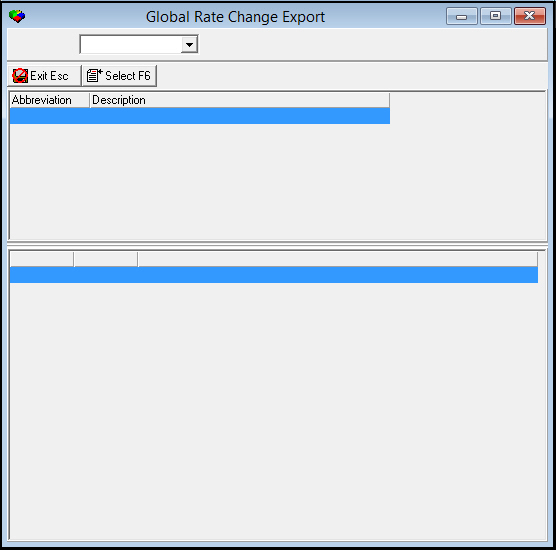
3. Select the type of export you want to run.
Note: You may only have one export, depending on your system configuration.
4. Double-click your selection or choose Select Export.
The Select Export dialog box appears.
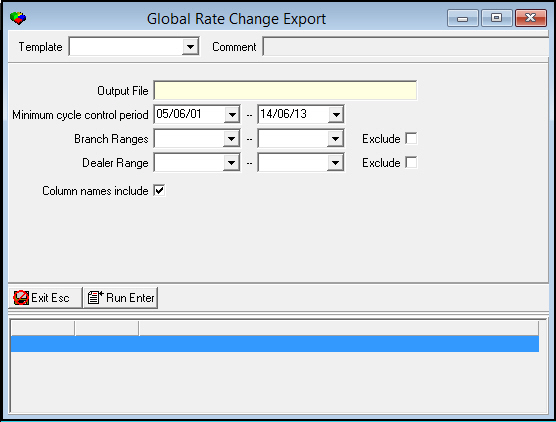
5. Complete the fields.
Note: You must type a name for the Output File that SBN creates when you run this program.
6. Choose Run Export.
‰ SBN shows the export events as the program processes.
7. Choose Exit to return to the main window.
Button Functions
The following table displays the buttons, describes the shortcut keys, actions, and functionality.
Button |
Name |
Shortcut Key |
Action |
Description |
|
Search |
shift+f5 |
1588/ 1 |
Search for batches of global rate changes. |
|
Get Record |
alt+f1 |
1588/ 2 |
View details of selected batch. |
|
Change Record |
f2 |
1588/ 3 |
Change details of selected batch. |
|
New Record |
f3 |
1588/ 4 |
Create a batch of global rate changes. |
|
Approve Batch |
f4 |
1588/ 5 |
Approve a batch of global rate changes. |
|
List Details |
f6 |
1588/ 6 |
Access Rate Change Batch List. |
|
Run Report |
f7 |
1588/10 |
Access Global Rate Change Summary (report #1197). |
|
Export |
f6 |
1588/11 |
Export batch data out of SBN in the template specified for your company. |
|
Delete Record |
shift+f10 |
1588/12 |
Delete selected batch. |
|
Exit without saving |
esc |
Exit without saving changes to selected record. |
|
|
Save Existing Record |
enter |
Save changes to selected record. |











Modifications and Updates to Global Rate Changes
The following table lists modifications and updates to the Global Rate Changes document.
Mod Number |
Date |
Description |
n/a |
8/04/14 |
Images updated. |
07.87.25369, 08.87.11015, 07.87.25324, 07.87.25323, 07.87.25322 |
06/05/17 |
Added new import 187 for company 105. |