
Closed Batches
Closed Batches
Closed Batches
Program #: 1507
Module: Accounting
Overview
Closed Batches (program #1507) combines with Write-off Batches (program #1579) and Open Batches (program #1577) to provide a complete system for posting and viewing batches of payments.
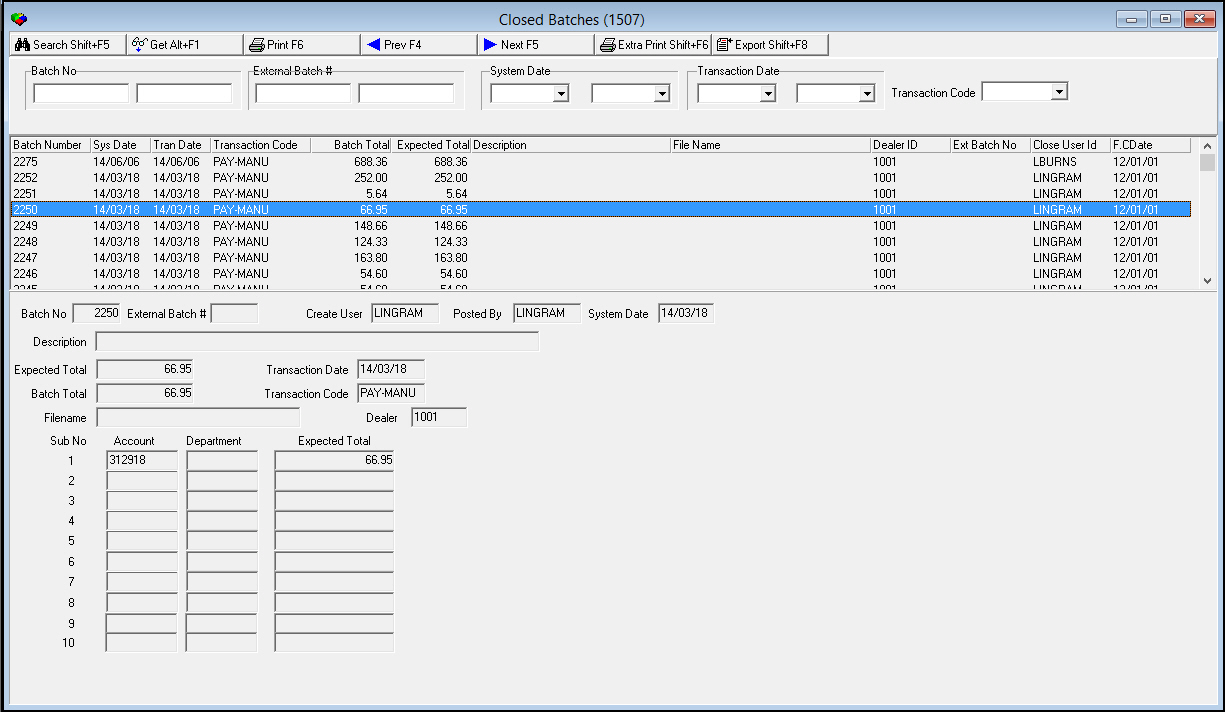
Use Closed Batches (program #1507) to view all closed payment batches for the Accounts Payable module. When the program opens, it displays all closed batches; use the search parameters to narrow the list.
The Closed Batches window contains three panes:
-
The upper pane - in which you select search parameters
-
The middle pane - displays search results
-
The lower pane - displays details of a selected closed batch
To access this program, select Closed Batches (program #1507) from the main menu of SBN.
The Closed Batches Window
The following graphic shows the Closed Batches window with information displayed. SBN sorts the batches first by System Date, then by Batch Number.
Field Descriptions - Search Parameters
The following table describes the search parameters in the upper pane of this window.
|
Field |
Description |
|
Batch No - From |
You may enter a range of batches to limit the display to batches within that range. Type the beginning batch number of the range. |
|
Batch No - To |
You may enter a range of batches to limit the display to batches within that range. Type the ending batch number of the range. |
|
External Batch # - From |
You may enter a range of external batches to limit the display to batches within that range. Type the beginning external batch number of the range. |
|
External Batch # - To |
You may enter a range of external batches to limit the display to batches within that range. Type the ending external batch number of the range. |
|
System Date - From |
You may enter a range of system dates to limit the display within that range. |
|
System Date - To |
You may enter an end date to limit the display. |
|
Transaction Date - From |
You may enter a range of dates to limit the display to batches closed during that range. Select the beginning date of the range. |
|
Transaction Date - To |
You may enter a range of dates to limit the display to batches closed during that range. Select the ending date of the range. |
|
Transaction Code |
You may select or enter a transaction code to limit the display to batches of that transaction type. (This menu originates from program #1586.) |
Column Descriptions - Search Results
The following table describes the columns used to display search results in the middle pane of this window.
|
Column |
Description |
|
Batch Number |
SBN-assigned batch number. |
|
System Date |
System date when the batch was created. |
|
Transaction Date |
Transaction date entered for the batch. |
|
Transaction Code |
Code that identifies the type of payment transactions contained in the batch. |
|
Batch Total |
Actual total dollar amount for the batch. |
|
Expected Total |
Expected total dollar amount for the batch. |
|
Description |
User-entered text description for the batch. |
|
File Name |
File name for the payment batch, if exported. |
|
Dealer ID |
ID of the dealer associated with the payment batch. Note: If your user profile contains a dealer ID, you only see those payment batches associated with that dealer ID. |
|
External Batch Number |
SBN-assigned external batch number. |
|
Close User ID |
User that closed the payment batch. |
|
Fiscal Close Date |
Fiscal close date of the payment batch. |
Field Descriptions - Details
The following table describes the fields used to display details in the lower pane of this window.
|
Field/Column |
Description |
|
Batch No |
SBN-assigned batch number. |
|
External Batch # |
SBN-assigned external batch number. |
|
Create User |
ID of the user who created the batch. |
|
Posted By |
ID of the user who posted the batch. |
|
System Date |
System date when the batch was created. |
|
Description |
Text description of the batch. |
|
Expected Total |
Expected total dollar amount for the batch. |
|
Transaction Date |
Transaction date entered for the batch. |
|
Batch Total |
Actual total dollar amount for the batch. |
|
Transaction Code |
Code that identifies the type of payment transactions contained in the batch. |
|
Filename |
Filename for the payment batch, if exported. |
|
Dealer ID |
ID of the dealer associated with the payment batch. O If your user profile contains a dealer ID, you only see those payment batches associated with that dealer ID. |
|
Account |
General ledger account number for this batch. |
|
Department |
Department associated with an account. |
|
Expected Total |
Total amount expected from all sub batches together. |
Searching for Closed Batches
You may search for closed batches by typing a range of batch numbers and/or selecting a range of dates.
Use the following steps to search for closed batches:
1. In Closed Batches, select your search parameters.
2. Choose Search.
‰ The Closed Batches List displays those batches that match your search parameters.
Using Common Functions
See the reference document Common Functions in SBN for more information.
Accessing the Payment Register Report
From the Closed Batches window you can access the payment register report by choosing Reprint Report Locally. For more information on this report, see Payment Register Report.
Button Functions
The following table displays the buttons, describes the shortcut keys, actions, and functionality.
|
Button |
Name |
Shortcut Key |
Action |
Description |
|
|
Search |
shift+f5 |
1507/ 3 |
Search for closed batches. |
|
|
Get Record |
alt+f1 |
1507/ 1 |
View details of selected record. |
|
|
Print selected records |
f6 |
1507/ 6 |
Print selected records. |
|
|
Previous Record |
f4 |
Go to previous record. |
|
|
|
Next Record |
f5 |
Go to next record. |
|
|
|
Reprint Report Locally |
shift+f6 |
1507/ 9 |
Access payment register report. |
|
|
Export |
SHIFT+F8 |
1507/10 |
Export details of selected closed batches. |
|
|
Exit without saving |
ESC |
Exit without saving changes. |
|
|
|
Save New Record |
ENTER |
Save existing changes to record. |









Modifications and Updates to Closed Batches
The following table lists modifications and updates to the Closed Batches document.
|
Mod Number |
Date |
Description |
|
n/a |
8/1/14 |
Images updated. |