
Printer Profile Updates
Printer Profile Updates
Printer Profile Updates
Program #: 1559
Module: System Administration
Overview
This chapter provides information on setting up and printing reports in SBN. In order for SBN to print reports correctly you must
-
Install Report Services
-
Set a print directory in each terminal
-
Set up report parameters in four system administration programs:
q Report Default Parameters (program #1561)
q Report Priorities (program #1509)
q Printer Profile Updates (program #1559)
q Report Messages (program #1766)
-
Define the report parameters in the individual report (See Report Parameters Pane)
-
Use the Report Queue
Printer Profile Updates
Use Printer Profiles Updates (program #1559) to define printer profiles in SBN. You can create and edit printer profiles, which define the specific printers you may select in Report Default Parameters (program #1561).
A printer profile should contain at least one printer. In Printer Profiles you define selected printers as �In Use.� Menus of Printer Queues then display those printers defined as "In Use� for that printer profile. See the following examples of printer profiles:
-
�Laser Printers� - could contain all the laser printers on-site
-
�Monitoring Center� - could contain all the printers in a specific location
Use the Printer Profile Details tab to maintain the list of printers for the Printer Queue menus available in Report Default Parameters (program #1561) and in all report parameter panes. For more information, see Zooming into the Sublevel.
To access this program, select Printer Profiles Updates (program #1559) from the main menu of SBN.
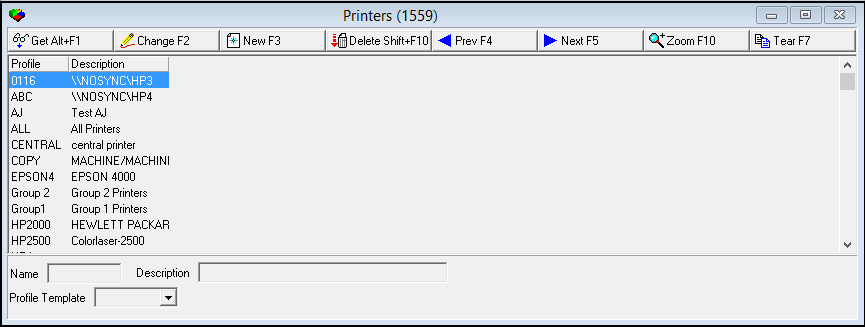
The Printer Profiles Update Window
The following graphic shows Printer Profiles Update as the program opens.
Field/Column Descriptions
The following table describes the fields and columns used in the Printer Profiles.
|
Field/Column |
Description |
|
Profile |
ID of the printer profile. |
|
Description |
Text description of printer profile. |
|
Name |
ID of the printer profile. O SBN automatically formats text in this field in upper-case. |
|
Profile Template |
To use an existing printer profile as a template for the new printer profile, select the profile ID of the template profile. |
Using Common Functions
See the reference document Common Functions in SBN for more information.
Note: After you create a profile, zoom into the sublevel to add or maintain individual printers for the profile.
Note: Printer numbers 0-99 are reserved for SBN. User-defined printers are from 100-255.
Zooming into the Sublevel
Printer Profiles Updates contains a sublevel tab in which you add individual printers to a selected profile or to maintain printers in the profile.
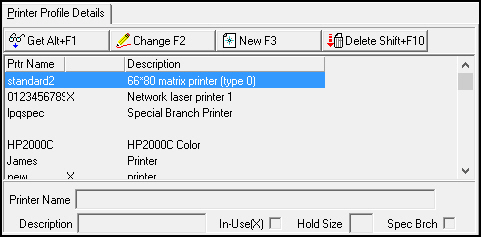
The Printer Profile Details Tab
The following graphic shows the Printer Profiles Details tab. The tab displays printers previously associated with the selected profile.
Field/Column Descriptions
The following table describes the fields and columns used in the Printer Profiles Details tab.
|
Field/Column |
Description |
|
Printer Name |
Name or path of printer. O This field accepts up to 100 characters. |
|
In Use |
If this column displays an X, the printer appears in the Printer Queue menu associated with the selected printer profile. O If the In Use column and field are blank, the selected printer does not appear in the Printer Queue menu associated with the selected printer profile. |
|
Description |
Text description of printer. |
|
Hold Size |
Type the maximum number of pages that print automatically. If the number of report pages exceeds the hold size, SBN l Holds the report in the Report Queue l Does not print the report l Does not migrate the report to the Done Queue O SBN holds a report with a hold size of 0 (zero) in the Report Queue and NEVER prints the report. |
|
Spec Brch |
If this box displays a check mark, the selected printer applies to a special branch. |
Button Functions
The following table displays the buttons, describes the shortcut keys, actions, and functionality.
|
Button |
Name |
Shortcut Key |
Action |
Description |
|
|
Get |
ALT+F1 |
1559/ 1 |
Get record. |
|
|
Change |
F2 |
1559/ 2 |
Change selected record. |
|
|
New |
F3 |
1559/ 3 |
Create new record. |
|
|
Delete |
SHIFT+F10 |
1559/ 4 |
Delete selected record. |
|
|
Zoom |
F10 |
1559/ 999 |
Zoom in/out of sublevel. |
|
|
Tear |
F7 |
1559/ 999 |
Lists details of selected field. |
|
|
Previous |
F4 |
1559/ 999 |
Select last record. |
|
|
Next |
F5 |
1559/ 999 |
Select next record. |








Modifications and Updates to Printer Profile Updates
The following table lists modifications and updates to the Printer Profile Updates document.
|
Mod Number |
Date |
Description |
|
n/a |
8/22/14 |
Images updated. |