
Rate Change Configuration
Rate Change Configuration
Rate Change Configuration
Program #: 1658
Module: Accounting
Overview
Use Rate Change Configuration (program #1658) to set up rate change configurations that SBN uses when a user selects the Use Incr Config check box in Global Rate Changes (program #1588).
To access this program, select Rate Change Configuration (program #1658) from the main menu of SBN.
The Rate Change Configuration Window
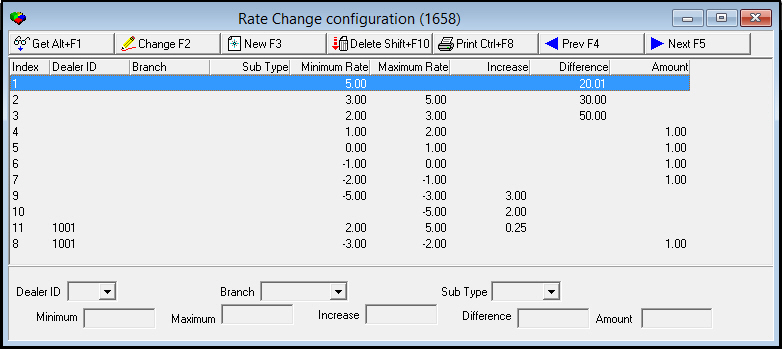
The following graphic shows the Rate Change Configuration window as the program opens. The window displays previously defined rate change configurations.
Field/Column Descriptions
The following table describes the fields and columns used in the Rate Change Configuration window.
|
Field/Column |
Description |
|
Index |
SBN-assigned index number. |
|
Dealer ID |
Dealer ID to which the rate change configuration applies. (This menu originates from program #1537.) |
|
Branch |
Branch to which the rate change configuration applies. (This menu originates from program #1530.) |
|
Sub Type |
Subscriber type to which the rate change configuration applies. (This menu originates from program #1534.) |
|
Minimum Rate |
Minimum rate to which the rate change configuration applies. |
|
Maximum Rate |
Maximum rate to which the rate change configuration applies. |
|
Increase |
Percentage by which to increase rates that fall within the defined minimum and maximum range. (SBN allows an entry in only one of the following fields: Increase, Difference, or Amount.) |
|
Difference |
Percentage of the difference between the minimum and maximum by which to increase rates that fall within the defined minimum and maximum range. (SBN allows an entry in only one of the following fields: Increase, Difference, or Amount.) |
|
Amount |
Fixed amount by which to increase rates that fall within the defined minimum and maximum range. (SBN allows an entry in only one of the following fields: Increase, Difference, or Amount.) |
Creating a Rate Change Configuration
You may create rate change configurations.
Use the following steps to create a rate change configuration:
1. In Rate Change Configuration, choose New Record.
‰ The fields in the lower pane open to allow you to enter details.
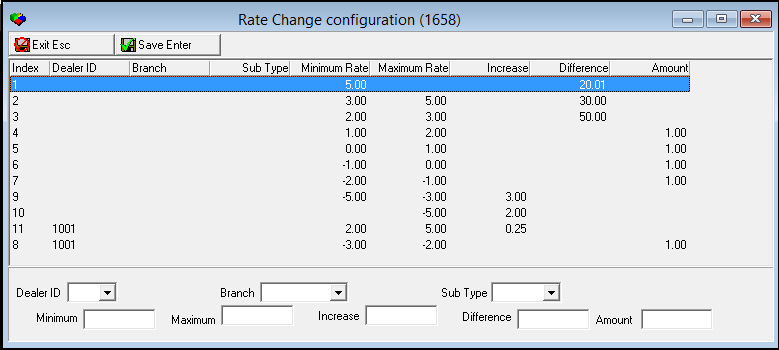
2. Enter information, as needed.
Note: SBN allows an entry in only one of the following fields: Increase, Difference, or Amount.
3. Choose Save.
‰ SBN displays the rate change configuration in the list in the upper pane.
Updating a Rate Change Configuration
Use the following steps to update a rate change configuration:
1. In the upper pane, select the rate change configuration that you want to update.
2. Choose Change.
‰ The fields in the lower pane open for changes.
3. Enter changes, as needed.
Note: SBN allows an entry in only one of the following fields: Increase, Difference, or Amount.
4. Choose Save.
‰ SBN displays the updated rate change configuration in the list in the upper pane.
Deleting a Rate Change Configuration
Use the following steps to delete a rate change configuration:
1. In the upper pane, select the rate change configuration that you want to delete.
2. Choose Delete.
‰ A Confirm dialog box appears: "Are you sure?"
3. Choose Yes.
‰ SBN removes the rate change configuration from the list in the upper pane.
Button Functions
The following table displays the buttons, describes the shortcut keys, actions, and functionality.
|
Button |
Name |
Shortcut Key |
Action |
Description |
|
|
Get Record |
alt+f1 |
1658/ 1 |
View details of selected rate change configuration. |
|
|
Change Record |
f2 |
1658/ 2 |
Change details of selected rate change configuration. |
|
|
New Record |
f3 |
1658/ 3 |
Create a rate change configuration. |
|
|
Delete Record |
shift+f10 |
1658/ 4 |
Delete selected rate change configuration. |
|
|
|
cTRL+F8 |
1658/ 6 |
Print displayed rate change configuration. |
|
|
Previous |
F4 |
1658/ 1 |
Go to previous record. |
|
|
Next |
F5 |
1658/ 1 |
Go to next record. |







Modifications and Updates to Rate Change Configuration
The following table lists modifications and updates to the Rate Change Configuration document.
|
Mod Number |
Date |
Description |
|
n/a |
8/06/14 |
Images updated. |