
Report Retrieval
Program #: 1558 (SBN Report Service, APIEngine)
Overview
At times it becomes beneficial to modernize and streamline existing subsystems within SBN.
This document details a new methodology for setting up, running, and retrieving, reports across a network.
This does not cover individual reports, or details outside of report setup/retrieval for any system mentioned in this document (i.e., APIEngine, Report service, etc.).
Issues with Existing Configuration
The Path
An SBN report is composed of a Path, Prefix, and Number.

|
|
|
|
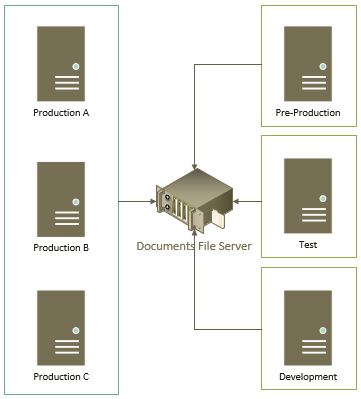
It is common for large-scale environments to have multiple instances of SBN processing reports into a single file server.
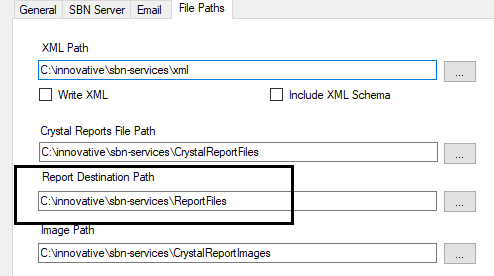
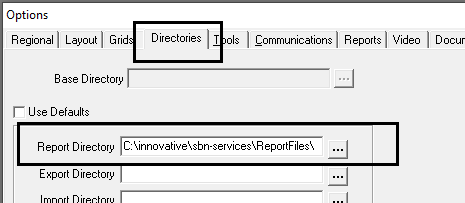
The report destination path must be defined in two places:
- The Report Service
- Each SBN.exe workstation
This leads to several issues:
Issue #1
This setup must be done for every workstation running SBN.exe, and requires that each workstation be reconfigured if the report path changes.
Issue #2
Each workstation will require sufficient permissions to access the network location.
Furthermore, end-users in a Cloud environment are generally denied direct access to resources, so this can never work.
The Prefix
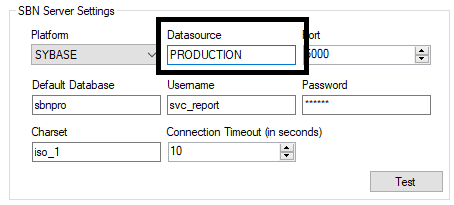
With all files residing in the same location it is possible that a report from Test may have the same number, thus conflict, with a report from Production. To resolve this conflict all reports are given a prefix. For each instance of SBN the report prefix is defined in two places:
1. The Report Service Datasource
2. The SBN Server
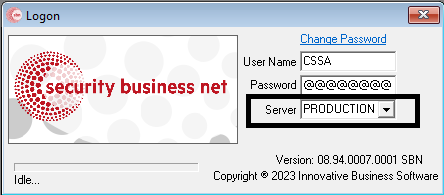
This leads to several issues
Issue #1
Redundant environments will have a Report Scheduler running against each data server. Because the Report Service Datasource name differs between each instance, the same report could have a different prefix based on which Report Service executed the report.
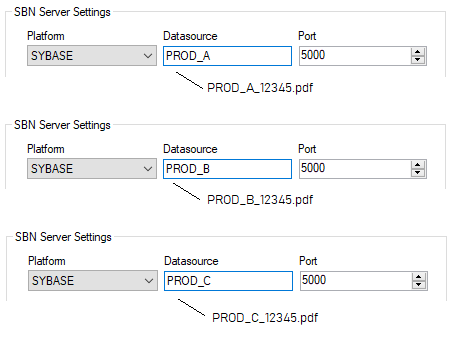
Issue #2
Datasource matching between the Report Service and SBN.exe is still a requirement even if you are not using a shared file server.
The Modern Approach
The report subsystem within SBN has been modernized to:
- Streamline the overall process
- Decouple SBN.exe from Reporting Services
- Take advantage of distributed resources
- Allow you to choose your level of complexity
Option rptfname
You may opt to leave this option blank and have no prefix assigned to your reports. In most cases you can solve report conflicts by generating reports into subfolders of the file server.
For example:
Environment | Destination Path |
|---|---|
PROD | \\fileserver\reports\prod\ |
TEST | \\fileserver\reports\test\ |
DEV | \\fileserver\dev\ |
However, if there is a situation where you must resolve all reports, from all servers, into the same directory, then specify the report prefix in SBN option rptfname.
Production (A, B, C) would say:

Development would say:

Test would say:

Note: This option has existed, and has been dormant, within SBN for many years and may have a description “Name of server used in report file name”. Regardless of the description, it will work as outlined in this document with release 94+.
If you are running a redundant environment then this option will be the same across all servers in the cluster. This means you will have the same report filename no matter which server, or which report service, generates the report.
SBN, Report Services, and APIEngine have all been updated to use option rptfname. Details on each are further in this document.
APIEngine
This is where things get exciting!
APIEngine is equipped with a new route to retrieve SBN-generated reports.
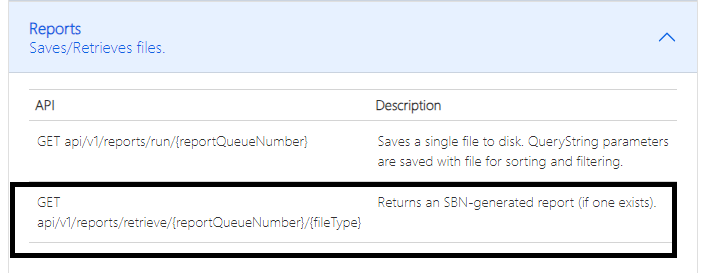
/// <summary>
/// Returns an SBN-generated report (if one exists).
/// </summary>
/// <param >The report queue #</param>
/// <param >Optional. Default is PDF.</param>
Release 96 and later
APIEngine does not read report files from a directory. Each APIEngine is configured with one or more Report Service connections, each one pointing at the SBN Services Dashboard on a machine that runs the Reports service. When a report is requested, APIEngine asks a dashboard for the finished file over HTTPS and hands it back to the caller.
A connection is three settings:
Setting | What to enter |
|---|---|
Services URL | Base address of the SBN Services Dashboard on the reporting machine, including its port — for example |
API token | A token issued by that dashboard. See below for how it is created and what it needs to be allowed to do. |
Reports service name | The name of the Reports service on that dashboard whose report folder is read — |
A connection can also be told to accept an untrusted certificate, for a dashboard that serves HTTPS with a self-signed certificate, and can be marked as down so that it is skipped without being contacted.
The API token
Tokens are created on the SBN Services Dashboard itself, from the API Tokens tab, while signed in as an administrator. The value is shown once, on the panel that appears immediately after the token is created — copy it into your secret store at that moment, because it is never shown again and cannot be recovered by anyone, including support.
For report retrieval the token needs exactly two capabilities, both for the Reports service:
- file read — so APIEngine can ask where a queued report sits
- file download — so APIEngine can fetch a finished report's contents
Grant nothing beyond those two, and scope the grant to the Reports service alone. Every extra capability is authority that someone else can use if the token ever leaks. Tokens carry a mandatory expiry of at most a year, so plan on replacing the value before it lapses; the dashboard's rotate action issues a new secret for the same token without changing what it is allowed to do.
Multiple connections and failover
Connections are tried in the order they are listed. If one is unreachable, or refuses the request, APIEngine moves on to the next, and the first that answers with the file wins. Listing every machine that runs a Reports service therefore gives report retrieval automatic failover with no other configuration. Each attempt and its result is written to the APIEngine log, so a failover can be seen after the fact.
Checking the connections
The authenticated route GET /api/v1/diagnostic/reportservices reports the state of every configured connection. The same feedback is written to the APIEngine log every time APIEngine starts, so the log shows whether the connections were usable before any report was ever requested.
What it reports | What it means |
|---|---|
OK | The token was accepted and the report folder is available on that service. Nothing to do. |
Token rejected | The token is unknown, expired, revoked or disabled — or it is being presented from a network its source list does not allow. Issue or rotate the token on the dashboard and update the connection. |
Missing permission | The token is valid but is not allowed to do this. The feedback names the capability that was required; add it to the token's grant for the Reports service. |
Service not found | No service of that name on that dashboard, or it publishes no browsable folders. Check the Reports service name against the dashboard's service list. |
Unreachable | No answer within the timeout. Check the Services URL and port, the network path between the two machines, and whether the APIEngine machine trusts the dashboard's certificate. |
Skipped | The connection is marked as down and was not contacted. |
The token value itself is never written to the diagnostic answer or to the log.
Where is my report
A queued report can be asked about before it finishes. The authenticated route GET /api/v1/reports/position/{report queue number} answers with that report's place in the queue on the data server the Reports service is pointed at — so it reflects the real queue, not APIEngine's view of it.
Field | What it means |
|---|---|
| The report queue number that was asked about. |
| Place in the queue, counting from 1 — 1 means it is next to run. |
| The report's own status number, as shown in the Report Queue form. This is what explains a |
The position is a snapshot and is approximate. It is counted at the moment you ask, against the reports that are actionable right then. Reports finish, get put on hold, or become ready while you are reading the answer, so treat it as a progress indication rather than a countdown.
An unknown report queue number answers 404. A data server that predates this feature answers 501 — the queue position requires a current data-server release, and that answer distinguishes an out-of-date data server from an outage. If nothing is configured, or no configured connection answers, the route reports the failure the same way report retrieval does.
Release 95 and earlier
Set the Report Destination directory in the APIEngine settings.
|
|
|
|
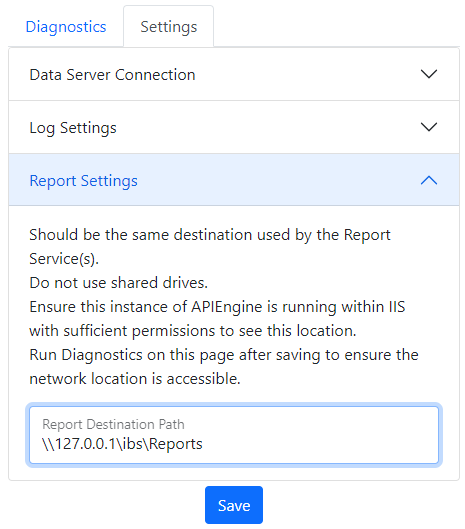
Run the APIEngine Diagnostics to ensure the destination directory is accessible you will see a message like the following:

A failure is typically a permissions issue that will need to be resolved by your Network Administrator.
SBN.exe
This is where things get really exciting!
SBN.exe can leverage the APIEngine to retrieve reports, meaning it is no longer necessary to specify a report directory on every workstation.
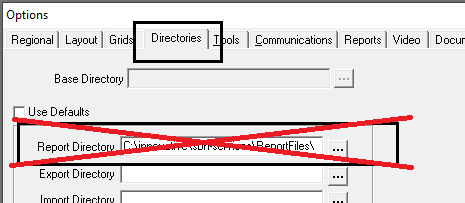
In addition, the Server name used when logging into SBN.exe no longer needs to match the Report Services.
The only requirement is that SBN option api_eng points to the correct APIEngine.

Display Report
Let’s take a moment to cover the order of operations for displaying a report from SBN.exe
When using the Display button in program 1558

or using the Display button found when double-clicking any of the reports liste din 1558…
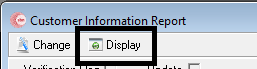
- If the report status anything other than Done, User Must Release, or Ready to Email or Print. Then no action is taken as there is no report to retrieve.
- SBN will look in the user’s local temp directory for the file (in case it was previously downloaded). This prevents unnecessary calls over the network. If a file is found the report is opened and the process ends.
- If there is a value in option api_eng then SBN will attempt to load the report using APIEngine. If a file is retrieved it is stored in the user’s local temp directory, then opened, and the process ends.
- If no report directory is specified (the old way) then the process ends.
- SBN attempts to locate the report with the specified report directory.
SNB.exe Debugging
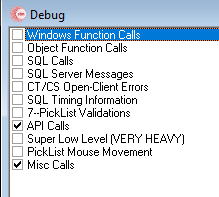
The SBN.exe Debug screen can help you diagnose issues. Use both the API Calls and Misc Calls selections.
Troubleshooting Permissions
Release 96 and later
Report retrieval no longer depends on a shared reports directory, so it is not affected by folder permissions or by the identity of the APIEngine application pool in IIS. When a report will not retrieve, call GET /api/v1/diagnostic/reportservices and work from what it reports for each connection — the answer distinguishes a token problem from a naming problem from a network problem, and the same feedback is in the APIEngine log from startup.
Folder permissions still matter on the machine that runs the Reports service, which writes the finished report file and serves it to APIEngine through the dashboard. Install that service under an account with authority over the folder it writes to.
Release 95 and earlier
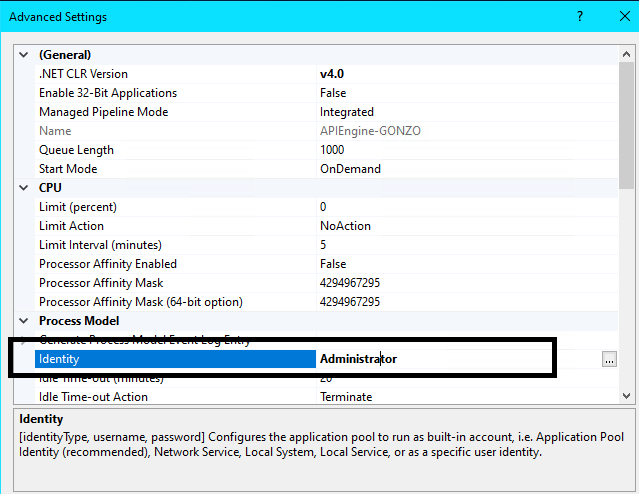
If you find that APIEngine is not able to access the reports destination directory then check the Identity Application Pool in IIS.
Change the Identity to a user that has the necessary authority.
If you find that the SBN Services are not able to access the reports destination directory then be sure to install the service with a user that has the necessary authority.