
Contact Medical Info
Contact Medical Info
Contact Medical Info
Program #: 1634
Module: Utilities
Overview
Use Contact Medical Info (program #1634) to define the Medical tab drop-down menus in the contact details screen of the Data Entry (program #559) Action Plans tab.
The Contact Medical Info Window
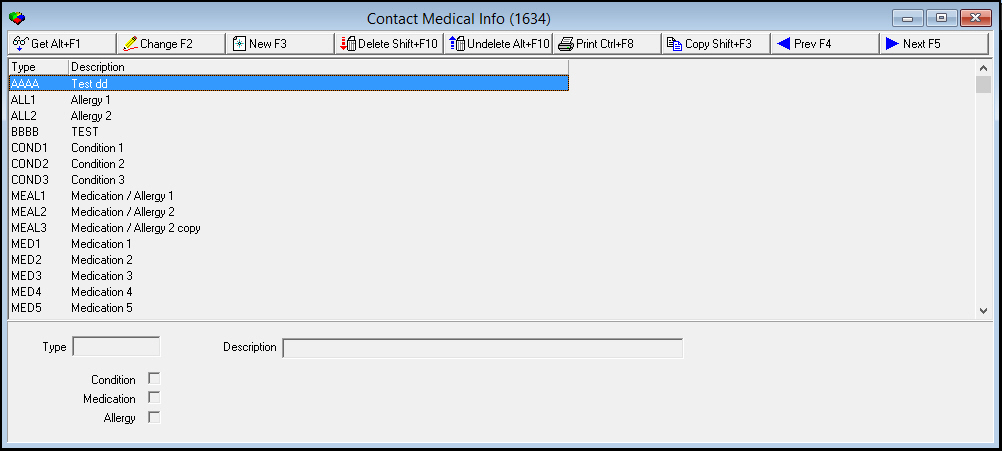
The following graphic shows Contact Medical Info as the program opens.
Field/Column Descriptions
The following table describes the fields and columns used in Contact Medical Info.
|
Field/Column |
Description |
|
Type |
Type of condition, medication, or allergy. |
|
Description |
Description of the condition, medication, or allergy. |
|
Condition |
A check in this box indicates the item will appear in the Condition menu in the Action Plans contact details screen. |
|
Medication |
A check in this box indicates the item will appear in the Medication menu in the Action Plans contact details screen. |
|
Allergy |
A check in this box indicates the item will appear in the Allergy menu in the Action Plans contact details screen. |
Creating a Contact Medical Info Item
Use the following steps to create a contact medical info item:
1. Choose New Record.
‰ The fields open for changes
2. Enter new item information.
3. Choose Save to save changes and close.
Changing a Contact Medical Info Item
Use the following steps to change a contact medical info item:
1. Select a contact medical info item from the list of existing items.
2. Choose Change Record.
‰ The description field and check boxes open for changes.
3. Change information as needed.
4. Choose Save to save changes and close.
Deleting a Contact Medical Info Item
Use the following steps to delete a contact medical info item:
1. Select the item you want to delete.
2. Choose Delete Record.
‰ The item no longer appears in the list.
Button Functions
The following table displays the buttons, describes the shortcut keys, actions and functionality.
|
Button |
Name |
Shortcut Key |
Action |
Description |
|
|
Get Record |
alt+f1 |
1634/ 1 |
View details of selected record. |
|
|
Change Record |
f2 |
1634/ 2 |
Change selected record. |
|
|
New Record |
f3 |
1634/ 3 |
Create new record. |
|
|
Delete Record |
shift+f10 |
1634/ 4 |
Delete selected record. |
|
|
Select Record to Undelete |
alt+f10 |
1634/ 5 |
Restore deleted record. |
|
|
Print Selected Records |
ctrl+f8 |
1634/ 6 |
Print selected record. |
|
|
Copy Current Record |
shift+f3 |
Copy current record. |
|
|
|
Exit without saving |
esc |
Exit without saving changes to selected record. |
|
|
|
Save Existing Record |
enter |
Save changes to selected record. |









Modifications and Updates to Contact Medical Info
The following table lists modifications and updates to the Contact Medical Info document.
|
Mod Number |
Date |
Description |
|
n/a |
8/28/14 |
Images updated. |