
Aging Levels
Aging Levels
Aging Levels
Module: System Administration
Overview
Use Aging Levels (program #1802) to define aging levels for accounts.
To access this program, select Aging Levels (program #1802) from the main menu of SBN.
The Aging Levels Window
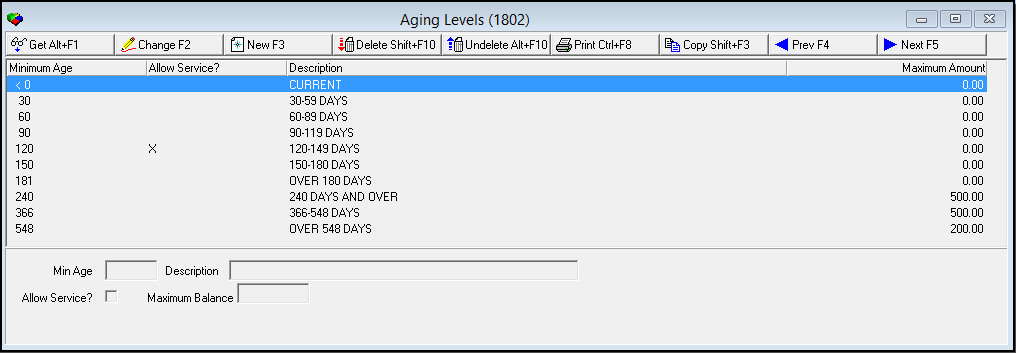
The following graphic displays previously defined aging levels.
Field/Column Descriptions
The following table describes the fields and columns used in Aging Levels.
|
Field/Column |
Description |
|
Minimum Age |
Minimum number of days an account with the selected aging level can be past due. |
|
Allow Service |
If this field displays a check mark, an account with the selected aging level can continue to receive service. Note: For further service and work order restrictions, see the No Serv/WO check box in Monitoring Status (program #1540). |
|
Description |
Text description of the selected aging level. |
|
Maximum Balance |
Balance that an account must exceed at the selected aging level before SBN prevents service on the account. If you select the Allow Service check box, service is allowed even if an account exceeds the balance at the selected aging level. Note: You may select the Bypass Aging Restriction in Service check box in the Billing Accounts tab of Contract Master (program #548) to allow service on a specific account even if it exceeds the maximum balance you enter for an aging level. |
Using Common Functions
See the reference document Common Functions in SBN for more information.
Note: Action 559/70 controls the Allow Service message in the Service Log tab of Data Entry Master (program #559). When the action is on and you attempt to save a service request with a status that requires a visit on an account with a service restriction, the message reads, "No service allowed: Open balance. Allow service anyway?" You may choose Yes or No. When the action is off, the message reads, "No service allowed: Open balance," and SBN does not allow you to save the service request.
Button Functions
The following table displays the buttons, describes the shortcut keys, actions, and functionality.
|
Button |
Name |
Shortcut Key |
Action |
Description |
|
|
Get |
ALT+F1 |
1802/ 1 |
Get record. |
|
|
Change |
F2 |
1802/ 2 |
Change selected record. |
|
|
New |
F3 |
1802/ 3 |
Create new record. |
|
|
Delete |
SHIFT+F10 |
1802/ 4 |
Delete selected record. |
|
|
Undelete |
alT+F10 |
1802/ 5 |
Restore a deleted record. |
|
|
|
CTRL+F8 |
1802/ 6 |
Print selected records. |
|
|
Copy |
shift+F3 |
Copy selected record. |
|
|
|
Previous |
F4 |
1802/ 999 |
Select last record. |
|
|
Next |
F5 |
1802/ 999 |
Select next record. |









Modifications and Updates to Aging Levels
The following table lists modifications and updates to the Aging Levels document.
|
Mod Number |
Date |
Description |
|
n/a |
08/14/14 |
Images updated. |