
Maintenance Ticket Generation
Maintenance Ticket Generation
Maintenance Ticket Generation
Program #: 701
Module: Account Management
Overview
Use Maintenance Ticket Generation (program #701) to automatically create service and inspection tickets. To create maintenance service tickets, SBN references the blue Maintenance field in the Basics tab of Data Entry (program #559); users typically schedule maintenance requests for burglar alarm systems. To create inspection service tickets, SBN references the inspection dates in the Inspections tab of Data Entry (program #559); users typically schedule inspection requests for fire alarm systems.
This document covers the following topics:
Navigating to Maintenance Ticket Generation
Maintenance Ticket Generation Options
The Maintenance Ticket Generation Window
Jumping to Inspection Tickets Report
Navigating to Maintenance Ticket Generation
Use the following steps to navigate to Maintenance Ticket Generation:
1. From the main SBN toolbar, select Menu.
2. From the drop-down menu, select Go To.
3. In the Go To Program dialog box, type in "701" and press Enter.
w The Maintenance Ticket Generation program opens.
Maintenance Ticket Generation Options
The settings of the following options specify functionality and define the default text for various Maintenance Ticket Generation fields. For detailed information on an option and its default setting, see SBN Options.
-
Option ba125 - When on, SBN automatically creates a work order when a Maintenance Ticket is generated.
-
Option ba168 - When on, SBN generates a separate service ticket for each CID. When off, SBN generates a single ticket for each installation.
-
Option sv031 - Use to define the default Request Status for maintenance tickets.
-
Option sv032 - Use to define the default Request Status for fire inspection tickets.
-
Option sv033 - Use to define the default Call Type for maintenance tickets.
-
Option sv034 - Use to define the default Problem Code for maintenance tickets.
-
Option sv035 - Use to define the default Work Type for maintenance tickets.
-
Option sv036 - Use to define the default Work Type for inspection tickets.
-
Option wopauto - When off, SBN turns off the work order auto generation for Maintenance Ticket Generation (program 701), so customers don't have to put a work order on the scheduling board (program 563). This option defines the default On => turn on work order auto generation.
-
Option wopwtp - Used to label the Work Order Type, when generating a Maintenance or Inspection tickets. Create the label in Program 1887 and change the option value.
The Maintenance Ticket Generation Window
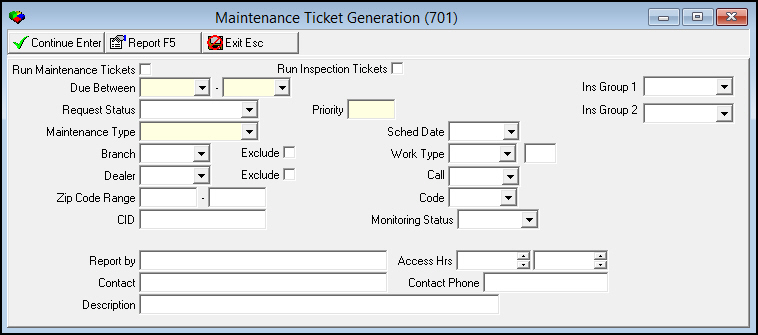
The following graphic shows Maintenance Ticket Generation as the program opens.
Field Descriptions
The following table describes the fields used in Maintenance Ticket Generation.
|
Field |
Description |
|
Run Maintenance Tickets |
Select this check box if you want to create service tickets for maintenance visits scheduled in the Data Entry Basics tab. |
|
Run Inspection Tickets |
Select this check box if you want to create inspection tickets for inspection visits scheduled in the Inspections tab. |
|
Due Between |
You must select range of dates to include in the ticket generation. Select a beginning and ending date. The ending month of the Due Between range no longer takes off one month, but reflects the actual month that you enter. For example, if you enter an ending month of December, 2013, that month will be used in ticket generation rather than November. |
|
Installation Group 1 |
Group 1 values to include in the ticket generation. (This menu originates from program #1868.) |
|
Request Status |
Select the service request status you want to print on the service tickets. (This menu originates from program #1525.) Note: If you select Run Maintenance Tickets, use option sv031 to define the default text for this field. Note: If you select Run Inspection Tickets, use option sv032 to define the default text for this field. |
|
Priority |
Defaults from the Request Status you choose. You can override the default. |
|
Installation Group 2 |
Group 2 values to include in the ticket generation. (This menu originates from program #1868.) |
|
Maintenance Type |
If you select Run Maintenance Tickets, you must select a maintenance type. (This menu originates from program #1555/11.) |
|
Schedule Date |
Schedule due date to insert in Scheduling (program #563). |
|
Branch |
Service branch to include in the ticket generation. (This menu originates from program #1530.) |
|
Exclude |
Select this check box to exclude the selected branch from ticket generation. |
|
Work Type |
Work type to associate with the ticket and schedule request. This appears in the Schedule Board. Note: If you select Run Maintenance Tickets, use option sv035 to define the default work type for this field. Note: If you select Run Inspection Tickets, use option sv036 to define the default work type for this field. |
|
Units (No label) |
Default number of units needed to complete the job for the tickets generated. This appears in the Schedule Board. |
|
Dealer |
Dealer ID to include or exclude from the ticket generation. (This menu originates from program #1537.) |
|
Exclude |
Select this check box to exclude the selected dealer from ticket generation. |
|
Call |
Reason the customer called about the installation. (This menu originates from program #1524.) Note: If you select Run Maintenance Tickets, use option sv033 to define the default call type for this field. |
|
Zip Code Range |
You can enter a range of zip codes to limit the ticket generation to. Enter beginning and ending zip codes for the range. |
|
Code |
Code and description of the problem that prompted the service call. (This menu originates from program #1522.) Note: If you select Run Maintenance Tickets, use option sv034 to define the default problem code for this field. |
|
CID |
You can type a specific CID to force inspection or maintenance ticket generation for a specific customer account, and you can reset the date that is maintained in Data Entry Master (program #559). |
|
Monitoring Status |
You can select a monitoring status to limit the ticket generation. (This menu originates from program #1540.) |
|
Report By |
Text field available for typing the name of the person reporting the problem. (This text appears on all tickets generated). |
|
Access Hours |
Text field for selecting hours for the location. (This text appears on all tickets generated.) |
|
Contact |
Text field for typing the name of the contact person. (This text appears on all tickets generated.) |
|
Contact Phone |
Text field for typing the contact phone number. (This text appears on all tickets generated.) |
|
Description |
Text field for typing a description of the ticket. (This text appears on all tickets generated.) |
Generating Tickets
Maintenance and inspection tickets that you generate from this window appear in the selected installation’s Alarm Log.
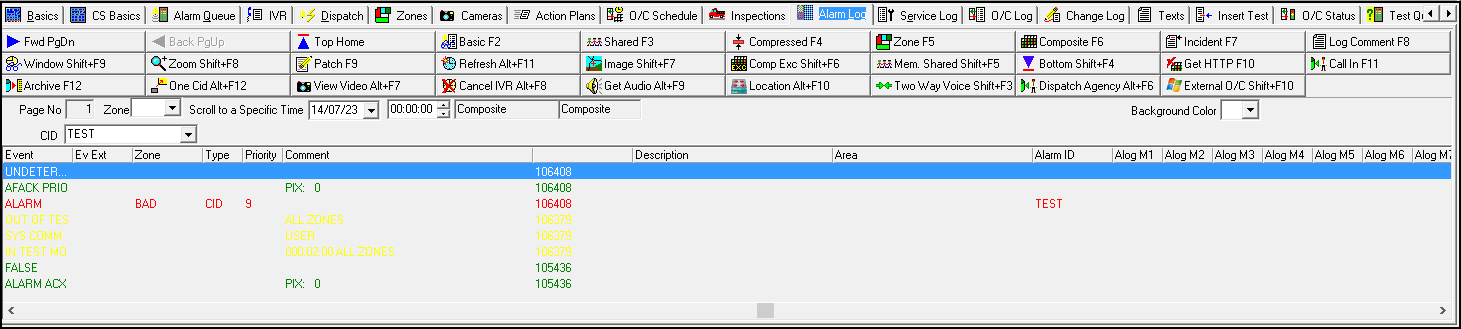
Use the following steps to generate tickets:
1. Enter information into the fields provided.
2. Choose Continue.
w SBN displays a message.
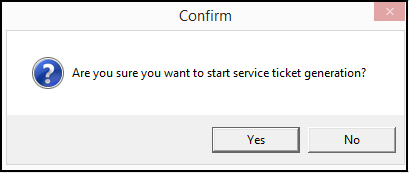
3. Choose Yes.
w The ticket generation process window opens.
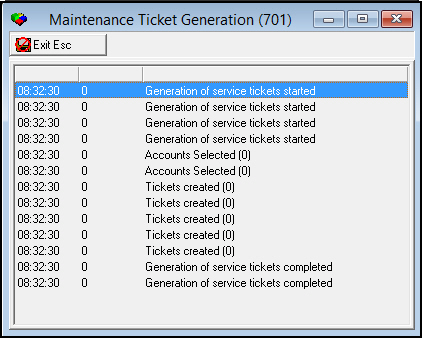
4. When the process finishes, choose Exit.
w SBN returns you to the Maintenance Ticket Generation window.
Note: When running maintenance tickets for a branch, a Service Branch MUST be assigned in Data Entry Basics (program #559).
Jumping to Inspection Tickets Report
Choose Inspection Ticket Report to go to Inspection Tickets (report #2089). Use this report to print service tickets for inspections.
Related Programs
The following table lists programs related to Maintenance Ticket Generation.
|
Program |
Number |
Document Link |
Description |
|
Data Entry Master and Basics |
559 |
Reset the last date for maintenance for an installation. Specify maintenance types and frequency in the blue Maintenance field. |
|
|
Scheduling |
563 |
View list of maintenance and inspection tickets, work orders, and service visits. Assign personnel to requests in the Schedule Board. |
|
|
Alarm Log tab |
N/A |
SBN records tickets that you generate in the Alarm Log tab of the installation. |
|
|
Inspections tab |
N/A |
Establish the inspection agency for the installation. Set inspection dates for individual devices and fire alarm systems. |
|
|
Inspection Tickets Report |
2089 |
Print service tickets for inspections. |
|
|
Financial Groups |
1868 |
Define financial groups to populate the Installation Group 1 and Installation Group 2 fields. |
|
|
Service Request Codes |
1525 |
Define service request status codes to populate the menu. |
|
|
Installation Classes |
1555 |
Define maintenance types to use in ticket generation. |
|
|
Branch Profiles |
1530 |
Create and maintain branch profiles to include in ticket generation. |
|
|
Dealer Profiles |
1537 |
Create and maintain dealer profiles to include in ticket generation. |
|
|
Service Call Types |
1524 |
Define types of service calls to specify why a customer called in about an installation. |
|
|
Service Problem Codes |
1522 |
Define problem codes to include in ticket generation. |
|
|
Monitoring Status |
1540 |
Define monitoring codes to identify the statuses of installations. |
Button Functions
The following table displays the buttons, describes the shortcut keys, actions, and functionality.
|
Button |
Name |
Shortcut Key |
Action |
Description |
|
|
Continue |
Enter |
701 |
Open ticket generation process window. |
|
|
Inspection Ticket Report |
f5 |
701 |
Open Inspection Ticket Report program window. |
|
|
Exit without saving |
Esc |
701 |
Exit without saving. |



Modifications and Updates to Maintenance Ticket Generation
The following table lists modifications and updates to the Maintenance Ticket Generation document.
|
Mod Number |
Date |
Description |
|
n/a |
05/14/09 |
document rewritten |
|
07.81.23484, 07.81.23471 |
06/24/14 |
Included information on option ba125 creating a work order with a Maintenance Ticket. |
|
n/a |
07/23/14 |
Images updated. |