
Dealer Branding Uploading
How to upload images to be used in Reporting and SMS
Overview
This enhancement covers Dealer Branding, which is essentially a process using APIEngine’s FileServer to pull Dealer Images into the correct location.
For report images to load they must exist in the Report Service ‘Image Path’. The flow is:
User uploads a dealer image from program 1537 to the APIEngine FileServer.
Report Windows service periodically checks for, then downloads, dealer images from APIEngine’s FileServer.
A report that supports dealer branding specifies which dealer image to use.
Dealer branding is a 1:1 feature with each dealer. This does not support a sub-dealer to dealer hierarchy. This means a master Dealer brand must be applied to each of it’s sub-dealers, otherwise the default Innovative logo will be displayed.
Options
dealbrnd
Turns the entire feature on/off.
api_eng
points to your instance of the APIEngine.

APIEngine File Server
This enhancement relies on an active installation of APIEngine that is configured for FileServer. If you are not familiar with FileServer you should stop here and read up on the feature.
Click here to learn how to configure APIEngine to use FileServer.
2204 - Dealer Branding
SBN program 2204 enables you to upload one image for each dealer.
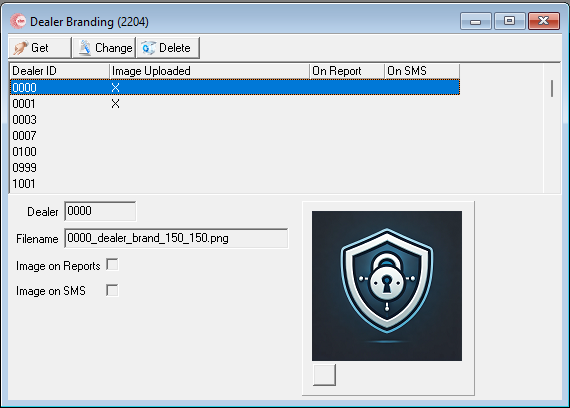
Note: If the APIEngine FileServer feature is not properly configured then the image section will never load, and you will be unable to upload an image.
Image Specifications
Maximum of 150x150 pixels
Maximum of 2 megs
Click here to learn how to configure the Report Service to download dealer branding images.
Click here to learn how to configure APIEngine to download dealer branding images.