
Immediate Queue Utility
Immediate Queue Utility
Immediate Queue Utility
Module: System Administration
Overview
Only System Administrators should use Immediate Queue Utility (program #557). In Immediate Queue Utility, system administrators delete signals used in testing or copy signals that stuck from an immediate queue to another immediate queue.
To access this program, select Immediate Queue Utility (program #557) from the main menu of SBN.
The Immediate Queue Utility Window
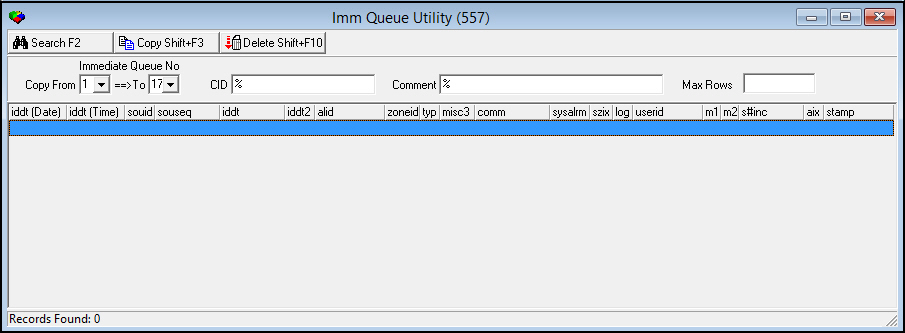
The following graphic displays Immediate Queue Utility as the program opens.
Field/Column Descriptions
The following table describes the fields and columns used in Immediate Queue Utility.
|
Field/Column |
Description |
|
Copy From |
The number of the Immediate Queue from which you want to view signals. O Seventeen (17) Immediate Queues are available. |
|
To |
The number of the Immediate Queue to which you want to copy signals, if applicable. O Seventeen (17) Immediate Queues are available. |
|
CID |
The CID number for which you want to view signals. |
|
Comment |
An Immediate Queue comment for which you want to view associated signals. |
|
iddt (Date) |
Date the signal arrived. |
|
iddt (Time) |
Time the signal arrived. |
|
souid |
ID of the source concentrator. |
|
souseq |
Unique ID that the concentrator assigned to the signal. |
|
iddt |
Time the raw data arrived. |
|
iddt2 |
Front End supplied time, raw data. |
|
alid |
Alarm ID. |
|
zoneid |
ID of the zone from which the signal originated. |
|
type |
Identifies the type of alarm. |
|
misc3 |
Additional receiver information. O The first two characters = receiver ID. |
|
comm |
Identifies the Immediate Queue comment. |
|
sysalarm |
When , identifies the CID. When not , identifies the INS number for system-generated alarms such as Missing or Simalarm. |
|
syszonix |
Identifies the zone for system-generated alarms. |
|
log |
A in this field identifies a log-only signal. |
|
userid |
ID of the user who created the alarm, if applicable. |
|
misc1 |
Identifies the user level for system-generated signals, if applicable. |
|
misc2 |
Identifies the user schedule for system-generated signals, if applicable. |
|
s#inc |
If the signal was forced to a specific incident, identifies the internal incident number assigned by SBN to the incident. |
|
aix |
Identifies the index placement of the alarm ID. |
|
stamp |
Internal sequence number. |
Searching for Signals to Delete or Copy
Use the following steps to search for Immediate Queue signals to delete or copy:
1. Select and/ or type search parameters in the applicable fields.
2. Choose Search.
‰ SBN displays all signals that match the search parameters.
Copying a Signal from One Immediate Queue
Use the following steps to copy a signal from one Immediate Queue to another Immediate Queue:
1. Select a signal to copy.
2. Choose Copy Current Record.
‰ SBN asks you to confirm the copy.
3. Choose Yes.
‰ SBN copies the signal from one Immediate Queue to another Immediate Queue.
Deleting a Signal from an Immediate Queue
Use the following steps to delete a signal from an Immediate Queue:
1. Select a signal to delete.
2. Choose Delete record.
‰ SBN asks you to confirm your choice.
3. Choose Yes.
‰ SBN deletes the signal from the Immediate Queue.
helpful hint: option fe015
When you have an issue with an alarm and cannot find its signal, turn on option fe015. When option fe015 is on, it makes backup copies of every signal that enters the IMMQ in a special queue, Queue 17, which can be viewed to figure out what type of signal is coming in.
Use the following steps to determine why a signal isn't interpreted correctly:
1. In Options (program #1887), activate option fe015.
2. Wait for the bad signal to occur.
3. Deactivate option fe015.
4. Look in Queue 17 for the bad signal.
5. Choose the signal and copy it to IMMQ2 by choosing Copy.
‰ The Copy dialog box appears.
6. Choose Yes.
‰ The signal appears in IMMQ2.
7. Run a test in debug mode and try to see why the signal is acting differently.
Note: If you forget to turn off option fe015, Queue 17 will remain full. You need to turn off the option to remove alarms from this queue.
If you want to test alarm translation tables, accumulate a full day's worth of signals in Queue 17. You can then move them over to a test server and play back real signals to see the signals in the alarm translation tables.
Button Functions
The following table displays the buttons, describes the shortcut keys, actions, and functionality.
|
Button |
Name |
Shortcut Key |
Action |
Description |
|
|
Search |
F2 |
557/ 1 |
Searches tasks based upon the entered parameters. |
|
|
Copy |
Shift+f3 |
557/ 2 |
Copies the selected queue number. |
|
|
Delete |
SHIFT+F10 |
557/ 3 |
Delete selected record. |



Modifications and Updates to Immediate Queue Utility
The following table lists modifications and updates to the Immediate Queue Utility document.
|
Mod Number |
Date |
Description |
|
n/a |
09/15/14 |
Images updated. |