
Branch Dealer Call List
Branch Dealer Call List
Branch/Dealer Call List
Program #: 1761
Module: System Administration
Overview
Use Branch/Dealer Call List (program #1761) to enter and change contact and telephone information for specific branches.
To access this program, select Branch/Dealer Call List (program #1761) from the main menu of SBN.
The Branch/Dealer Call List Window
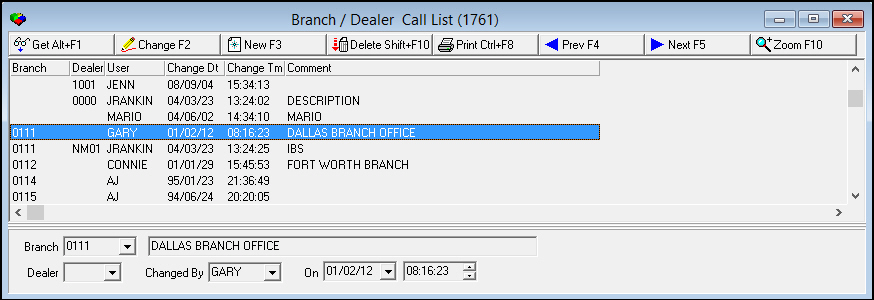
The Branch/Dealer Call List window displays only the branches added to the Call List. You can add new branches or make changes to existing branches. The window contains a sublevel with five tabs in which you enter detailed contact information. The following graphic shows Branch/Dealer Call List as the program opens.
Field/Column Descriptions
The following table describes the fields and columns used in the upper pane of the Branch/Dealer Call List.
|
Field/Column |
Description |
|
Branch |
Branch ID number for the branch listed. (This menu originates from program #1530.) |
|
Dealer |
Dealer ID number for the dealer listed. (This menu originates from program #1537.) |
|
User |
ID of the user who last updated the record. |
|
Change Date |
Date the record was last updated or changed. |
|
Change Time |
Time the record was last updated or changed. |
|
Comment |
Text description of the Branch or Dealer. |
Using Common Functions
See the reference document Common Functions in SBN for more information.
Zooming into the Sublevel of the Branch/Dealer Call List
The sublevel contains five tabs for adding detailed contact information:
-
The Base List tab
-
The Misc Numbers tab
-
The On Call Numbers tab
-
The Vendors tab
-
The Text tab
The Base List Tab
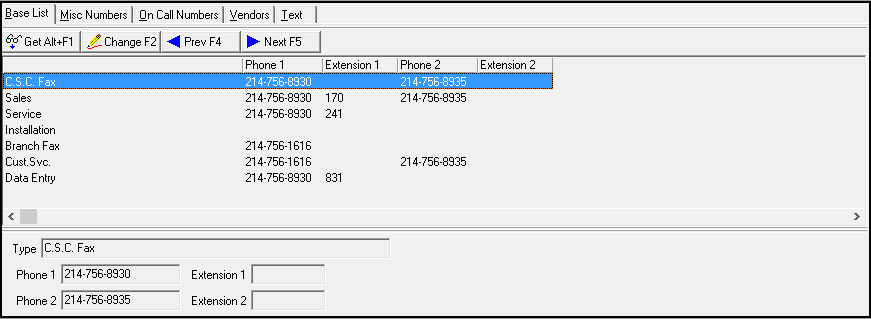
Use this tab to enter specific phone numbers for the following positions:
-
C.S.C Fax - Customer Service Center Fax
-
Sales
-
Service
-
Installation
-
Branch Fax - main Fax number
-
Cust. Svc. - main Customer Service number
-
Data Entry
You also have access to one blank line that you can add to the Base List Tab. You can create your own category for the number you choose.
The following graphic shows the Base List tab with information displayed.
Field/Column Descriptions
The following table describes the fields and columns used in the Base List tab.
|
Field/Column |
Description |
|
Type (No label) |
Phone number description. |
|
Phone 1 |
First phone number for that department or location. |
|
Extension 1 |
Extension for the first phone number, if necessary. |
|
Phone 2 |
Second or backup phone number for that department or location. |
|
Extension 2 |
Extension for the second number, if necessary. |
The Misc Numbers Tab
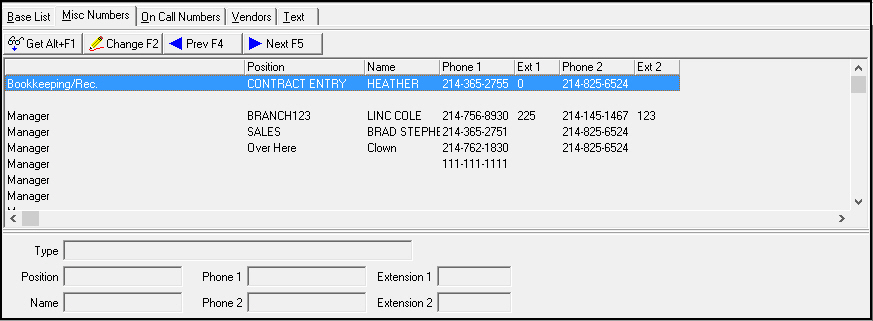
Use the Misc Numbers Tab to enter other numbers for your branch. Each department contains multiple lines for positions and several blank lines that you can change to contain specific custom types and positions.
The following graphic shows the Misc Numbers tab with information displayed.
Field/Column Descriptions
The following table describes the fields and columns used in the Misc Numbers tab.
|
Field/Column |
Description |
|
Type |
Phone number description or department. |
|
Position |
Position in branch of the person listed. |
|
Phone 1 |
First phone number for that type. |
|
Extension 1 |
Extension for the first number, if necessary. |
|
Name |
Name of the person who holds the position listed. |
|
Phone 2 |
Second or backup phone number for that type. |
|
Extension 2 |
Extension for the second number, if necessary. |
The On Call Numbers Tab
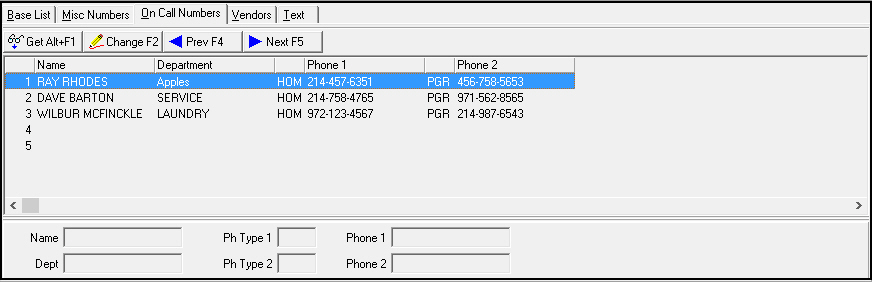
The On Call Numbers tab holds a maximum of ten phone numbers. Use the On Call Numbers tab to enter information about:
-
People who are on call
-
Their positions
-
Two after-hours contact phone numbers for each person on call.
The following graphic shows the On Call Numbers tab with information displayed.
Field/Column Descriptions
The following table describes the fields and columns used in the On Call Numbers tab.
|
Field/Column |
Description |
|
Index number |
Line number for the contact. |
|
Name |
Name of the contact. |
|
Department |
Department where the person works. |
|
Phone 1 Type (No label) |
Type of number contained in the Phone 1 field (three letter abbreviation). |
|
Phone 1 |
First phone number for the contact. |
|
Phone 2 Type (No label) |
Type of number contained in the Phone 2 field (three letter abbreviation). |
|
Phone 2 |
Second or backup phone number for the contact. |
The Vendors Tab
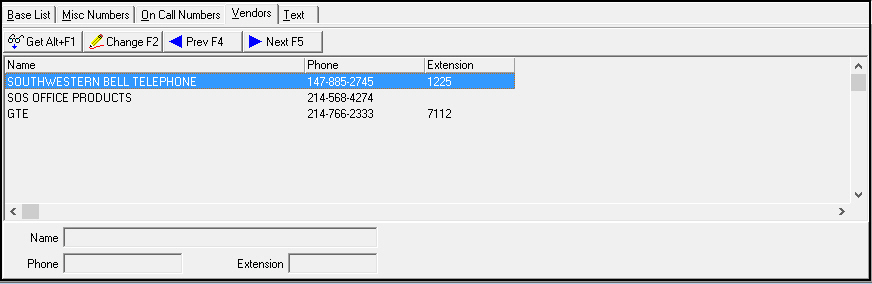
Use the Vendors Tab to enter critical vendor phone numbers for the branch. The following graphic shows the Vendors tab with information displayed.
Field/Column Descriptions
The following table describes the fields and columns used in the Vendor tab.
|
Field/Column |
Description |
|
Name |
Vendor Name. |
|
Phone |
Main phone number of the vendor. |
|
Extension |
Extension for the main phone number, if necessary. |
The Text Tab
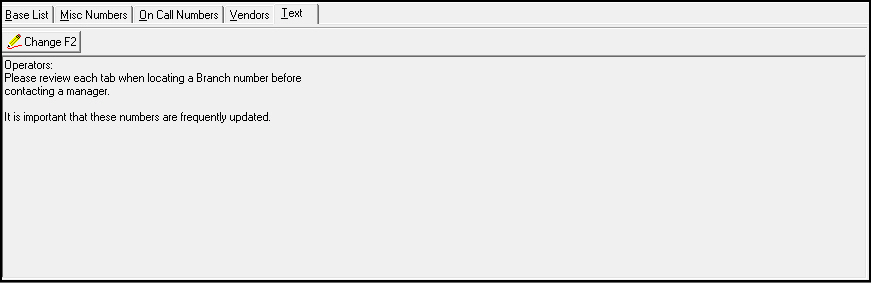
Use the Text tab to enter free-form text to display to operators who view the Branch Call List. The following graphic shows the Text tab with information displayed.
Button Functions
The following table displays the buttons, describes the shortcut keys, actions, and functionality.
|
Button |
Name |
Shortcut Key |
Action |
Description |
|
|
Get |
ALT+F1 |
1761/ 1 |
Get record. |
|
|
Change |
F2 |
1761/ 2 |
Change selected record. |
|
|
New |
F3 |
1761/ 3 |
Create new record. |
|
|
Delete |
SHIFT+F10 |
1761/ 4 |
Delete selected record. |
|
|
Undelete |
ALT+F10 |
1761/ 5 |
Restore deleted record. |
|
|
|
CTRL+F8 |
1761/ 6 |
Print selected records. |
|
|
Previous |
F4 |
1761/999 |
Select last record. |
|
|
Next |
F5 |
1761/999 |
Select next record. |
|
|
Zoom In/Out of Sublevel |
F10 |
1761/999 |
Access sublevel tabs. |









Modifications and Updates to Branch Dealer Call List
The following table lists modifications and updates to the Branch Dealer Call List document.
|
Mod Number |
Date |
Description |
|
n/a |
8/14/14 |
Images updated. |
F1 Help
| Delphi Forms | mabranchmiscform |
| Program Numbers | 1761 |