
Communication Sources
Communication Sources
Communication Sources
Program #: 1518
Module: System Administration
Overview
Use Communication Sources (program #1518) to define and maintain profiles of communication source codes in SBN. The menu of defined Communication Source Codes appears in the Communication/Collection Log window and in new entry windows.
To access this program, select Communication Sources (program #1518) from the main menu of SBN.
The Communication Sources Window
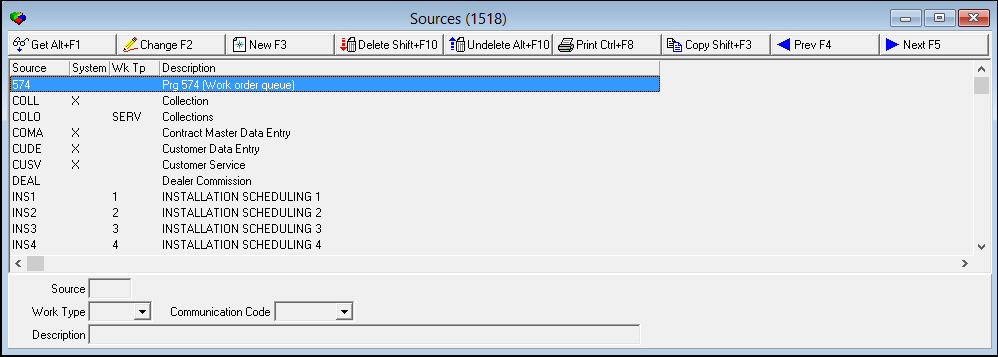
The following graphic shows Communication Sources as the program opens. The upper pane displays all previously defined communication source codes.
Field/Column Descriptions
The following table describes the fields and columns used in Communication Sources.
|
Field/Column |
Description |
|
Source |
Abbreviation that identifies the selected communication source. |
|
System |
If this field displays an X, SBN uses this code. O You cannot change or delete any communication source code designated as System. |
|
Work Type |
You can specify a default work type associated with the selected communication source code. The default work type appears in Scheduling. (This menu originates from program #1526.) O The default work type specified here should only apply to quotation scheduling and service scheduling sources. |
|
Description |
Text description of the communication source code. |
Related Programs
The following table lists programs related to Communication Sources.
|
Program |
Number |
Document Link |
Description |
|
Communication Log |
1888 |
Log communication between customer and company. |
|
|
Status Codes |
1721 |
Create Status Codes used in the Communication Log to describe the status of an entry. |
|
|
Communication Codes |
1517 |
Create Communication Codes used in the Communication Log to describe the type of communication for an entry. |
|
|
Keys |
1519 |
Create and define codes and descriptions that appear in the Communication Log as Key 1, Key 2, Key 3, and Key 4. |
|
|
Media |
1520 |
Create Media Codes used in the Communication Log to describe the type of communication media for an entry. |
|
|
Resolution Codes |
1877 |
Create Resolution Codes used in the Communication Log to describe the resolution for an entry. |
|
|
Misc Communication Fields |
1627 |
Create Miscellaneous Fields used in the Communication Log to describe the substatus, satisfaction level, or priority of an entry. |
|
|
Communication Log Queue |
535 |
Research closed Communication Log entries. |
Button Functions
The following table displays the buttons, describes the shortcut keys, actions, and functionality.
|
Button |
Name |
Shortcut Key |
Action |
Description |
|
|
Get |
ALT+F1 |
1518/ 1 |
Get record. |
|
|
Change |
F2 |
1518/ 2 |
Change selected record. |
|
|
New |
F3 |
1518/ 3 |
Create new record. |
|
|
Delete |
SHIFT+F10 |
1518/ 4 |
Delete selected record. |
|
|
Undelete |
ALT+F10 |
1518/ 5 |
Restore deleted record. |
|
|
|
CTRL+F8 |
1518/ 6 |
Print selected records. |
|
|
Previous |
F4 |
1518/ 999 |
Select last record. |
|
|
Next |
F5 |
1518/ 999 |
Select next record. |








Modifications and Updates to Communication Sources
The following table lists modifications and updates to the Communication Sources document.
|
Mod Number |
Date |
Description |
|
n/a |
8/15/14 |
Images updated. |